# Automatic Script for Android Emulator
> Use the Proxyman automatic script to set the HTTP proxy and install the Proxyman certificate on Android Emulators, so you can capture HTTPS in one click.
## 1. What's it?
Manually overriding the HTTP Proxy, then installing and trusting the Proxyman Certificate on your Android Emulator, is complicated and error-prone.
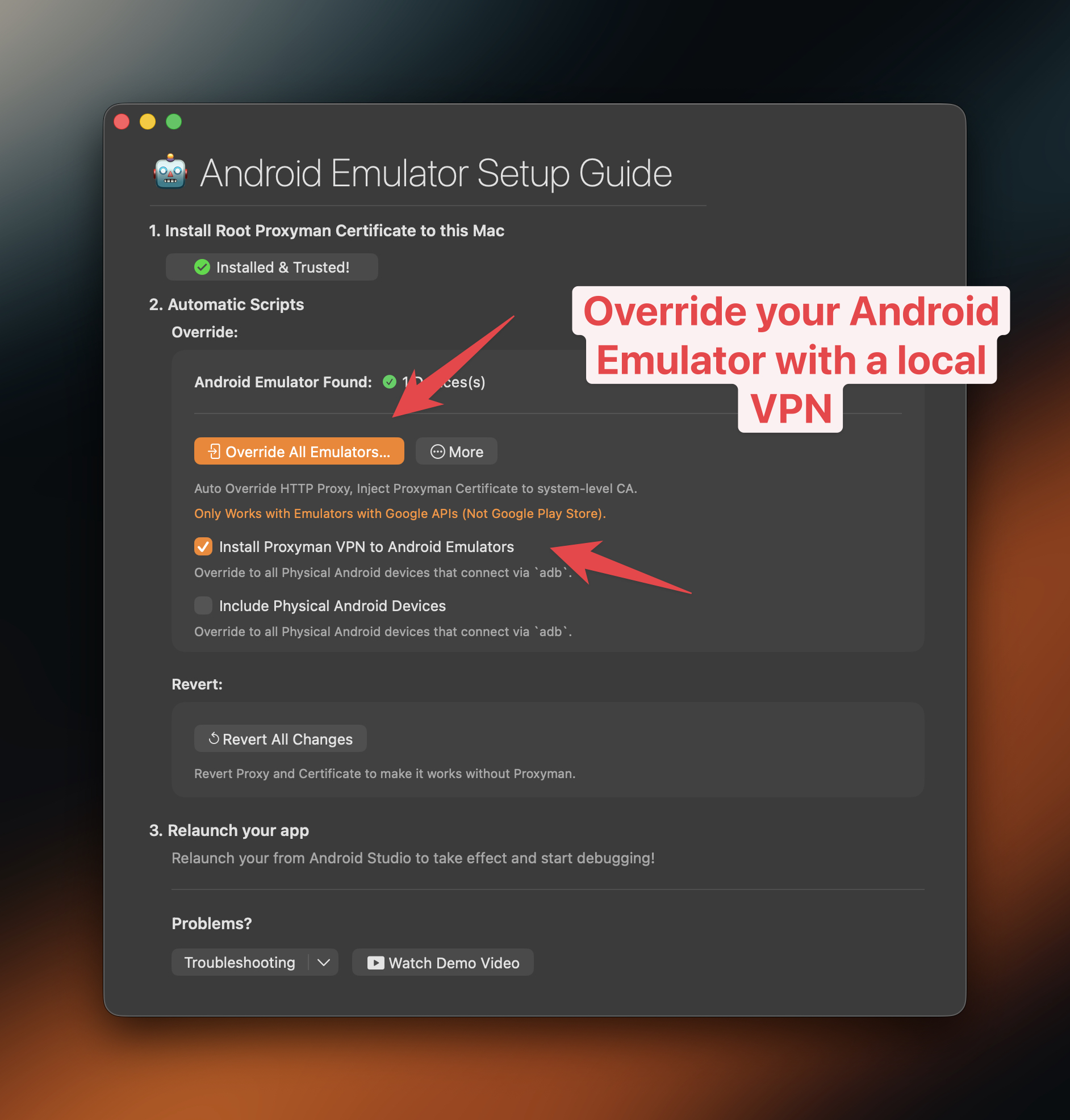
Proxyman provides a built-in script that does it for you in seconds. You can open it from **Certificate Menu -> Install Certificate on Android -> Emulators…**
> **Tip:** From Proxyman 5.16.0 or later, Proxyman can install the Proxyman certificate into the system-level store. This makes it possible to decrypt all HTTPS traffic from Android Emulators.
> **Note:** Proxyman now works with Google Play and non-Google Play Emulators. Override them in 1 click. See [google-play-android-emulator-with-magisk.md](https://proxyman.com/docs/debug-devices/android-device/google-play-android-emulator-with-magisk)
## Video
[Capture HTTPS from a native Android app (OkHttp) on the Android Emulator with API 36](https://www.youtube.com/watch?v=CWInB7gZj6g)
## 2. Benefit?
**1 Click to:**
* **✅ Auto** Override / Revert HTTP Proxy
* **✅ Automatically** download, install, and trust the Proxyman Certificate in the system-level store. Decrypt all HTTPS from your Emulators. (Available on Proxyman 5.16.0 or later)
* No need for **network\_security\_config.xml**
* **✅** Less error-prone and done in a few clicks
> **Tip:** Works with Android Emulators and Android Physical Devices via `adb` (Only for Proxyman v5.19.0+)
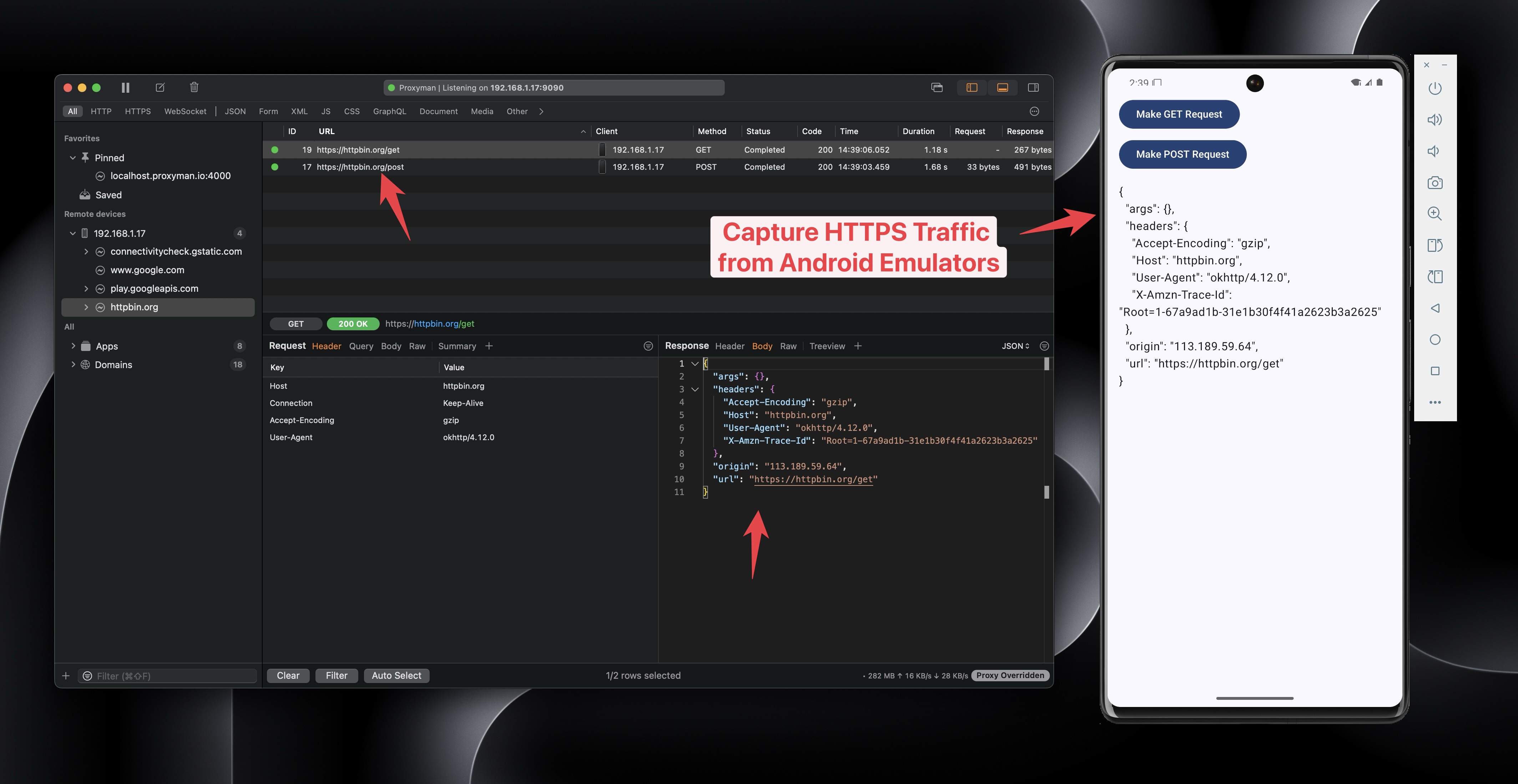
_Capture and decrypt HTTPS from Android Emulators with Proxyman_
* Install Proxyman Certificate to the system-level Store.
### ✅ Flutter / React Native app
From Proxyman macOS 6.4.0 or later, Proxyman can capture HTTPS traffic from Flutter apps without any code change.
See the [flutter.md](https://proxyman.com/docs/debug-devices/flutter) documentation to learn more.
## 3. How to use it?
1. Make sure the `adb` command is installed. If not, please install it
```bash
brew install android-platform-tools
```
2. Open your Android app with Android Studio
3. Create a new Emulator in the Android Virtual Device Manager. **Make sure it's not a Google Play image. It must be a Google APIs image.**
* ✅ NEW: Proxyman can now root Google Play Store Emulators. Please read [google-play-android-emulator-with-magisk.md](https://proxyman.com/docs/debug-devices/android-device/google-play-android-emulator-with-magisk)
4. Open Proxyman -> Certificate Menu -> Install Certificate on Android -> Emulators… -> Click the Override All Emulators button
5. Wait until the Terminal script completes
6. Relaunch your Android app from Android Studio
7. Proxyman will capture all HTTPS data ✅
> **Note:** If you close Proxyman, make sure to click the Revert All Changes button. Otherwise, your Android Emulator cannot access the Internet.
## 4. ⚠️ Proxyman 5.15.0 or earlier
* Proxyman 5.15.0 or earlier can only install the Proxyman Certificate at the user level.
* It means you have to complete the next step:
* In your source code:
* Add res/xml/network\_security\_config.xml
```xml
```
* Add to AndroidManifest.xml
<?xml version="1.0" encoding="utf-8"?>
<manifest xmlns:android="http://schemas.android.com/apk/res/android"
    xmlns:tools="http://schemas.android.com/tools">

    <uses-permission android:name="android.permission.INTERNET" />

    <application
        android:networkSecurityConfig="@xml/network_security_config">
        <activity
            ...
        </activity>
    </application>

</manifest>
## 5. Advanced: Run the script manually
You can run the script manually in your Terminal app without granting the Automation permission in Privacy & Security.
### **Script path**:
```bash
/Applications/Proxyman.app/Contents/Frameworks/ProxymanCore.framework/Resources/install_certificate_android_emulator.sh
```
* For Proxyman 5.19.0 or later
```bash
Usage: /Applications/Proxyman.app/Contents/Frameworks/ProxymanCore.framework/Resources/install_certificate_android_emulator.sh -m [options]
Modes:
all Set proxy and install certificate
proxy Set proxy only
revertProxy Revert proxy settings only
certificate Install certificate only
Required Options based on Mode:
-m, --mode : Operation mode (all, proxy, revertProxy, certificate)
-i, --ip : IP address (required for all, proxy, certificate)
-p, --port : Port number (required for all, proxy, certificate)
-c, --cert : Path to Proxyman certificate (required for all, certificate)
Optional Options:
--include-physical : Include physical devices (default: only emulators)
-h, --help : Show this help message
```
### Prepare the certificate
1. Open the Proxyman app
2. Find the current IP in the main toolbar
3. Certificate menu -> Export -> Root Certificate as PEM -> Save to the Desktop folder
### 5.1 Override HTTP Proxy and Install the Certificate to system-level Store
* Proxyman v5.19.0 or later (NEW)
```bash
bash /Applications/Proxyman.app/Contents/Frameworks/ProxymanCore.framework/Resources/install_certificate_android_emulator.sh --mode all --ip --port --cert
```
* Proxyman v5.18.0 or earlier
```bash
bash /Applications/Proxyman.app/Contents/Frameworks/ProxymanCore.framework/Resources/install_certificate_android_emulator.sh all
```
### 5.2 Only Override HTTP Proxy
* Proxyman v5.19.0 or later (NEW)
```bash
bash /Applications/Proxyman.app/Contents/Frameworks/ProxymanCore.framework/Resources/install_certificate_android_emulator.sh --mode proxy --ip --port
```
* Proxyman v5.18.0 or earlier
```bash
bash /Applications/Proxyman.app/Contents/Frameworks/ProxymanCore.framework/Resources/install_certificate_android_emulator.sh proxy
```
### 5.3 Revert HTTP Proxy
* Proxyman v5.19.0 or later (NEW)
```bash
bash /Applications/Proxyman.app/Contents/Frameworks/ProxymanCore.framework/Resources/install_certificate_android_emulator.sh --mode revertProxy
```
* Proxyman v5.18.0 or earlier
```bash
bash /Applications/Proxyman.app/Contents/Frameworks/ProxymanCore.framework/Resources/install_certificate_android_emulator.sh revertProxy
```
## 6. Left certificate expiry date
6.1 Problem: You get this error when intercepting HTTPS from an Android WebView
❗️ Android WebView rejects with ERR\_CERT\_VALIDITY\_TOO\_LONG
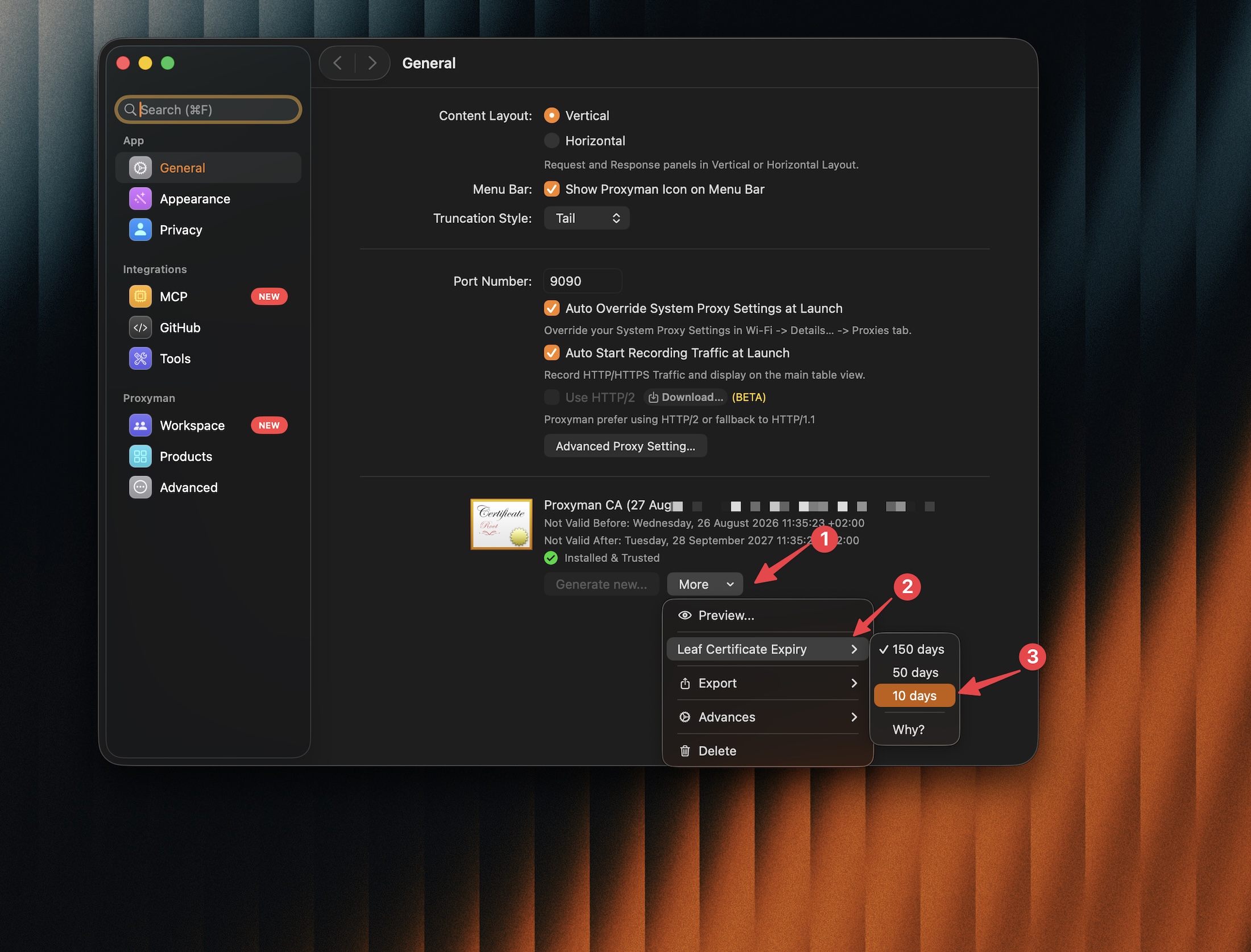
You can change the leaf certificate's expiry in Proxyman Settings -> General -> **More** (next to the certificate) -> **Leaf Certificate Expiry**, then select a shorter expiry, such as 10 days.
* Ref: [https://github.com/ProxymanApp/Proxyman/issues/2751](https://github.com/ProxymanApp/Proxyman/issues/2751)
## Learn more
* [How to capture HTTPS traffic from Android Emulators with API 35](https://proxyman.com/posts/capture_https_android_emulators)
* [How to capture HTTPS traffic from Flutter apps on Android Emulators](https://proxyman.com/posts/Capture-https-flutter-android-emulator)
* [Capture Android Emulator HTTP/HTTPS traffic with Proxyman](https://proxyman.com/android-emulator) (Proxyman website)