Proxyman vs Charles Proxy vs Wireshark: Which Tool Fits Your Work?
New in 2026: HTTP/2 and Network Extension
Two big updates change how Proxyman compares with Charles Proxy and Wireshark:
- Network Extension (Beta): capture HTTP/HTTPS from Mac apps and scripts that ignore the system proxy. Charles Proxy can't see this traffic.
- HTTP/2: inspect HTTP/2 requests, responses, and trailers in Proxyman v26.0.0 for macOS.
✅ Network Extension: capture the traffic Charles Proxy never sees
The problem with a regular proxy
Charles Proxy, like Proxyman's regular mode, works by setting the macOS system proxy. Apps that follow this setting send their requests through it. Many tools don't:
- cURL, Node.js, Python, and Ruby scripts often need their own
--proxyflag or proxy environment variables. - Some Mac apps and HTTP libraries skip the system proxy entirely.
- A local backend server sends its API calls straight to the internet.
Those requests still reach the server, but they never appear in Charles. You end up configuring a proxy in each tool, or changing your code, just to see one request.
What Network Extension does
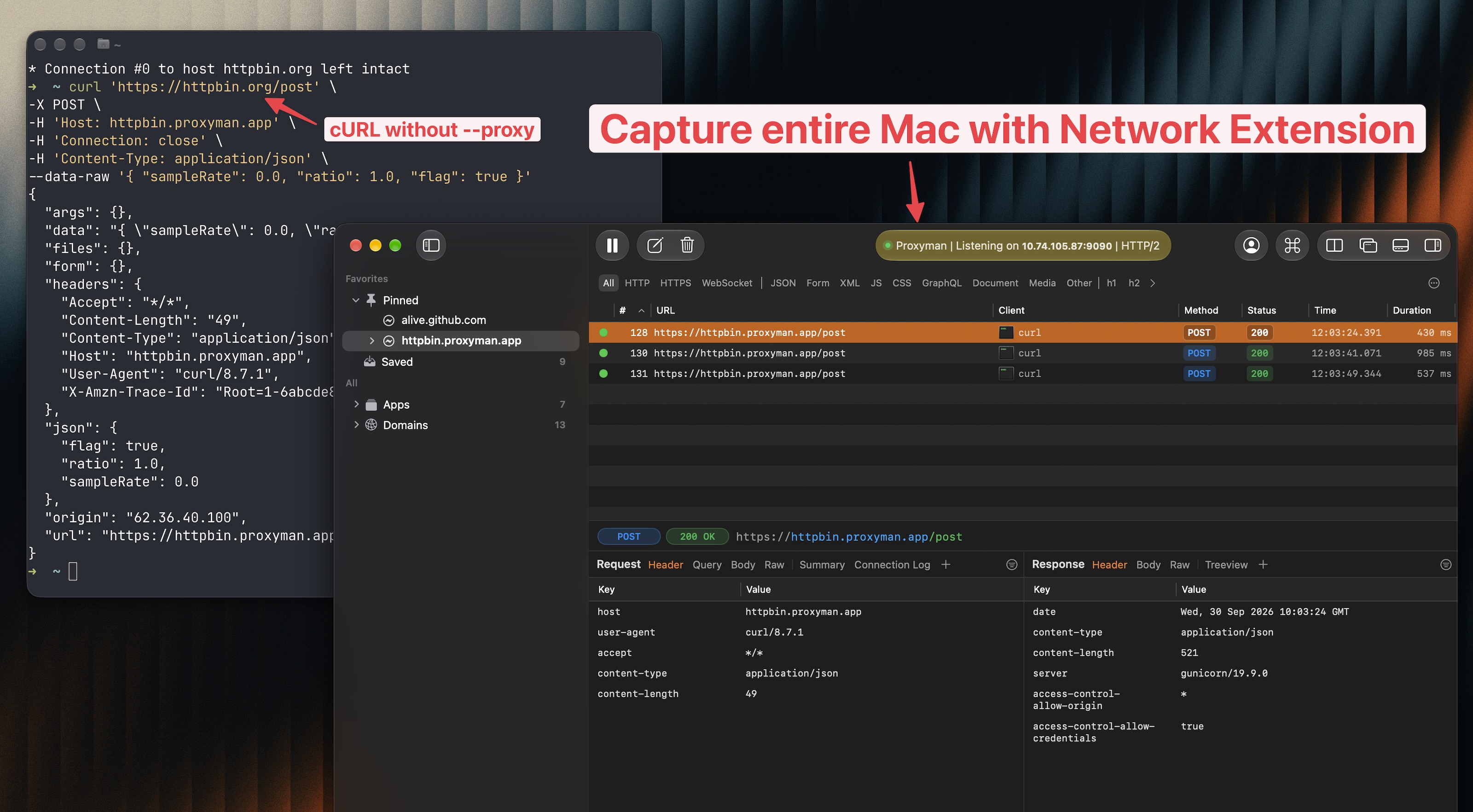
Proxyman's Network Extension is a transparent proxy built on Apple's Network Extension API. macOS routes HTTP/HTTPS connections from apps on your Mac through Proxyman, so the app doesn't need to know a proxy exists.
What you get:
- 🔎 See the missing requests: capture Mac apps, CLIs, scripts, and local servers that ignore proxy settings.
- ⚡️ No per-app setup: run
curl https://api.example.comwithout--proxy, and skip proxy code changes in your projects. - 🛠 Keep your debugging tools: Map Local, Breakpoint, Scripting, and filters work on every captured request.
- 🍎 Native and trusted: a macOS system extension, notarized by Apple and approved in System Settings.
- 🔒 Local by design: captured traffic is processed on your Mac.
Turn it on in Proxyman → Settings → Network Extension, approve it in macOS, then send a fresh request. Learn more on the Network Extension page or in the launch blog.
Network Extension is in Beta and requires Proxyman PRO and macOS 26 or later. To read HTTPS content, trust the Proxyman certificate and enable SSL Proxying. Node.js, Python, and Ruby may also need Automatic Setup to trust the certificate in their runtime.
✅ HTTP/2: debug with the protocol your app really uses
Proxyman v26.0.0 for macOS brings HTTP/2 capture to the regular release. Turn on Use HTTP/2 in Settings → General, then capture a fresh request.
What it gives you:
- Real-world behavior: debug traffic over HTTP/2 instead of forcing everything down to HTTP/1.1, which matters when a bug depends on protocol negotiation or concurrent requests.
- One request per stream: requests that share an HTTP/2 connection appear as separate rows, so you can select and read each one.
- Trailers: read headers sent after the body, such as
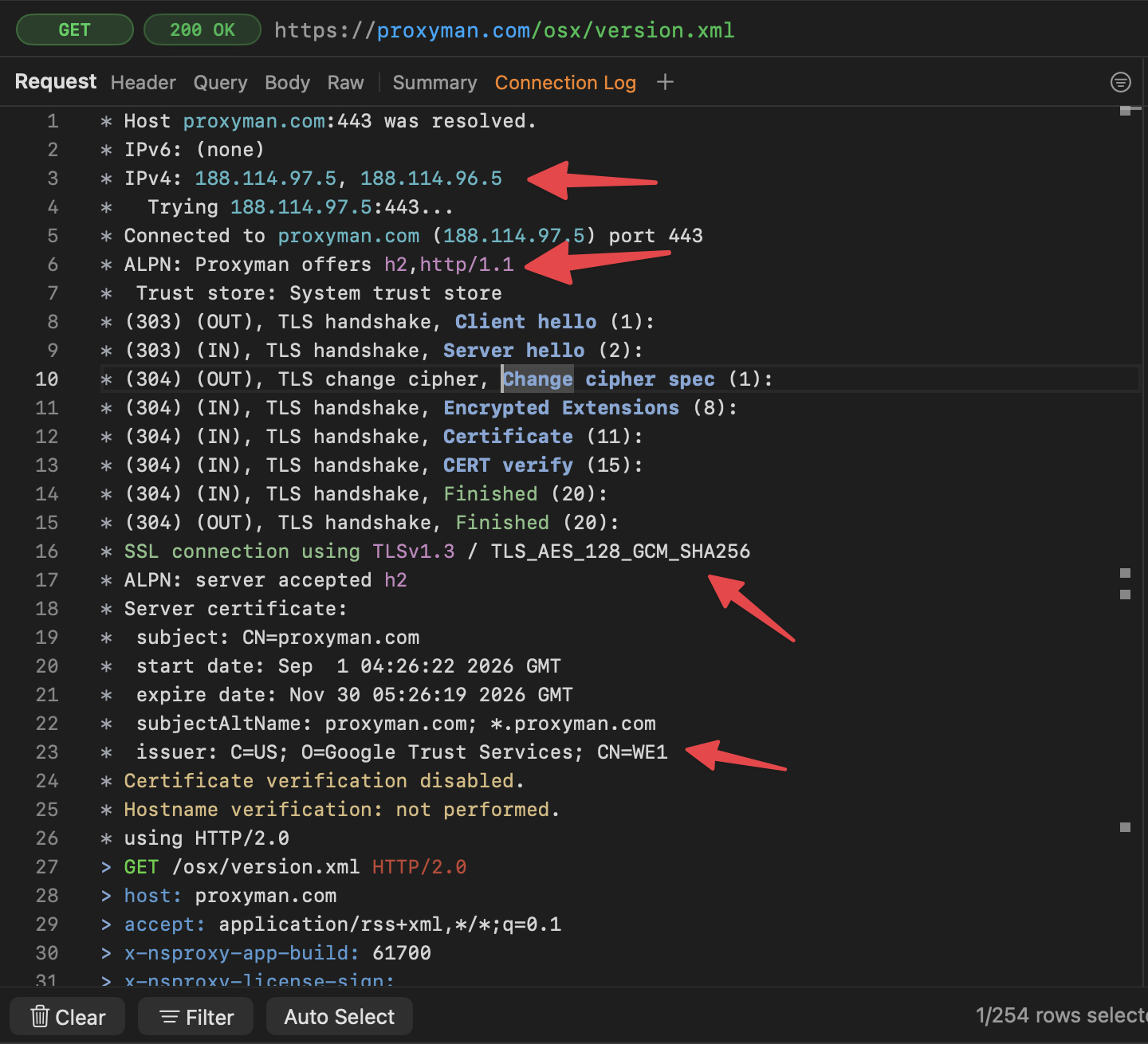
grpc-statusandgrpc-messagefor gRPC calls. - Proof of the protocol: the Connection Log shows whether the server accepted
h2or fell back to HTTP/1.1. - Compare side by side: pair HTTP/2 capture with Split View and Safari-style tabs (PRO) to keep two endpoints in view.
Charles Proxy has supported HTTP/2 since version 4, so moving from Charles to Proxyman no longer means giving it up. Wireshark can decode HTTP/2 frames, but HTTPS traffic stays encrypted unless you export TLS session keys. Read the HTTP/2 release blog for setup details.
Proxyman vs Charles Proxy vs Wireshark at a glance
| Proxyman | Charles Proxy | Wireshark | |
|---|---|---|---|
| Capture apps that ignore the system proxy | ✅ Network Extension (Beta) | ❌ System proxy settings only | ✅ Packet capture, HTTPS stays encrypted |
| HTTP/2 | ✅ Requests, trailers, negotiated protocol | ✅ Since Charles 4 | ✅ Frame-level decoding, needs TLS keys for HTTPS |
| Read and edit HTTPS requests | ✅ SSL Proxying, Breakpoint, Map Local, Scripting | ✅ SSL Proxying, Breakpoint, Map Local, Rewrite | ❌ Read-only packet analysis |
| App technology | Native macOS (Swift, SwiftNIO) | Java, cross-platform | Qt, cross-platform |
What Proxyman is distinguished from other tools
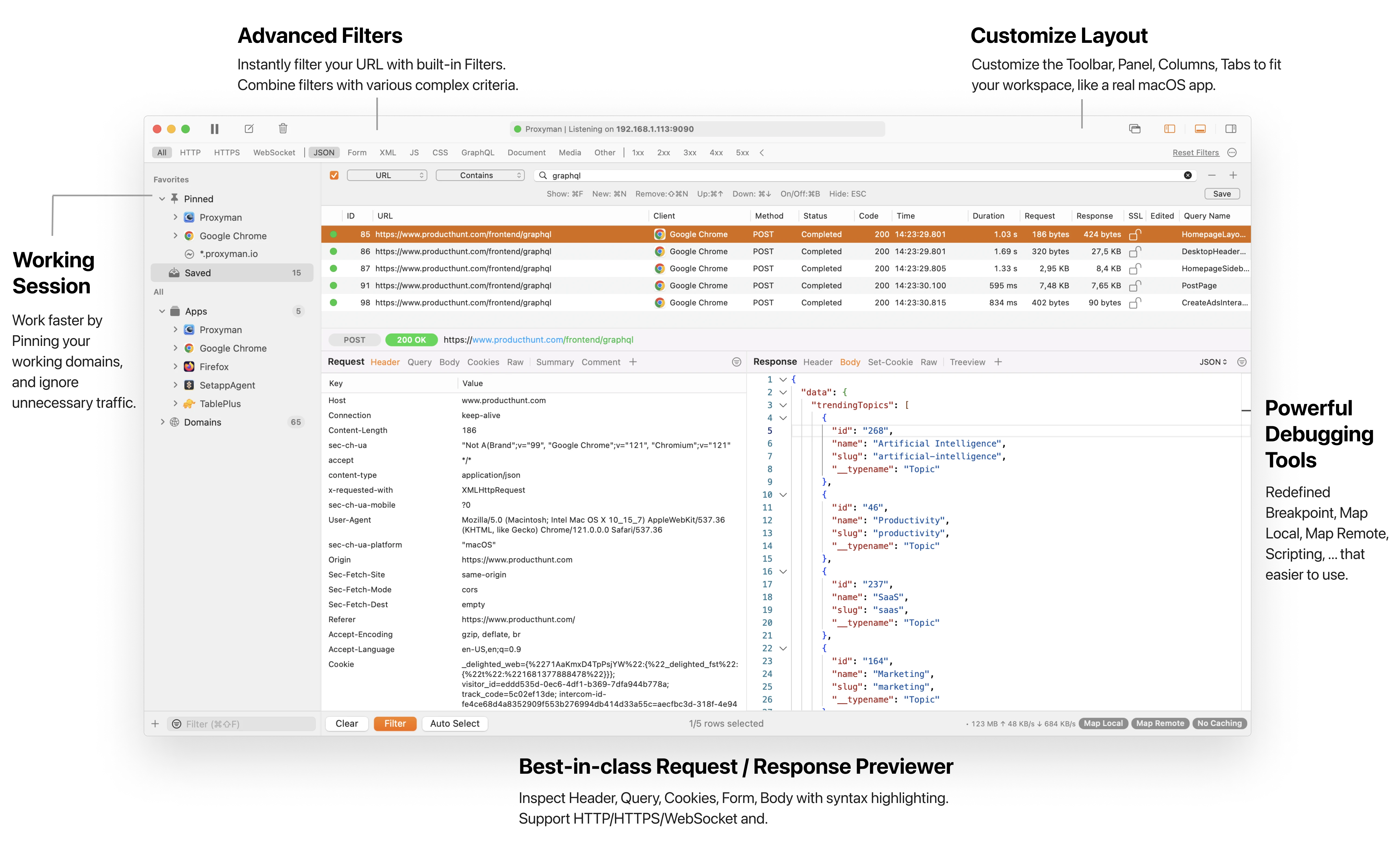
✅ 0. Native macOS app

- Best-in-class NATIVE macOS.
- Powered by SwiftNIO, which is a cross-platform asynchronous event-driven network application framework. Developed and maintained by Apple.
- Built with a developer mindset: Familiar UI, Universal Shortcut Keys, and super-fast Apple M1/M2/M3/M4 performance. Less time to re-learn how to use the app.
- Complete suite of networking debugging tools, including Breakpoint, Map Local, Scripting to debug faster.
✅ 1. Refine UI/UX and Debugging Tools
Proxyman also refines the UI/UX of all debugging tools to be easier to use and fit with 2026+ design standards.
- Strictly follow the macOS Human Interface Guidelines.
- Multiple Filters with various filter criteria: Instantly search your Requests by URL, Regex, Method, Header, Body, etc
- Pin and save folders for later inspection.
Built-in Advanced debugging tools:
- Map Local with built-in editor.
- Map Remote: Better UI.
- Breakpoint: Manipulate Request/Response on the fly.
- Scripting: Modify your Request/Response data by writing JavaScript code. It's designed to replace the ReWrite tool from Charles Proxy since it can do anything ReWrite can do and is more powerful. You can check out the Snippet Code for common tasks.
- Support Network Throttling, Reverse Proxy.
- Capture HTTP/HTTPS, WS/WSS, GRPC traffic with Atlantis framework
- Proxyman for iOS: A native iOS app, capture HTTP/HTTPS from your iOS devices, no need Mac (Required iOS 16+).
- HTTP/2: Inspect HTTP/2 requests, responses, and trailers.
- Network Extension: Capture Mac apps and scripts that ignore proxy settings.
- and more...

✅ 2. Comprehensive Certificate Guidelines for iOS, Android, Simulator, and Emulator.
We understand that configuration on remote devices is tedious. Therefore, Proxyman provides various guidelines to set up Proxyman with the following devices. Some of them can be done with a single click.
- iOS Physical device
- iOS Simulators
- Android Physical Device
- Android Emulator
- NodeJS/Python/Ruby Dev Env
- ...


✅ 3. Scripting with JavaScript
Proxyman offers a scripting feature that the developer could write the JS code to manipulate the Request/Response in a flexible way.

- Implement Map Local / Map Remote / Breakpoint by JS Code. 100x Faster
- Copy&Paste from Proxyman Snippet Code.
- Modify the Request Content, including Domain, Host, Scheme, Port, Path, HTTP Method, HTTP Headers, Query, Body (Encoded-Form, JSON, plain-text)
- Change the Response Content, including HTTP Status Code, HTTP Headers, Body (JSON, Encoded-Form, plain-text, binary...)
- Provide plenty of built-in addons and libraries for common tasks, such as Hashing, Encode/Decode, JSON/Text transformer, Beautify, ...
- Able to write your own JS Addons or Libraries
- Designed to replace Rewrite GUI Tool
- Assign and receive shared States between each script or current session with ShareState or Environment Variables
✅ 4. Active development
Since we are a small team, so we can omit all unnecessary procedures to move forward at a quick pace, but still, maintain the high quality of the product.
What we've achieved so far:
- We have shipped more than 150+ versions since the first beta version in late 2019.
- Rewrite Proxyman with Apple Swift NIO, which is powered for high performance networking application.
- Bring Proxyman to the iOS native app.
- Support the majority of debugging tools from other apps, such as Breakpoint, Map Local, Scripting, Network Conditioner, etc.
- Resolve 1000+ bugs, feature requests on Proxyman Bug Tracker.
- Bring Proxyman to iOS native app. Capture HTTPS traffic from your mobile phone.
- Bring Proxyman to Windows/Linux.
✅ 5. Command Palette (New in 2026)
Find and execute any Proxyman action instantly. Press ⌘⇧P, type to search, and accelerate your workflow.
Why you'll love it
- Open Command Palette (⌘⇧P) — bring up a universal search for commands, tools, and settings without touching the mouse.
- Search and execute instantly — use fast, fuzzy search to find actions and hit Enter to run. No menus, no hunting.
- Pin favorites — keep frequently used actions at your fingertips across windows and sessions.
- Learn more: Command Palette Documentation
Comparison with other apps
Wireshark

Wireshark is a highly credible cross-platform application that has been released since 1998. However, it brings a lot of cumbersome to developers:
- ❌ Old Design from the last century
- ❌ Steep learning curve. Required a lot of experience to use the app efficiently.
- ❌ Some advanced features of the app are designed with a lot of low-level information to satisfy hard-core developers so it might not be friendly to other users.
- ✅ Work with TCP/UDP level.
- ✅ Built for hackers, not developers.
Charles Proxy

Similar to Wireshark, Charles Proxy is another cross-platform application written in Java to support all platforms. It is also a highly matured and stable application that facilitates debugging procedures.
- ❌ Slow Java app.
- ❌ UI/UX isn't optimized and polished.
- ❌ Only sees apps that follow the macOS system proxy. No transparent capture like Proxyman's Network Extension.
- ❌ No public bug tracker.
- ✅ Friendly with new developers, easier to use than Wireshark
- ✅ Full debugging tools, including Map Local, Breakpoint, ReWrite, etc
- ✅ Supports HTTP/2.
Which application is for you?
It is hard to decide whether each application is good or bad as it depends a lot on developers' preferences.
In a nutshell:
-
If you are a hacker/security developer who needs a full-set proxy tool to dig deep into the network level, Wireshark and Fiddler might be your go-to option.
-
If you are a developer who needs to use package analyzers on macOS, Windows, or Linux with full debugging features, you might consider using Charles Proxy.
-
If you are a QA, front-end, iOS, Android developer, security developer who wants a native, high-performance application on macOS with full debugging features and customization (a.k.a a Mac-assed Mac app), it is worth trying Proxyman.
-
If you need readable HTTP/HTTPS from Mac apps, CLIs, or scripts that ignore proxy settings, Proxyman's Network Extension is the only one of these three tools that captures them at the HTTP level.
What's next?
Let's check out other blogs:
- Getting Started with Proxyman
- Getting Started with Proxyman on iOS
- Capture HTTP/HTTPS from iOS 26 - iPhone or iPad
A simple way to choose
Choose by the traffic you need to understand. Wireshark is useful when you need packet-level TCP or UDP details. Charles is a familiar cross-platform HTTP proxy with a long history. Proxyman focuses on app and API debugging with readable request views, device setup, and tools for changing or mocking traffic. If you are unsure, capture the same small test in each tool and compare setup time, filters, and the response view you use every day.
Updated at Oct 18, 2026: Add HTTP/2 and Network Extension, a feature table for Proxyman, Charles Proxy, and Wireshark, and refresh the Charles Proxy section.
Updated at Oct 06, 2025: Add 2026 updates - new Command Palette section with video placeholder, refreshed copy, and fixed typos.
Updated at Apr 08, 2024: Improve wording with new 2024 updates.
Updated at Mar 22, 2022: Improve wording to make the blog is neutral.
Updated at Sep 13, 2022: Update new tools and features.
Updated at Jun 16, 2021: Update new screenshots.
Updated at Nov 24, 2021: Add new features to the latest build.
Proxyman is a high-performance macOS app, which enables developers to capture and inspect HTTP/HTTPS requests from apps and domains on iOS device, iOS Simulator and Android devices.
Get it at https://proxyman.com