Capture raw packets
Record live traffic from your Mac's network interfaces. See TCP, UDP, DNS, TLS, and other protocols packet by packet.

TCP Viewer
Native packet viewer for Mac
TCP Viewer works at the packet level, just like Wireshark. Capture live network traffic, inspect raw packets, use Wireshark display filters, and follow TCP streams in a native Mac app.
Apple silicon, macOS 15 or later
TCP Viewer capturing and inspecting live packets on macOS. Click the video to expand it.
BETA
A transparent proxy for HTTP/HTTPS traffic from apps on your Mac, including apps that ignore the system proxy.
Capture apps that ignore proxy settings
See HTTP/HTTPS requests from Mac apps and scripts that the system proxy misses.
Skip per-app proxy setup
Run tools such as cURL without a --proxy flag or separate proxy settings for each app.
Keep your debugging workflow
Use Map Local, Breakpoint, and Scripting on the requests captured by the extension.
A real packet viewer
TCP Viewer is closer to Wireshark than an HTTP debugging proxy. It records packets from network interfaces and lets you inspect their headers, decoded fields, and bytes.
Record live traffic from your Mac's network interfaces. See TCP, UDP, DNS, TLS, and other protocols packet by packet.
Open decoded fields, protocol trees, byte ranges, and exact values. TCP Viewer uses Wireshark libraries for deep packet details.
Reassemble one TCP conversation, switch between text and hex, search the stream, and jump back to its source packets.
Open PCAP and PCAPNG files, filter the packets you need, and export a capture for Wireshark or your team.
Get the familiar Wireshark packet workflow in a focused, Mac-native app built by the Proxyman team.
Download TCP Viewer for MacProxyman is a modern alternative to Wireshark that provides native macOS app (Not Cross-platform), better UI/UX, built for developers and easier to use.
While Wireshark is powerful for network analysis, it's overkill and overly complex for typical app development debugging
Wireshark is designed for network engineers and security experts, making it overwhelming for developers who just want to debug HTTP/HTTPS traffic from their apps.
Shows every single network packet including system traffic, making it nearly impossible to focus on your app's HTTP requests without extensive filtering knowledge.
No automatic setup for iOS/Android devices. Requires manual certificate installation, network configuration, and deep understanding of network protocols to get working.
Intimidating interface with hundreds of options, filters, and technical jargon. New users often spend more time learning Wireshark than debugging their actual code.
Proxyman focuses on HTTP/HTTPS debugging with automatic device setup and developer-friendly UI
Discover the advantages that make Proxyman the preferred choice for app developers
Best-in-class macOS app with meticulous attention to detail.
A closer look at Proxyman
Pin working domains and hide noisy traffic while you debug.
All you'd expect from a great Mac app: Familiar UI, Universal Shortcuts Keys, and super-fast Apple M1/M2/M3/M4 and M5 performance.
Dive into the network level to diagnose and fix problems with reliable and powerful tools.
Narrow down your search with Proxyman's Multiple Filters. You can combine complex filtered criteria like Protocol, Content-Type, URL, Request Header, Response Header, Body, etc that find exact what you're looking for.
Keep two traffic views open in the same tab. Each pane has its own filters, selected request, and inspector, while both panes use the same live capture.
Breakpoint, Map local GUI is so slow?
Try Scripting Tool: Use Javascript code to manipulate the Request/Response with your own logic.
We provide a handful of Snippet Code, common Add-ons and JS Libraries to facilitate your debugging procedure and make it 100x faster.
Breakpoint Tool helps you to modify Requests/Responses Data on the fly without changing any client code. Supports URL, Headers, Body, Status Code, Raw Message, etc.
Map Local Tool allows developers to mock a Response with a local file. Boost development speed up by directly modifying the response with Status Code, Header, and Body without waiting for the backend.
Easily debug GraphQL Request by defining a matching rule with a particular GraphQL QueryName. Works with Breakpoint, Map Local, Map Remote, and Scripting Tool.
Inspect live WebSocket messages as they arrive. Follow client and server frames in real time, preview their payloads, and quickly track down realtime communication issues.
Connect Claude Code to Proxyman via Model Context Protocol. Fetch flows, analyze requests, and create debugging rules - all from your terminal.
Fetch all requests from a connected iPhone or Android device
| Method | URL | Status | Duration |
|---|---|---|---|
| GET | /api/v2/users/profile | 200 | 124ms |
| POST | /api/v2/auth/refresh-token | 200 | 89ms |
| GET | /api/v2/projects/list | 200 | 203ms |
| GET | /api/v2/notifications | 304 | 45ms |
| PUT | /api/v2/settings/preferences | 200 | 167ms |
| GET | /api/v2/analytics/dashboard | 200 | 312ms |
Found 6 requests from the connected mobile device. All requests target the api.atlantis.com domain with successful responses.
Proxyman's built-in MCP server lets AI assistants interact with your debugging session in real time - no plugins required.
Works with your favorite AI tools
Quickly find the differences between requests/responses with built-in Diff Tool.
Side-by-Side or Unified Display, with Light/Dark GitHub Theme.
Try Online
Run directly on your Web Browser. Your data is safe 🔐
Try macOS app
Offline macOS app works with your local data. Lifetime deal.
Create, edit, and send custom HTTP requests directly from Proxyman.
Start from scratch, paste a cURL command, or reuse requests from your history.
History
Revisit, duplicate, and resend previous requests without rebuilding them from scratch.
Import cURL
Paste a cURL command to instantly populate its method, URL, headers, and body.
Compose full requests like Postman
Configure methods, URLs, headers, queries, and bodies in one focused workspace.
Bulk Edit
Paste or update multiple headers and parameters at once to save repetitive editing.
WebSocket
Open WebSocket connections and send messages without switching to another tool.
Preview request / response instantly
Inspect the complete request and formatted response side by side as soon as it returns.
Capture and inspect HTTP/2 traffic in Proxyman v26.0.0 for macOS.
Turn on Use HTTP/2 in Settings → General → Proxy, then capture a fresh request.
Inspect requests and responses
Read HTTP/2 methods, URLs, headers, bodies, status codes, and timing.
Follow concurrent requests
Keep each request clear while multiple streams share one connection.
Read headers and trailers
Inspect request and response metadata, including HTTP/2 trailers.
Check the negotiated protocol
Confirm HTTP/2 or HTTP/1.1 fallback in the Connection Info tab.
BETA
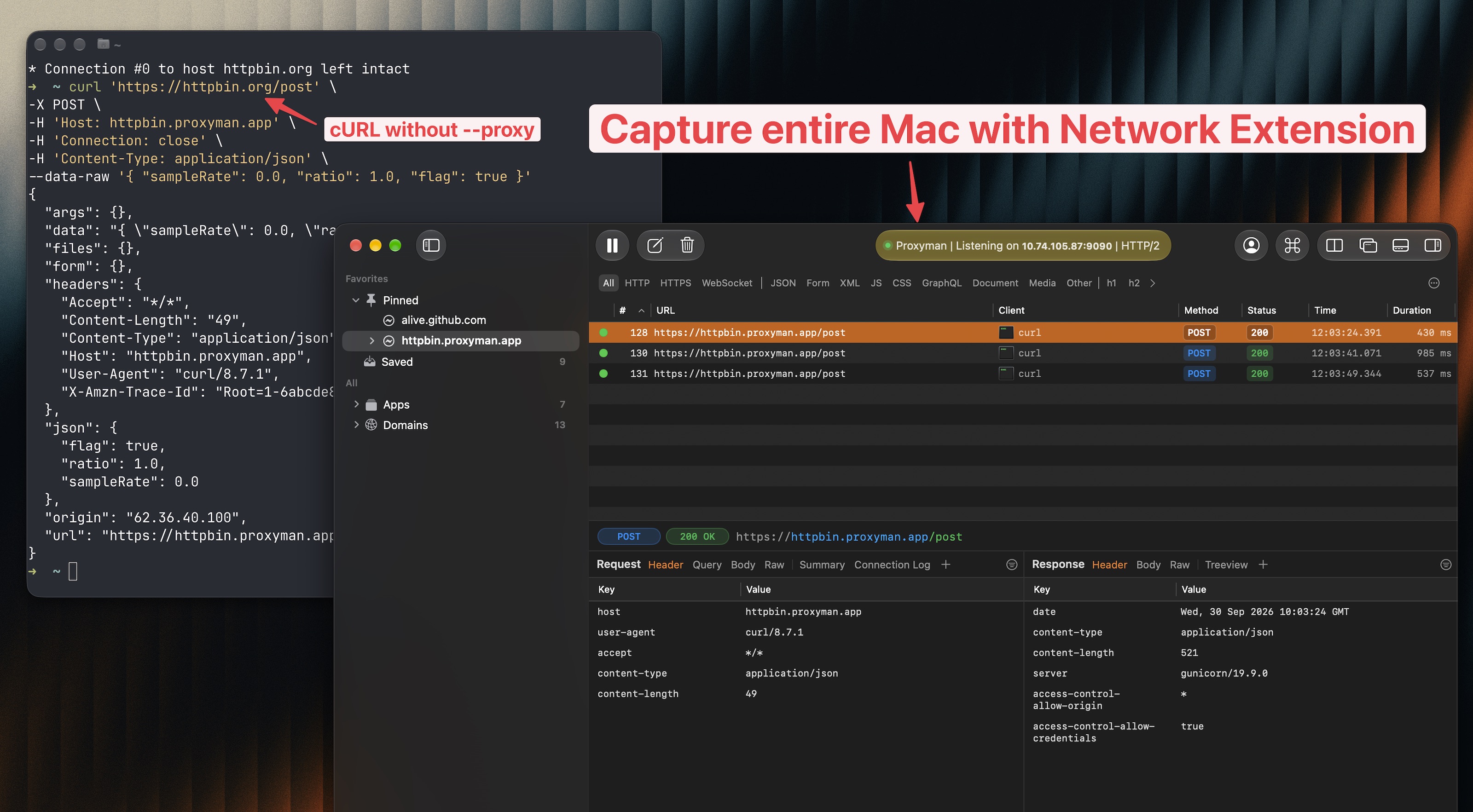
A transparent proxy for HTTP/HTTPS traffic from apps on your Mac, including apps that ignore the system proxy.
Capture apps that ignore proxy settings
See HTTP/HTTPS requests from Mac apps and scripts that the system proxy misses.
Skip per-app proxy setup
Run tools such as cURL without a --proxy flag or separate proxy settings for each app.
Keep your debugging workflow
Use Map Local, Breakpoint, and Scripting on the requests captured by the extension.
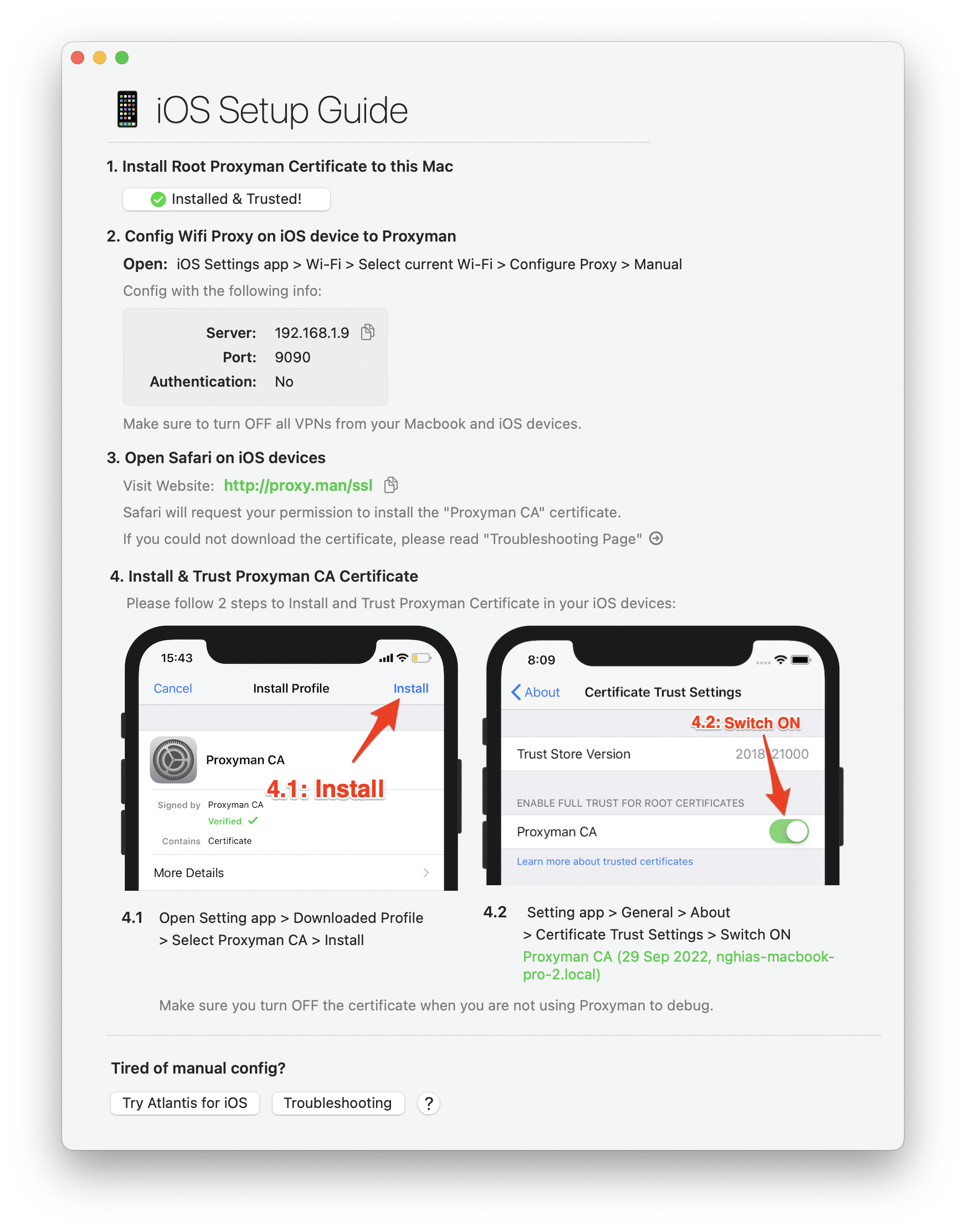
Easy-to-follow instructions to capture HTTP traffic from your iOS/ Android devices, simulators, emulators.
Proxyman provides a straightforward walkthrough to set up a Proxy with iOS, Android physical devices, iOS Simulators and Android Emulators .
Simply follow the detailed instructions to capture and intercept HTTP(s) traffic with just a few clicks.
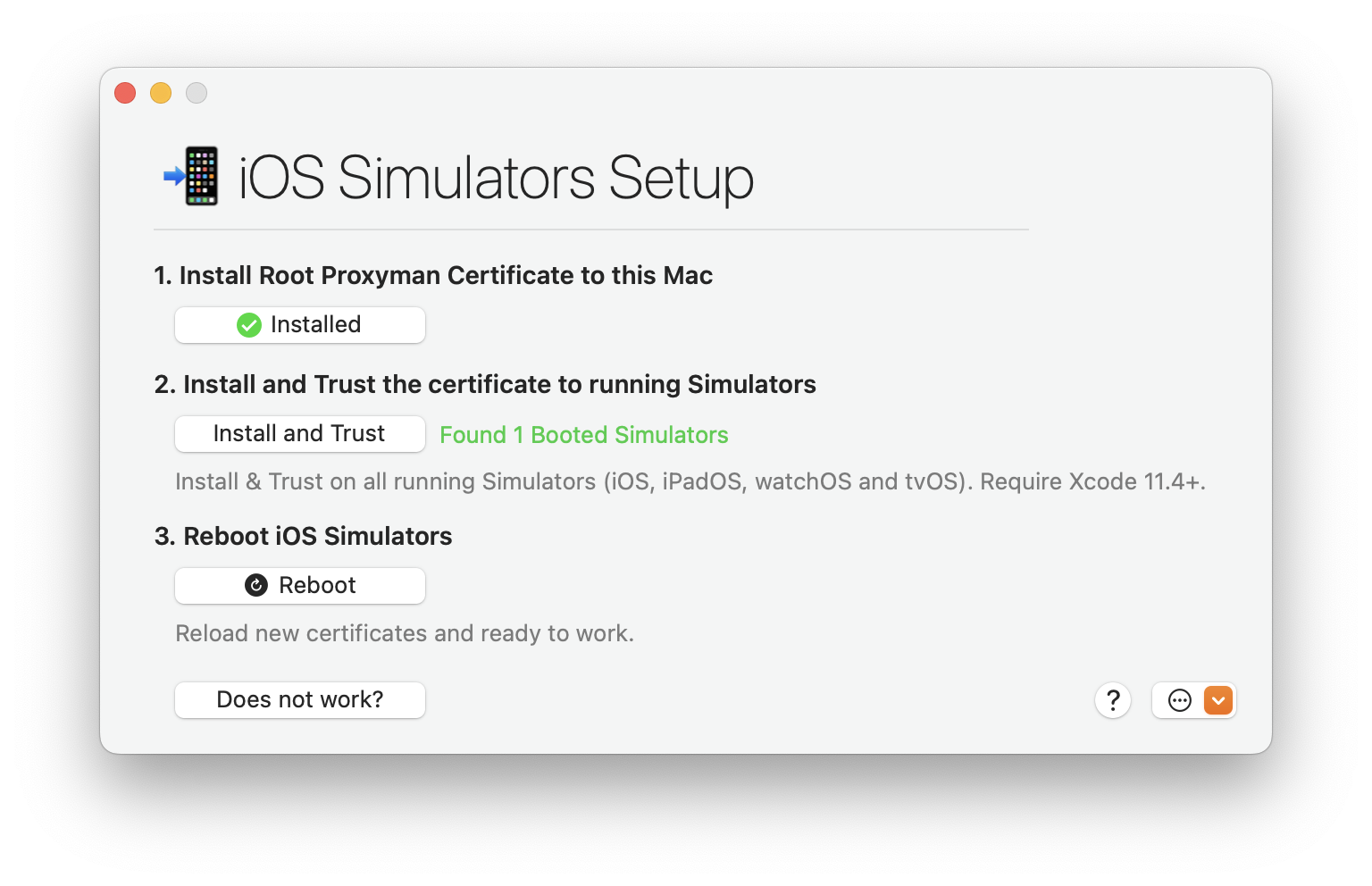
Tired of manual & error-prone config on your iOS Simulator?
Leave all complicated steps to us and let Proxyman automatically inspect the network traffic for you. No need to configure HTTP Proxy, Install or Trust any Certificate.
Comprehensive list of current and up-coming Proxyman features.
Finder Categorize
Proxyman Plugins


 happy users
Proxyman is used daily by 800k+ developers worldwide. Here are some of their feedbacks.
and more from Daring Fireball, Inessential, Donny Wals, iOS Dev Weekly, Twitter, and Hacker News.
What developers are saying in the discussion
Start debugging with confidence. Join thousands of developers — from indie hackers to Fortune 500 teams.