如何绕过 CORS 跨域限制
本文介绍在开发网站或移动应用(iOS 和 Android)时,如何绕过 CORS(跨域资源共享)限制。
在应用开发中绕过 CORS 策略
CORS 本质上是一种机制:通过额外的 HTTP 响应头告诉浏览器,哪些域名可以访问受限的资源。你可以在 MDN 上阅读关于 CORS 的完整技术文档。
以下情况可能会遇到这个问题:
- 在本地网站中访问线上接口
- 正在开发的 iOS / Android 应用尝试访问线上接口
你可能会遇到如下错误:
Access to fetch at https://your-production-endpoint.com from origin http://localhost:8080 has been blocked by CORS Policy.
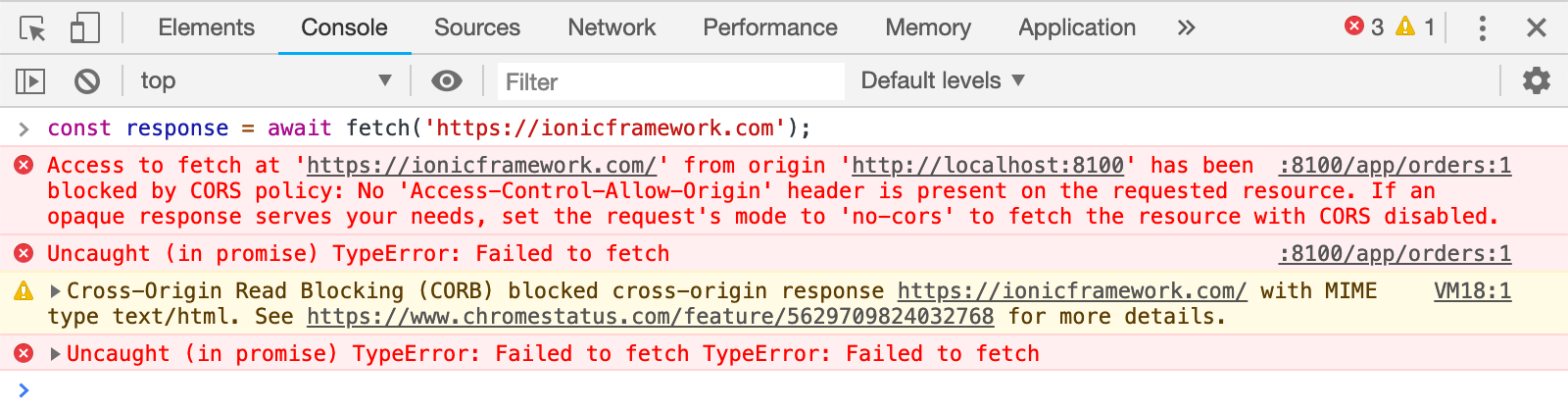
图片来源:Rodrigo Fernández
如何绕过 CORS
绕过 CORS 机制的简单方法,就是在响应中注入特定的 HTTP 响应头。
如果你使用 Proxyman 进行调试,有多种方案可以实现,只需使用 Scripting 工具或 Map Local 工具即可轻松完成。
Scripting 工具
Scripting 工具可以为匹配的请求或响应注入任意 Header。
它非常适合为你正在调试的所有响应注入 CORS Header。
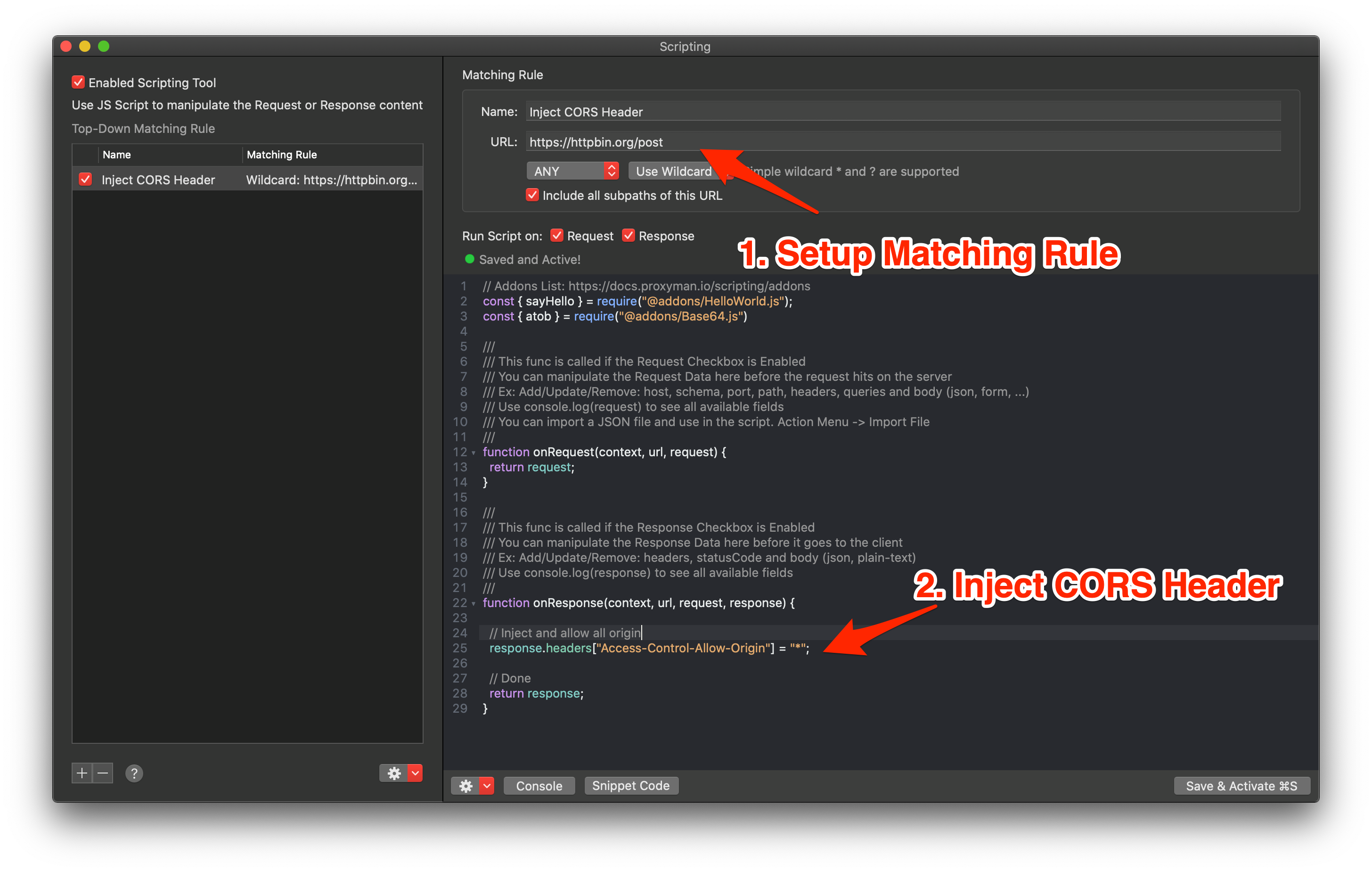
- 为你的域名创建一条匹配规则。Scripting 的匹配规则可以是 http://localhost:8080 或 https://dev.mydomain.com
- 编写脚本,并向响应中注入 Access-Control-Allow-Origin Header
///
/// This func is called if the Response Checkbox is Enabled
/// You can manipulate the Response Data here before it goes to the client
/// Ex: Add/Update/Remove: headers, statusCode and body (json, plain-text)
/// Use console.log(response) to see all available fields
///
function onResponse(context, url, request, response) {

  // Allow all
  response.headers["Access-Control-Allow-Origin"] = "*";

  // Done
  return response;
}
Map Local 文件
也可以使用 Map Local 文件来绕过 CORS。
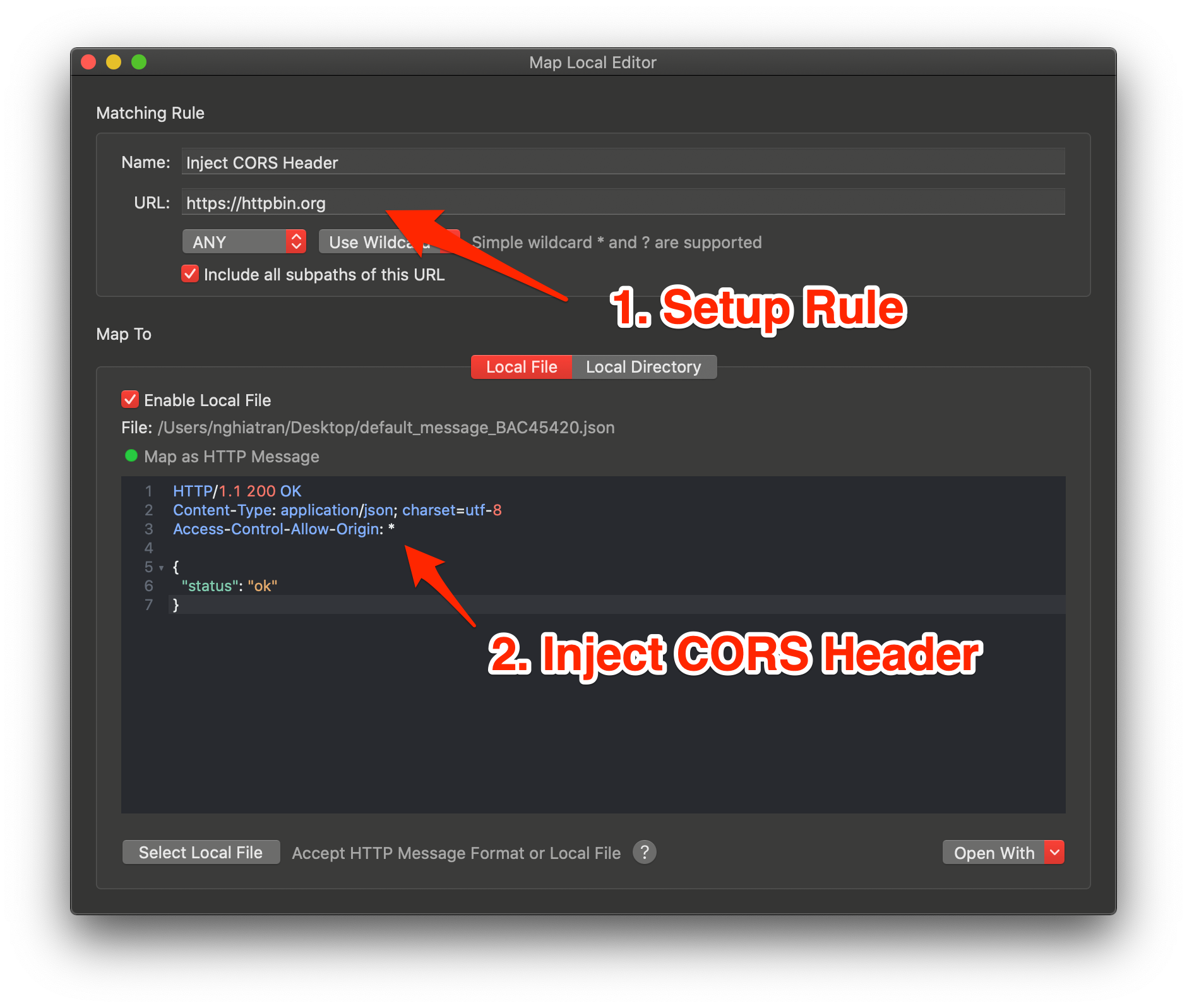
- 从零创建一条 Map Local 规则,或基于选中的 Flow 创建
- 设置规则以覆盖目标 URL
- 在 Header 部分添加 Access-Control-Allow-Origin: *
HTTP/1.1 200 OK
Content-Type: application/json; charset=utf-8
Access-Control-Allow-Origin: *

{
  "status": "ok"
}
Map Local 目录
如果你使用本地目录进行映射,可以将 Map Local 与 Scripting 工具结合使用来实现。
- 正确设置 Map Local 目录,并确保映射无误后再进行下一步
- 创建一条与相同 URL 匹配的 Scripting 规则
- 向响应中注入 Access-Control-Allow-Origin Header
///
/// This func is called if the Response Checkbox is Enabled
/// You can manipulate the Response Data here before it goes to the client
/// Ex: Add/Update/Remove: headers, statusCode and body (json, plain-text)
/// Use console.log(response) to see all available fields
///
function onResponse(context, url, request, response) {

  // Allow all
  response.headers["Access-Control-Allow-Origin"] = "*";

  // Done
  return response;
}
相关文档
更多内容请参阅:
- Scripting 工具:https://proxyman.com/docs/scripting/script
- 插件和代码片段:https://proxyman.com/docs/scripting/addons
- Map Local:https://proxyman.com/docs/advanced-features/map-local
重要:仅用于测试
在 Proxyman 中修改响应,可以帮助你在本地继续开发,但无法修复真实用户访问的服务器。线上服务器应只允许应用所需的来源、方法和 Header。如果浏览器发送了 OPTIONS 预检请求,请确保该响应同样包含正确的 CORS Header。涉及凭据或私密数据时,请避免使用 Access-Control-Allow-Origin: *。
Proxyman 是一款高性能的 macOS 应用,可帮助开发者抓取并查看来自 iOS 设备、iOS 模拟器和 Android 设备上的应用与域名的 HTTP/HTTPS 请求。
下载地址:https://proxyman.com