Scripting(脚本)
使用 Proxyman Scripting 工具,通过 JavaScript 修改 HTTP 请求和响应、模拟 API,并使用 onWebsocket 记录 WebSocket 消息。
1. 这是什么?
Proxyman 提供了 Scripting 工具。你可以编写 JavaScript 代码,以灵活的方式修改请求和响应。
2. 优势
- 使用 JS 代码实现 Map Local / Map Remote / Breakpoint,速度快 100 倍
- 修改请求内容,包括 Domain、Host、Scheme、Port、Path、HTTP Method、HTTP Headers、Query、Body(Encoded-Form、JSON、纯文本)
- 使用
onWebsocket记录和检查 WebSocket 消息(macOS、Windows 和 Linux 版 Proxyman 26.1.0 或更高版本)。 - 使用
onWebsocket编辑、丢弃或发送 WebSocket 消息(macOS 版 Proxyman 26.2.0 或更高版本,Windows/Linux 版 Proxyman 26.1.0 或更高版本)。 - 修改响应内容,包括 HTTP Status Code、HTTP Headers 和 Body(JSON、Encoded-Form、纯文本、二进制等)
- 内置大量常用插件和库,例如 Hashing、Encode/Decode、JSON-Text transformer、Beautify 等
- 编写你自己的 JS 插件或库
- 旨在替代 Charles Proxy 的 Rewrite 图形界面工具
- 通过 Shared State 或环境变量,在当前会话的脚本之间共享状态
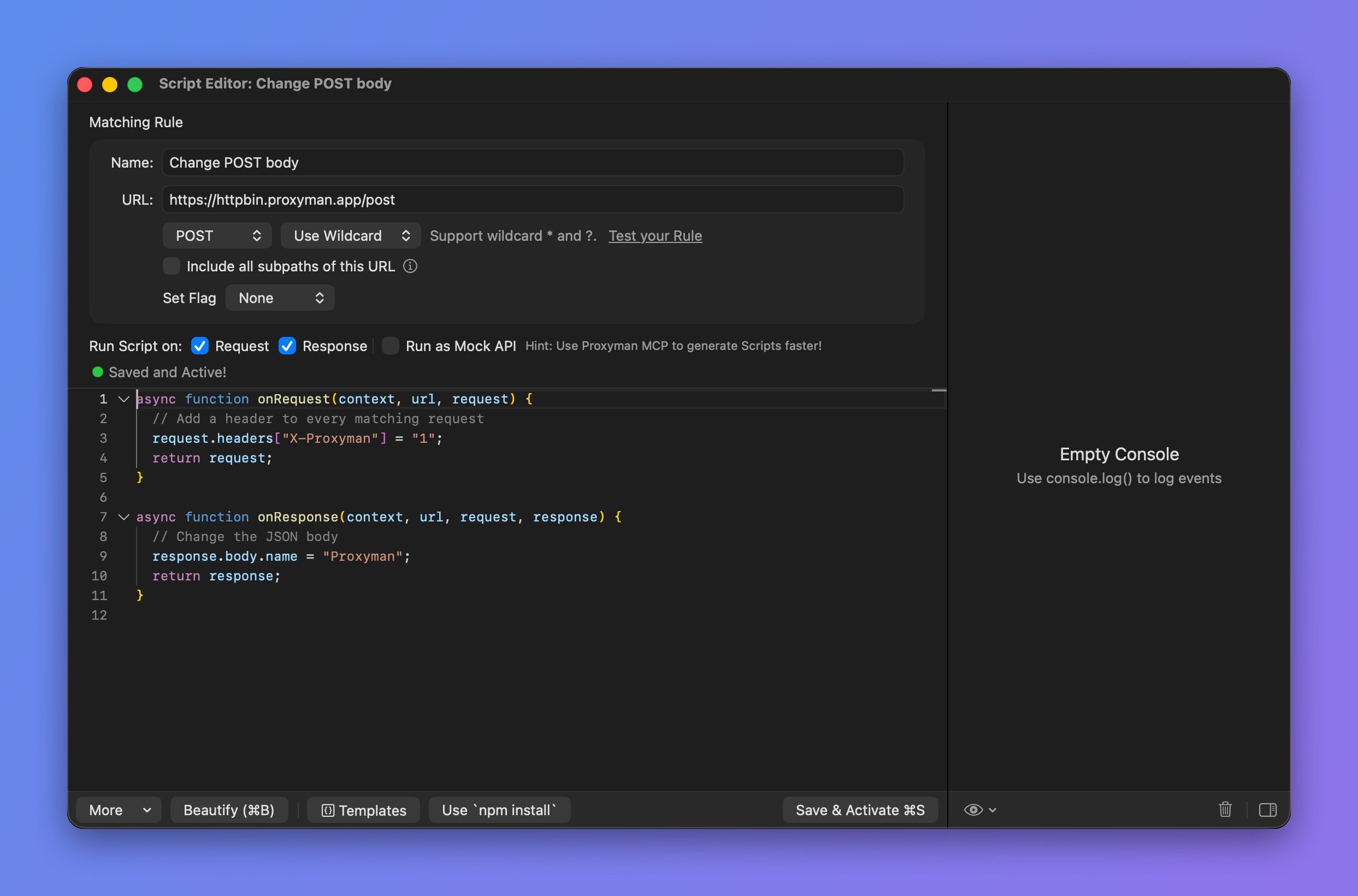
Scripting 工具
3. 如何使用?
你可以通过以下方式打开 Scripting 工具:
- Scripting 菜单 -> Script List…(⌥⌘I)
- 右键点击一个请求 -> Tools -> Scripting…
查看 代码片段 页面,了解 Scripting 工具的 JS 代码片段合集。
4. 在 GraphQL 请求中使用 Scripting
从 Proxyman 2.27.0 版本开始,Scripting 工具可以通过 QueryName 匹配 GraphQL 请求。请参阅以下 GraphQL 文档。
4.1 在 WebSocket 中使用 Scripting
从 macOS 版 Proxyman 6.2.0 开始,可以使用 onRequest 和 onResponse 修改 WebSocket 请求的 URL 和握手请求头。请参阅修改 WebSocket URL 和请求头。
使用 onWebsocket 记录消息
onWebsocket 可在 macOS、Windows 和 Linux 版 Proxyman 26.1.0 或更高版本中使用,iOS 版不支持。
使用 onWebsocket(context, url, request, response, message) 检查并记录从客户端和服务器抓取的消息:
function onWebsocket(context, url, request, response, message) {
  console.log(`[${message.from}] ${message.type}: ${message.data}`);
}
默认情况下,该钩子为只读。Proxyman 会先转发消息,再运行脚本。修改其参数或返回值都不会改变流量或已抓取的消息。无需 return 语句。
要编辑、丢弃或发送消息,请在规则上勾选 Modify WebSocket Messages(macOS 版 Proxyman 26.2.0 或更高版本,Windows/Linux 版 Proxyman 26.1.0 或更高版本)。请参阅 Modify WebSocket Messages。
使用方法
- 抓取一个 WebSocket 连接。对于
wss://,请为该主机开启 SSL Proxying,以便 Proxyman 读取其中的消息。 - 右键点击已抓取的请求,选择 Tools → Scripting。生成的脚本会在
onResponse下方包含onWebsocket。 - 添加日志代码,然后点击 Save & Activate。
- 重新连接 WebSocket,发送消息,然后查看脚本的 Console Log。
连接建立时,规则必须处于启用状态。创建规则后,或在连接建立时脚本尚未包含 onWebsocket、之后才添加该钩子,都需要重新连接。普通的新脚本模板不包含此钩子,你可以手动添加。
参数
必须保留全部五个参数并保持顺序。context 和 url 描述请求及匹配的规则。request 和 response 包含最终的握手信息,其中包括 onRequest、onResponse 或 Breakpoint 所做的修改。message 包含以下内容:
| 字段 | 值 |
|---|---|
message.type | "text"、"binary"、"ping"、"pong" 或 "close"。 |
message.from | "client" 或 "server"。 |
message.data | 始终为字符串。二进制数据会尽可能以 UTF-8 文本显示,否则显示为 Binary (length=N)。不会应用可选的 WebSocket 标签页解码器。 |
message.rawData | 复制得到的 Uint8Array,仅适用于二进制消息。需要显式记录;枚举 message 时不会包含该字段。 |
message.closeCode | 数字,仅适用于关闭消息,例如 1000。 |
注意事项
- 分片的文本帧和二进制帧会在钩子运行前重新组装。你收到的是一条完整消息,而不是每个延续帧各触发一次回调。
- 不会提供 Ping/Pong 的负载数据和关闭原因。
- 支持同步和
async钩子,并可使用console.log、require、sharedState和$http等辅助功能。 - 消息到达时,对现有钩子的编辑以及规则、文件夹和工具的启用状态,最多每秒检查一次。已排队的调用仍可能执行完成。
- Console Log 最多保留最新的 200 条日志。如果脚本处理不及时,流量会照常传输,但钩子调用可能会被跳过并显示警告。Console Log 用于调试,不是完整的流量存档。
文本、JSON、二进制、Ping/Pong 和关闭消息的示例,请参阅 WebSocket 消息代码片段。
5. 示例
以下指南介绍如何编写 JS 代码,将请求域名从生产环境改为 localhost,并修改响应体。
- 创建脚本前,请先为该域名开启 SSL Proxying。
- 打开 Scripting 工具,新建一个脚本条目(⌘N)。你也可以右键点击请求 -> Tools -> Scripting…,Proxyman 会自动为你创建脚本。
- 为脚本命名,并定义 Matching Rule。
- 例如:Name=在 localhost 上测试接口,URL=https://proxyman.io
- 在 Run Script on 中勾选 Request 和 Response 复选框
- 开始编写
onRequest函数的 JS 代码
onRequest(context, url, request) {}
// Import UUID addons
const { uuidv4 } = require("@addons/UUID.js");

function onRequest(context, url, request) {
  // print log
  console.log(request);

  // Change Production domain -> Localhost
  request.method = "GET";
  request.scheme = "http";
  request.host = "localhost";
  request.port = 8000;

  // Add new header
  request.headers["X-New-Header"] = "Hello From Scripting feature";
  request.headers["UUID"] = uuidv4(); // generate random UUIDv4
  delete request.headers["Key-Need-Delete"];

  // Update or Add a new Query
  request.queries["name"] = "Proxyman";

  // Update Body
  var body = request.body;
  body["name"] = "Proxyman";
  request.body = body;

  // Or Map the body with a local file (Proxyman 2.25.0+)
  // request.bodyFilePath = "~/Desktop/mockdata.json";

  // Done
  return request;
}
onRequest() 对象格式
context、url 和 request 对象的定义如下:
// context (readonly)
{
    "scriptName": "<String> Your Script Name",
    "matchingRule": "<String> Your Matching Rule",
    "matchingMethod": "<String> Method",
    "isEnableOnRequest": "Bool",
    "isEnableOnResponse": "Bool",
    "filePath": "<String> Script path",
    "flow": { // Available from 2.16.0+
        "serverPort": "443",
        "serverIpAddress": "104.18.230.83",
        "clientIpAddress": "192.168.0.102",
        "remoteDeviceName": "iPhone XR",
        "remoteDeviceIP": "192.168.0.102",
        "id": "51",
        "clientPath": null,
        "clientPort": "51494",
        "clientName": null,
        "mapRemoteOriginalURL": "<String> Original URL before Map Remote modification (nullable)"
    },
}

// url (readonly)
url: String // => Present the full URL

// request
{
    "method": "<String> HTTP Method. Accept string method. Ex: GET, POST, ...",
    "scheme": "<String> Accept http or https",
    "host": "<String> Host of the request. Ex: api.proxyman.io, localhost, ...",
    "path": "<String>: Path of the URL. Ex: /v1/data",
    "port": "<Int> Accept int port number. Ex: 443, 8080, ..",
    "queries": "<[String: Any]> A JS Object (Dictionary) contains key values of the query",
    "headers": "<[String: Any]> A JS Object (Dictionary) contains key values of the header",
    "body": "Depend on the Content-Type header. It might be a dictionary for JSON and form, Plain Text or Uint8Array",
    "bodyFilePath": "<String><Optional> Set a body with a local file. See example in Snippet Code Page"
    "rawBody": "<Readonly>: A raw body String or Uint8Array",
    "preserveHostHeader": "<Bool> Preserve the Host",
    "isURLEncoding": "<Bool> Determine if Proxyman will perform URLEncoding when constructing the final URL. Default is True",
    "upstream": "<Object><Optional> Upstream TLS ALPN and HTTP/2 settings. Proxyman v26.0.0 or later for macOS."
}
除 rawBody 外,你可以修改 request 对象的任何值。
在 onRequest 中设置 request.upstream。示例和支持的字段,请参阅上游 ALPN 和 HTTP/2 设置。
如果由于 Content-Type 请求头不正确,body 的格式无效,请使用 rawBody 并手动解析字符串。
request.body 的类型取决于 Content-Type 请求头。
| Content-Type 请求头 | request.body |
|---|---|
| application/json 或 JSON 系列 | JavaScript 对象 |
| application/x-www-form-urlencoded | JavaScript 对象 |
| 纯文本或基于文本的 Content-Type,例如:application/js、text/css、text/html 等 | String |
| 其余类型:二进制数据(application/zip、application/octet-stream) | Uint8Array |
以下是代码片段页面中的常用 JS 代码:
7. 开始编写 onResponse 函数的代码
function onResponse(context, url, request, response) {
  console.log(response);

  // Update or Add a new header
  response.headers["Content-Type"] = "application/json";

  // Update status Code
  response.statusCode = 500;

  // Update Body
  var body = response.body;
  body["new-key"] = "Proxyman";
  response.body = body;

  // Or Map the body with a local file (Proxyman 2.25.0+)
  // response.bodyFilePath = "~/Desktop/mockdata.json";

  // Done
  return response;
}
onResponse() 对象格式
context、url、request 和 response 对象的定义如下:
// context (readonly): Same with onRequest

// url (readonly): Same with onRequest

// request (readonly): Same with onRequest

// response
{
    "statusCode": "<Int> Status Code. Ex: 200, 400, 404,...",
    "httpVersion": "<String><Readonly> The HTTP Version",
    "statusPhrase": "<String><Readonly> HTTP Status Phrase. Ex Not Found, OK, ...",
    "headers": "<[String: Any]> A JS Object (Dictionary) contains key values of the header",
    "body": "Depend on the Content-Type header. It might be a dictionary for JSON and form, PlainText or Uint8Array",
    "rawBody": "<Readonly>: A raw body String or Uint8Array",
    "bodyFilePath": "<String><Optional> Set a body with a local file. See example in Snippet Code Page"
}
你可以修改 response 对象中的 statusCode、headers 和 body。
如果由于 Content-Type 请求头不正确,body 的格式无效,请使用 rawBody 并手动解析字符串。
response.body 的类型取决于 Content-Type 请求头。
| Content-Type 请求头 | response.body |
|---|---|
| application/json 或 JSON 系列 | JavaScript 对象 |
| application/x-www-form-urlencoded | JavaScript 对象 |
| 纯文本或基于文本的 Content-Type,例如:application/js、text/css、text/html 等 | String |
| 其余类型(application/zip、application/octet-stream) | Uint8Array |
你必须在 onRequest 和 onResponse 函数中返回 request 和 response 对象。
6. 内置插件和库
Proxyman 提供大量常用任务所需的插件和库,例如 Hashing、Encode/Decode 等。
7. 调试 JS 错误
有时你可能会因为语法错误、无效代码等原因遇到 JavaScript 错误。你可以通过阅读控制台中的错误信息,或使用 console.log() 进行调试。
8. 将 Scripting 用作 Mock API
从 Proxyman 2.32.0 开始,你可以将 Scripting 工具用作 Mock API。请求不会发送到服务器,响应体由你自己定义。其工作方式与 Map Local 相同。
当真实的 REST API 尚未就绪时,这一功能很有用。你可以在本地定义并测试它。
启用 Mock API 的步骤如下:
- 打开 Scripting 工具 -> 选择脚本
- 在脚本编辑器中,于 Request 和 Response 复选框旁边勾选 Run as Mock API(参见上方的脚本编辑器截图)。
然后,你可以像平常一样定义响应:
function onResponse(context, url, request, response) {

  // Init new body
  var body = {};
  body["new-key"] = "Proxyman";
  response.body = body;

  // Or map from a file
  // response.bodyFilePath = "~/Desktop/myfile.json"

  // Done
  return response;
}
9. 注意事项
- 你必须在
onRequest和onResponse函数中返回request和response对象。 - Proxyman 4.16.0 或更高版本:Proxyman 现在会将二进制数据转换为 Uint8Array
- Proxyman 4.15.0 或更早版本:JavaScript 没有 Data 类型,因此二进制 body 会在 JavaScript 中被转换为 Base64 编码字符串。如需将 Uint8Array、blob 或 ArrayBuffer 传入 body,请先将其转换为 Base64 编码字符串。