Proxyman now supports the HTTP QUERY method
APIs often need to search or filter data. For a small search, a GET request is usually enough. But when the search has many filters, a long URL becomes hard to read and maintain.
There is now a new HTTP method named QUERY. It gives an API a clear way to say: “Please find data for me, but do not change anything.”
Proxyman now supports QUERY requests across the app. You can compose one by hand, see it in captured traffic, filter it from a busy list, and use it with your usual debugging tools.
1. What is the HTTP QUERY method?
QUERY is a new HTTP method for asking a server to search, filter, or select data. The query details are sent in the request body, instead of the URL.
The important idea is simple: a QUERY request is for reading data. It should not create, update, or delete anything, and it is safe to send again if needed.
The method is defined in RFC 10008. Like any HTTP method, it only works when the API server has chosen to support it.
How is it different from GET and POST?
GET, QUERY, and POST can all send input to an API. The difference is where it goes and what the method says about the request.
- GET puts search values in the URL. It works well for small requests that people may want to bookmark or share:
/products?brand=Proxyman&sort=price. - QUERY puts search values in the request body. It suits a detailed search with many filters and tells the server that the request is read-only.
- POST also sends data in the request body. It often creates or changes something, such as submitting an order. An API can use
POSTfor a search, but the method alone does not say whether it changes data.
In short: use GET for a small URL-based lookup, QUERY for a detailed read-only search, and POST when the action may create or change data.
A simple cURL example
Imagine an online store that supports searching products with a detailed set of filters. The following request asks for in-stock wireless headphones, sorted by price:
curl --request QUERY 'https://api.example.com/products/search' \
  --header 'Content-Type: application/json' \
  --header 'Accept: application/json' \
  --data '{
    "text": "wireless headphones",
    "filters": {
      "inStock": true
    },
    "sort": "price"
  }'
The --request QUERY part chooses the HTTP method. The JSON below it is the search input, and Content-Type tells the server that it is JSON.
With GET, the same search would need to fit in the URL. That can be awkward when it contains many fields.
Do not expect every API to accept QUERY yet. If the server does not support it, you may see 405 Method Not Allowed. That response comes from the API server, not from Proxyman.
2. Compose a QUERY request in Proxyman
You can now send a QUERY request directly from the Compose tool. This is useful when you want to try a new endpoint, check a response, or compare the result with a GET or POST request.
- Open Compose in Proxyman.
- Choose QUERY from the method menu.
- Enter the API URL.
- Add the headers required by the API. For a JSON request, this is usually
Content-Type: application/json. - Enter the search input in the Body tab.
- Click Send and inspect the response on the right.
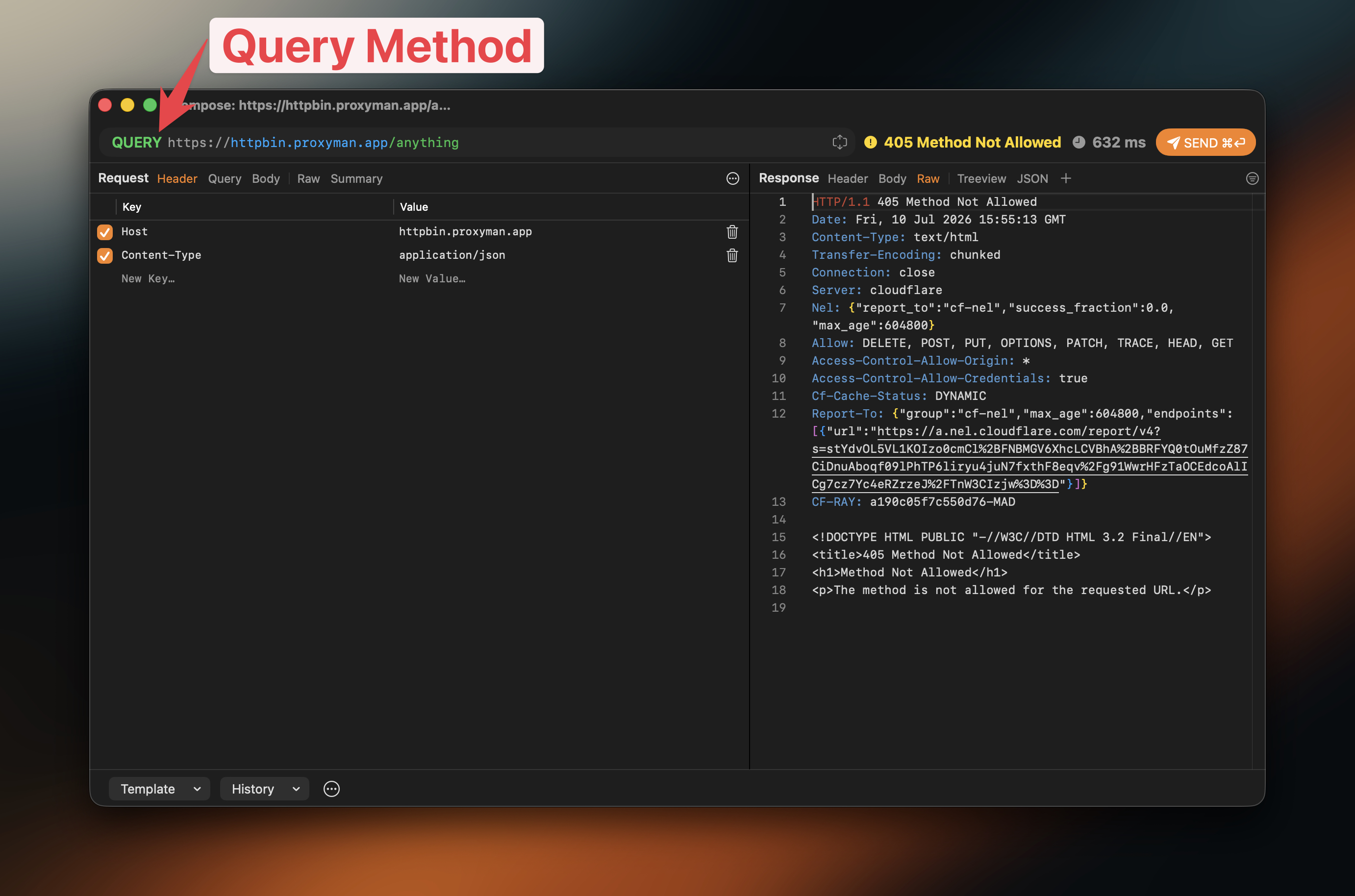
The screenshot shows a 405 Method Not Allowed response. It confirms that Proxyman sent QUERY, while the selected endpoint does not support it. Use an endpoint that documents QUERY support when you want a successful response.
3. Find QUERY traffic quickly
When an app starts using QUERY, it can be easy to miss among many GET and POST requests. Proxyman displays QUERY in the Method column, so you can identify it at a glance.
To focus on it, open the filter bar and set Method to QUERY. Proxyman then shows only matching requests, ready for you to inspect or compare.
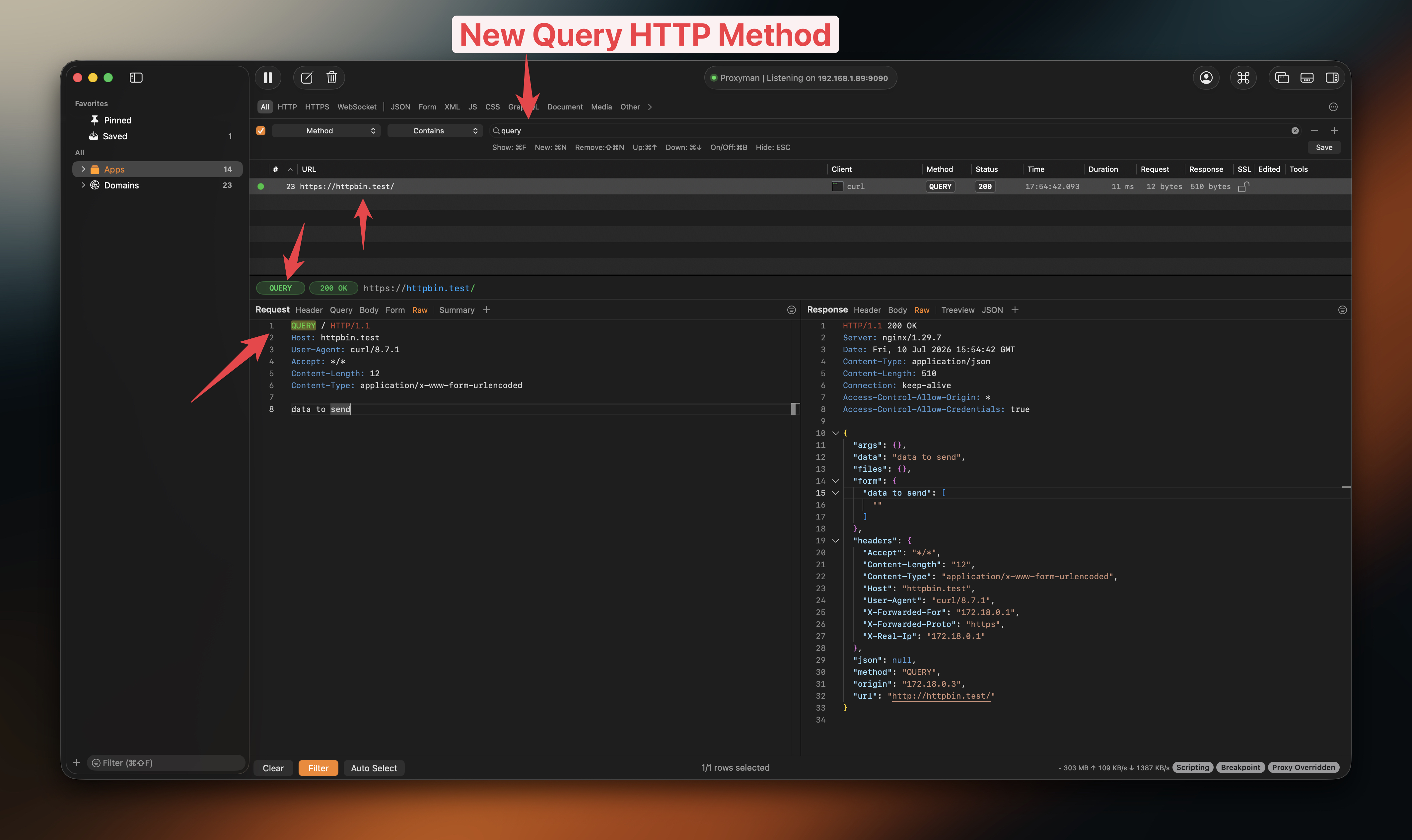
It is especially helpful when testing a search screen: make a change, run the search again, and see the matching request without sorting through unrelated traffic.
4. Use QUERY with the debugging tools you already know
QUERY is not limited to Compose and filters. Proxyman recognizes it wherever the request method matters, so it fits into the normal debugging workflow.
- Request details: See
QUERYin the captured request and read its headers, query values, body, and response just as you would for any other method. - Debugging Tools: When a tool lets you match a request by method, choose
QUERYto make a rule apply only to those searches. YourGETandPOSTtraffic can remain untouched. - Scripting: Run a script only for
QUERYrequests. This is useful when you want to check search input, add a test header, or change a response during local testing. - Breakpoint: Pause a
QUERYrequest before it reaches the server. You can review or edit the search input, then send it on and inspect the result.
These controls let a rule or script target exactly the requests you mean to test, without affecting an update or checkout request.
5. Summary and what’s next
The HTTP QUERY method makes an API’s intent clearer: it is asking for data, not changing data. It is useful when a search needs more detail than a short URL can comfortably hold.
With Proxyman, you can now:
- Compose and send
QUERYrequests - Capture and inspect
QUERYtraffic - Filter the main list by the
QUERYmethod - Target
QUERYrequests in Debugging Tools, Scripting, and Breakpoint
Support for a new HTTP method takes time. Before you use it in an app, check the API documentation or try the endpoint first. If it returns 405 Method Not Allowed, it does not support QUERY yet.
Test the complete route from the app to the server, not only the server itself. An older gateway, firewall, or client library may reject a method it does not know. Also check retry and cache behavior in your own system; the method says the request is read-only, but each part of the route still needs to handle it correctly.
Keep Proxyman updated, and you will be ready to inspect and debug QUERY traffic as more APIs adopt it. To learn more, read RFC 10008 or visit the Proxyman Documentation.
Related guides