Best Burp Suite Alternative: Proxyman for macOS
A native, developer-first HTTP debugging proxy
Burp Suite is excellent for penetration testing. When your daily work is inspecting, mocking, and debugging app or API traffic, Proxyman gives you a faster, more focused workflow.
BETA
Capture more with Network Extension
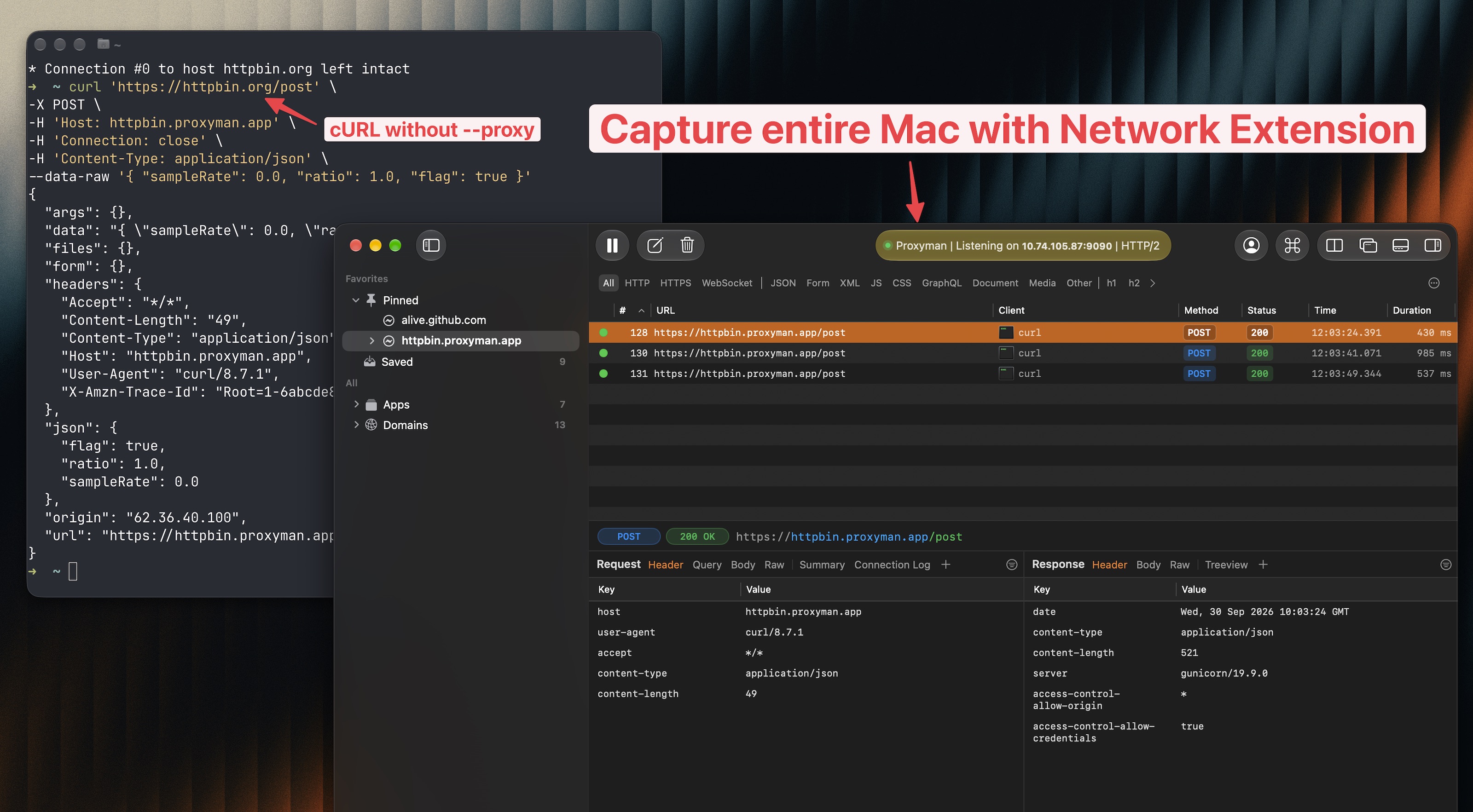
A transparent proxy for HTTP/HTTPS traffic from apps on your Mac, including apps that ignore the system proxy.
- Burp Suite
- Non-proxy-aware clients need invisible proxying, hosts-file redirects, and a listener for each port.
- Proxyman
- Turn on Network Extension. HTTP/HTTPS from apps that ignore the system proxy shows up automatically, ready for Breakpoint and Map Local.
Capture apps that ignore proxy settings
See HTTP/HTTPS requests from Mac apps and scripts that the system proxy misses.
Skip per-app proxy setup
Run tools such as cURL without a --proxy flag or separate proxy settings for each app.
Keep your debugging workflow
Use Map Local, Breakpoint, and Scripting on the requests captured by the extension.
6 reasons developers choose Proxyman over Burp Suite
Proxyman removes security-testing complexity when the job is to understand and control application network traffic.
- Native macOS experience
- Proxyman is built with Swift and optimized for Apple Silicon, with familiar macOS controls, shortcuts, and window behavior.
- Faster mobile device setup
- Guided setup for iPhone, iPad, iOS Simulator, Android devices, and emulators gets app traffic into your workspace quickly.
- Focused HTTP debugging UI
- A clean request list, powerful filters, multiple tabs, and readable body viewers keep everyday debugging work front and center.
- Visual mocking and breakpoints
- Create Map Local, Map Remote, Breakpoint, Block List, and Allow List rules from the captured request without building an extension.
- JavaScript request rewriting
- Use JavaScript to inspect and rewrite request or response headers, status codes, query parameters, and bodies in real time.
- API-aware debugging tools
- Work with GraphQL, WebSocket, Protobuf, JSON, MessagePack, and other common application payloads using purpose-built viewers and filters.
Proxyman vs Burp Suite: choose the right tool for the job
Both can intercept HTTP traffic, but they are designed around different primary workflows.
Choose Proxyman for development
- Inspecting traffic from macOS, iOS, and Android apps.
- Capturing Mac apps and CLIs that ignore proxy settings with Network Extension.
- Reading HTTP/2 requests, responses, and trailers such as grpc-status.
- Mocking APIs and testing edge cases during development.
- Filtering and reading GraphQL, WebSocket, and Protobuf data.
- Automating request and response changes with JavaScript.
Choose Burp Suite for security testing
- Web application penetration testing and vulnerability research.
- Automated vulnerability scanning and crawling.
- Intruder, Repeater, Collaborator, and security extensions.
- Dedicated AppSec and offensive-security workflows.
Burp Suite alternative FAQs
Is Proxyman a good alternative to Burp Suite?
Yes, when your primary goal is intercepting, inspecting, and modifying HTTP/HTTPS traffic during app or API development. Burp Suite remains the better choice for vulnerability scanning and dedicated penetration-testing workflows.
Can Proxyman intercept and modify HTTPS traffic?
Yes. Proxyman supports SSL Proxying, Breakpoint, Map Local, Map Remote, Scripting, Repeat, Compose, and other tools for inspecting and modifying HTTP/HTTPS traffic.
Does Proxyman work with mobile devices and simulators?
Yes. Proxyman provides guided setup for physical iOS and Android devices, iOS Simulator, and Android emulators.
Can Proxyman capture apps that ignore proxy settings?
Yes, on macOS. Proxyman's Network Extension is a transparent proxy built on Apple's Network Extension API. It captures HTTP/HTTPS from Mac apps and scripts that ignore the system proxy, without invisible proxying or hosts-file redirects. Network Extension is in beta and requires Proxyman PRO and macOS 26 or later.
Does Proxyman support HTTP/2?
Yes. Proxyman v26.0.0 for macOS captures HTTP/2. Turn on Use HTTP/2 in Settings → General, then inspect each request, response, and trailer, and confirm the negotiated protocol in the Connection Log.
Does Proxyman replace Burp Suite's security scanner?
No. Proxyman is an HTTP debugging proxy for developers, not an automated vulnerability scanner. Use Burp Suite when security scanning and penetration testing are the main job.
Simple & Powerful Developer Tool
Native macOS app
Best-in-class macOS app with meticulous attention to detail.
A closer look at Proxyman
Working Session
Pin working domains and hide noisy traffic while you debug.
All you'd expect from a great Mac app: Familiar UI, Universal Shortcuts Keys, and super-fast Apple M1/M2/M3/M4 and M5 performance.
Complete suite of network debugging tools
Dive into the network level to diagnose and fix problems with reliable and powerful tools.
Capture HTTP/HTTPS Traffic
Multiple Filters
Narrow down your search with Proxyman's Multiple Filters. You can combine complex filtered criteria like Protocol, Content-Type, URL, Request Header, Response Header, Body, etc that find exact what you're looking for.
Split View
Keep two traffic views open in the same tab. Each pane has its own filters, selected request, and inspector, while both panes use the same live capture.
Scripting Tool
Breakpoint, Map local GUI is so slow?
Try Scripting Tool: Use Javascript code to manipulate the Request/Response with your own logic.
We provide a handful of Snippet Code, common Add-ons and JS Libraries to facilitate your debugging procedure and make it 100x faster.
Breakpoint Tool
Breakpoint Tool helps you to modify Requests/Responses Data on the fly without changing any client code. Supports URL, Headers, Body, Status Code, Raw Message, etc.
Map Local Tool
Map Local Tool allows developers to mock a Response with a local file. Boost development speed up by directly modifying the response with Status Code, Header, and Body without waiting for the backend.
GraphQL Debugging
Easily debug GraphQL Request by defining a matching rule with a particular GraphQL QueryName. Works with Breakpoint, Map Local, Map Remote, and Scripting Tool.
WebSocket Realtime
Inspect live WebSocket messages as they arrive. Follow client and server frames in real time, preview their payloads, and quickly track down realtime communication issues.
AI-Powered Debugging with MCP
Connect Claude Code to Proxyman via Model Context Protocol. Fetch flows, analyze requests, and create debugging rules - all from your terminal.
Fetch all requests from a connected iPhone or Android device
| Method | URL | Status | Duration |
|---|---|---|---|
| GET | /api/v2/users/profile | 200 | 124ms |
| POST | /api/v2/auth/refresh-token | 200 | 89ms |
| GET | /api/v2/projects/list | 200 | 203ms |
| GET | /api/v2/notifications | 304 | 45ms |
| PUT | /api/v2/settings/preferences | 200 | 167ms |
| GET | /api/v2/analytics/dashboard | 200 | 312ms |
Found 6 requests from the connected mobile device. All requests target the api.atlantis.com domain with successful responses.
Proxyman's built-in MCP server lets AI assistants interact with your debugging session in real time - no plugins required.
Works with your favorite AI tools
Spot your bugs with ease
Quickly find the differences between requests/responses with built-in Diff Tool.
Side-by-Side or Unified Display, with Light/Dark GitHub Theme.
Try Online
Run directly on your Web Browser. Your data is safe 🔐
Try macOS app
Offline macOS app works with your local data. Lifetime deal.
Compose requests with ease
Create, edit, and send custom HTTP requests directly from Proxyman.
Start from scratch, paste a cURL command, or reuse requests from your history.
History
Revisit, duplicate, and resend previous requests without rebuilding them from scratch.
Import cURL
Paste a cURL command to instantly populate its method, URL, headers, and body.
Compose full requests like Postman
Configure methods, URLs, headers, queries, and bodies in one focused workspace.
Bulk Edit
Paste or update multiple headers and parameters at once to save repetitive editing.
WebSocket
Open WebSocket connections and send messages without switching to another tool.
Preview request / response instantly
Inspect the complete request and formatted response side by side as soon as it returns.
HTTP/2 is finally here
Capture and inspect HTTP/2 traffic in Proxyman v26.0.0 for macOS.
Turn on Use HTTP/2 in Settings → General → Proxy, then capture a fresh request.
Inspect requests and responses
Read HTTP/2 methods, URLs, headers, bodies, status codes, and timing.
Follow concurrent requests
Keep each request clear while multiple streams share one connection.
Read headers and trailers
Inspect request and response metadata, including HTTP/2 trailers.
Check the negotiated protocol
Confirm HTTP/2 or HTTP/1.1 fallback in the Connection Info tab.
BETA
Capture more with Network Extension
A transparent proxy for HTTP/HTTPS traffic from apps on your Mac, including apps that ignore the system proxy.
Capture apps that ignore proxy settings
See HTTP/HTTPS requests from Mac apps and scripts that the system proxy misses.
Skip per-app proxy setup
Run tools such as cURL without a --proxy flag or separate proxy settings for each app.
Keep your debugging workflow
Use Map Local, Breakpoint, and Scripting on the requests captured by the extension.
Inspect network traffic from iOS/ Android
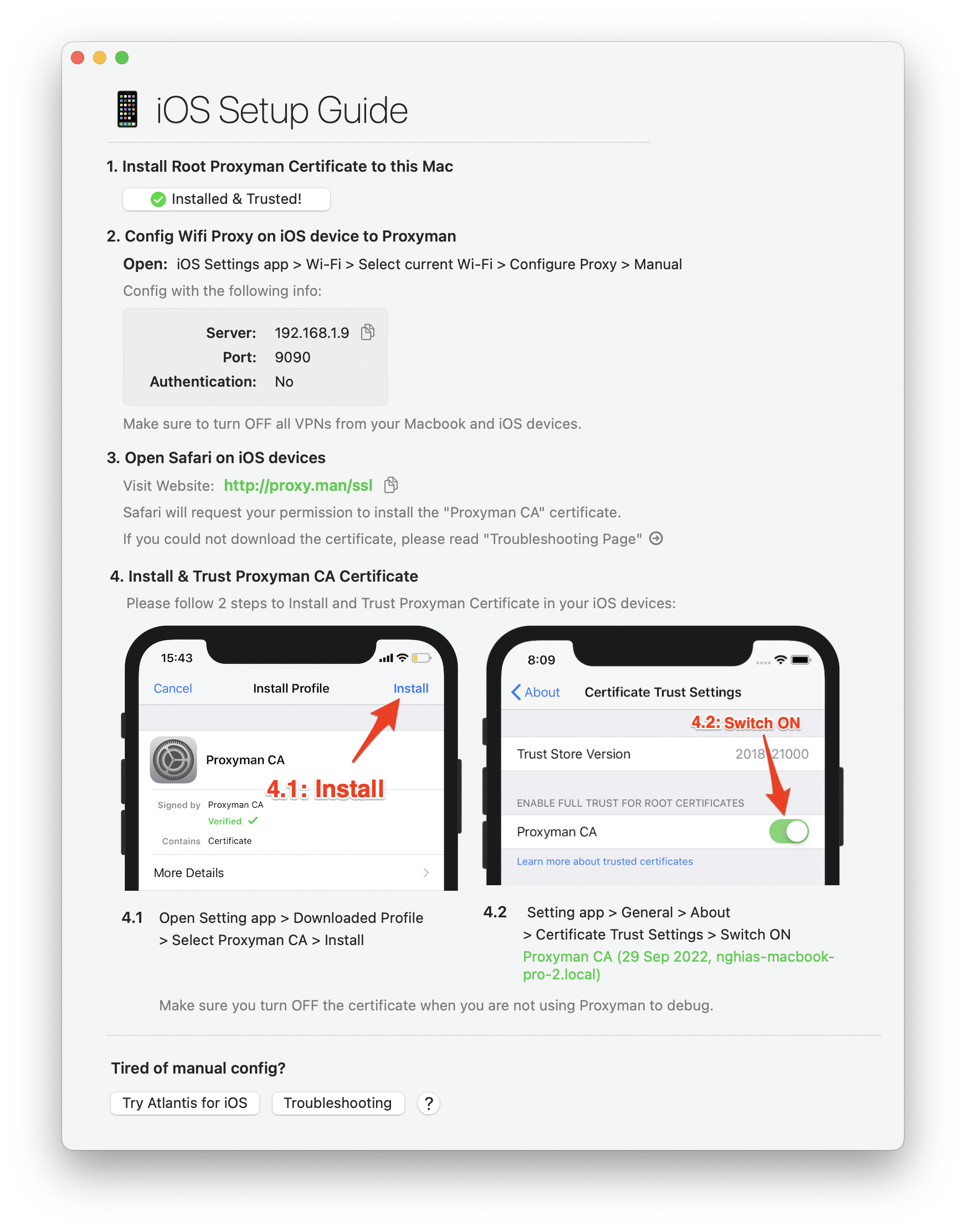
Easy-to-follow instructions to capture HTTP traffic from your iOS/ Android devices, simulators, emulators.
Capture traffic from iOS/ Android devices
Proxyman provides a straightforward walkthrough to set up a Proxy with iOS, Android physical devices, iOS Simulators and Android Emulators .
Simply follow the detailed instructions to capture and intercept HTTP(s) traffic with just a few clicks.
Capture traffic from iOS Simulators
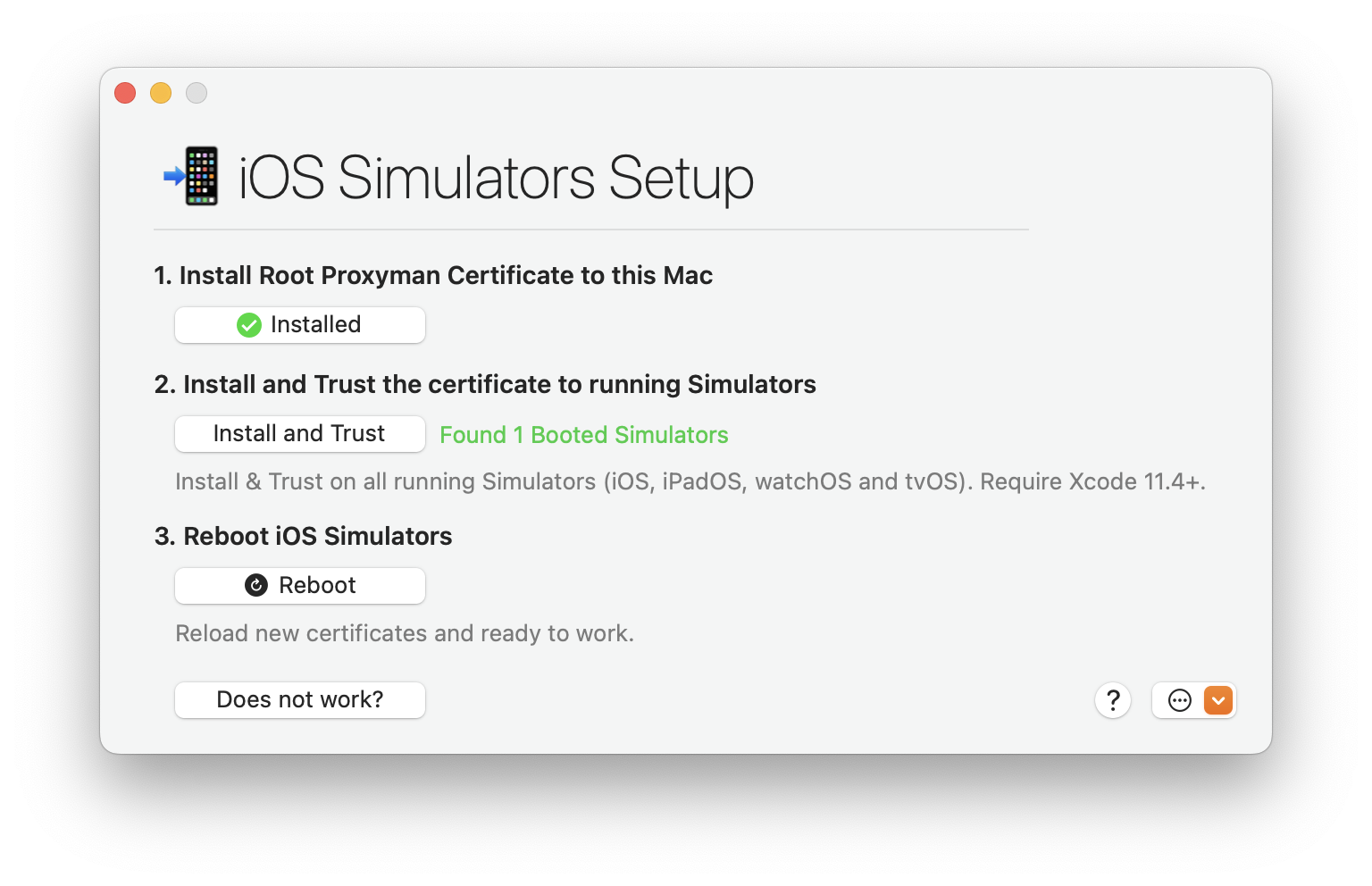
Tired of manual & error-prone config on your iOS Simulator?
Leave all complicated steps to us and let Proxyman automatically inspect the network traffic for you. No need to configure HTTP Proxy, Install or Trust any Certificate.
Capture traffic from mobile devices
Capture traffic from popular network libraries
What's more?
Comprehensive list of current and up-coming Proxyman features.
Basic Features
- Inspect HTTP/HTTPS traffic in plain text
- SSL Proxying
- Proxying on iOS Devices, iOS Simulator and Android
- Export Requests/ Responses
- Content Filter
- Body Syntax Highlighting
- JSON/ Tree View Format
- Horizontal/Vertical Layout
Finder Categorize
- Multiple Tabs
- Custom Previewer Tabs
- Custom Header Columns
- Highlight with Color & Add Comment
- MessagePack Body Previewer
- JSONPath Filter
- Customize Toolbar


Advanced Features
- HTTP/2 (macOS)
- Network Extension / Transparent Proxy (BETA, macOS 26+, PRO)
- Proxy Helper Tool
- Map Local (File/Directory)
- Map Remote
- Breakpoint
- No Caching
- Repeat Requests
- Compose Requests
- WebSocket Debugging
- Save Session
- Block List
- Allow List
- External Proxying (HTTP/HTTPS/SOCKS/PAC)
- Protobuf
- Import Charles Proxy files
- Custom Root & Client & Server Certificates
- Wildcard & Regex Matching Rules
- Scripting (ReWrite)
- JS Addons and Snippet Code
- Atlantis framework for iOS
- GraphQL Debugging
- Network Condition (Network Throttling)
- Multiple Filters
- Publish to Gist
- Reverse Proxy
- Code Generator
- Command Line
- Diff for Request/Response
- Access Control
- Automatic/Manual Setup
- DNS Spoofing
- SOCKS Proxy
- Custom Filters
- Command Palette
Upcoming Features
Proxyman Plugins
- Request new features?
More than 800,000+

 happy users
Proxyman is used daily by 800k+ developers worldwide. Here are some of their feedbacks.

















and more from Daring Fireball, Inessential, Donny Wals, iOS Dev Weekly, Twitter, and Hacker News.
Mentioned on Hacker News
What developers are saying in the discussion
Check out Proxyman Tutorials






Start debugging today
Start debugging with confidence. Join thousands of developers — from indie hackers to Fortune 500 teams.