如何抓取 Flutter iOS 应用的 HTTPS 流量
1. Flutter 与网络请求
Flutter 是 Google 推出的热门框架,可帮助开发者使用同一套代码构建 iOS、Android 等平台的应用。
开发 Flutter 应用时,开发者经常需要发起网络请求,从服务器获取数据或向服务器发送数据。但这些网络请求有时会失败,或者无法按预期工作。在开发过程中,能够查看并分析应用与服务器之间真实的 HTTP/HTTPS 流量,对于定位和修复问题非常有帮助。
2. 如何使用 Proxyman 抓取 Flutter iOS 应用的 HTTPS 流量
2.1 为 Flutter 添加 HTTP 代理配置
默认情况下,Flutter 不会使用任何 HTTP 代理配置。你需要手动为 Flutter 项目添加 HTTP 代理配置。
具体写法取决于你在 Flutter 项目中使用的 HTTP 网络库。本示例使用 http 包。
如果你使用的是 Android,请将 <YOUR_LOCAL_IP> 替换为你电脑的外部 IP 地址。你可以在 Proxyman → Tools 菜单 → Install for iOS → Physical Device 中获取该 IP。
http 包
// Make sure to replace <YOUR_LOCAL_IP> with
// the external IP of your computer if you're using Android.
// You can get the IP in the Android Setup Guide window
String proxy = Platform.isAndroid ? '<YOUR_LOCAL_IP>:9090' : 'localhost:9090';

// Create a new HttpClient instance.
HttpClient httpClient = new HttpClient();

// Hook into the findProxy callback to set
// the client's proxy.
httpClient.findProxy = (uri) {
  return "PROXY $proxy;";
};

// This is a workaround to allow Proxyman to receive
// SSL payloads when your app is running on Android.
httpClient.badCertificateCallback =
  ((X509Certificate cert, String host, int port) => true);

// Pass your newly instantiated HttpClient to http.IOClient.
IOClient myClient = IOClient(httpClient);

// Make your request as normal.
var response = myClient.get('/my-url');
Dio 库
// Make sure to replace <YOUR_LOCAL_IP> with
// the external IP of your computer if you're using Android.
// You can get the IP in the Android Setup Guide window
String proxy = Platform.isAndroid ? '<YOUR_LOCAL_IP>:9090' : 'localhost:9090';

// Create a new Dio instance.
Dio dio = Dio();

// Tap into the onHttpClientCreate callback
// to configure the proxy just as we did earlier.
(dio.httpClientAdapter as DefaultHttpClientAdapter).onHttpClientCreate = (client) {
  // Hook into the findProxy callback to set the client's proxy.
  client.findProxy = (url) {
    return 'PROXY $proxy'?;
  };

  // This is a workaround to allow Proxyman to receive
  // SSL payloads when your app is running on Android.
  client.badCertificateCallback = (X509Certificate cert, String host, int port) => true;
}
Dart HTTP 包
// Make sure to replace <YOUR_LOCAL_IP> with
// the external IP of your computer if you're using Android.
// You can get the IP in the Android Setup Guide window
String proxy = Platform.isAndroid ? '<YOUR_LOCAL_IP>:9090' : 'localhost:9090';

// Create a new HttpClient instance.
HttpClient httpClient = new HttpClient();

// Hook into the findProxy callback to set
// the client's proxy.
httpClient.findProxy = (uri) {
  return "PROXY $proxy;";
};

// This is a workaround to allow Proxyman to receive
// SSL payloads when your app is running on Android
httpClient.badCertificateCallback =
  ((X509Certificate cert, String host, int port) => true);
更多技术细节请参阅 Proxyman Flutter 文档。
2.2 在 iOS 模拟器中抓取 Flutter 的 HTTPS/HTTP 流量
- 先打开 iOS 模拟器,并确保它是你用来运行 Flutter 应用的模拟器。
- 打开 Proxyman → Certificate 菜单 → Install for iOS → Simulator → 按照步骤操作 → Proxyman 会自动设置代理并一键安装证书
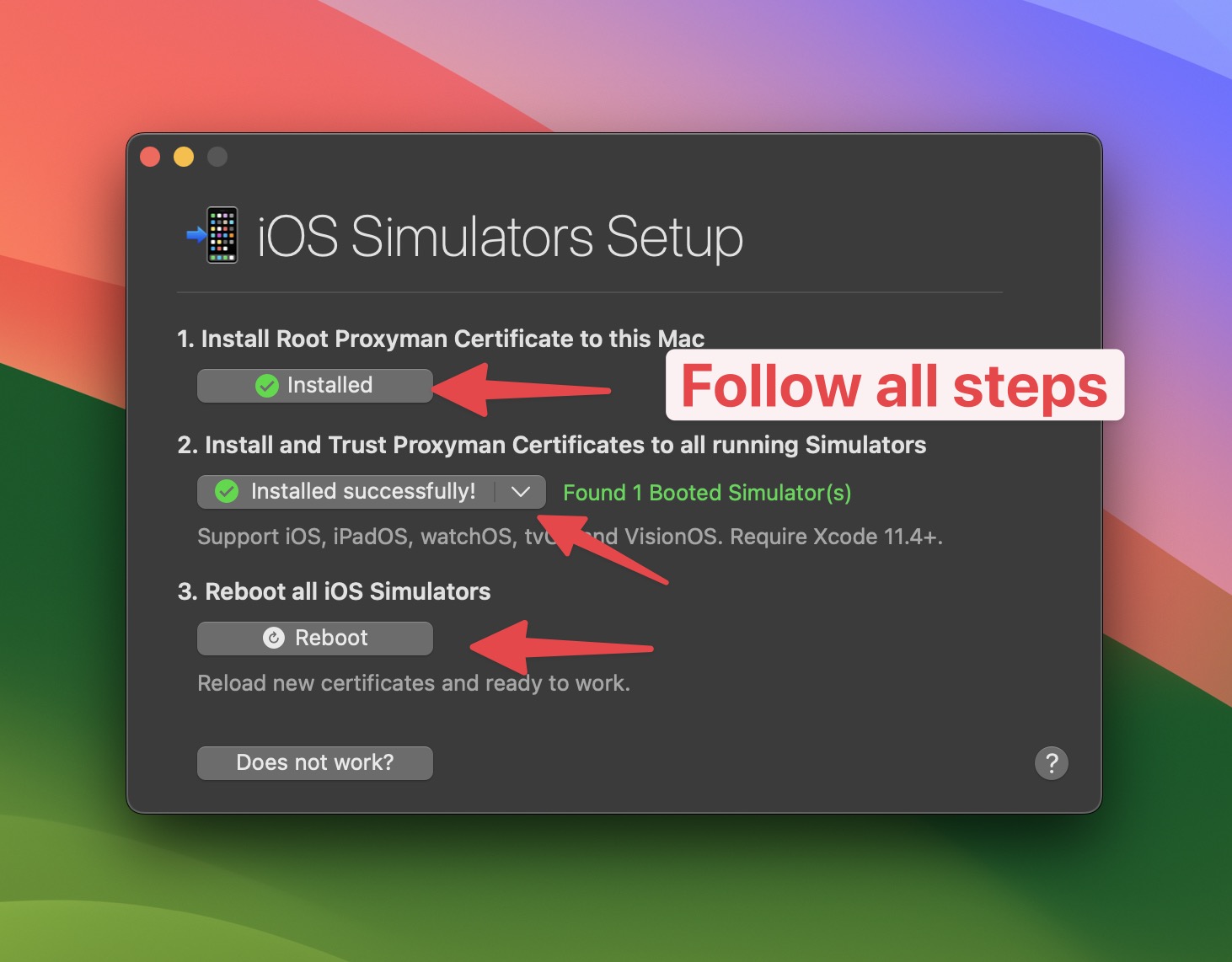
现在,可以在 iOS 模拟器中运行你的 Flutter 应用,开始抓取 HTTP/HTTPS 流量了。
Proxyman 会自动开始抓取 Flutter 应用的 HTTP/HTTPS 流量。
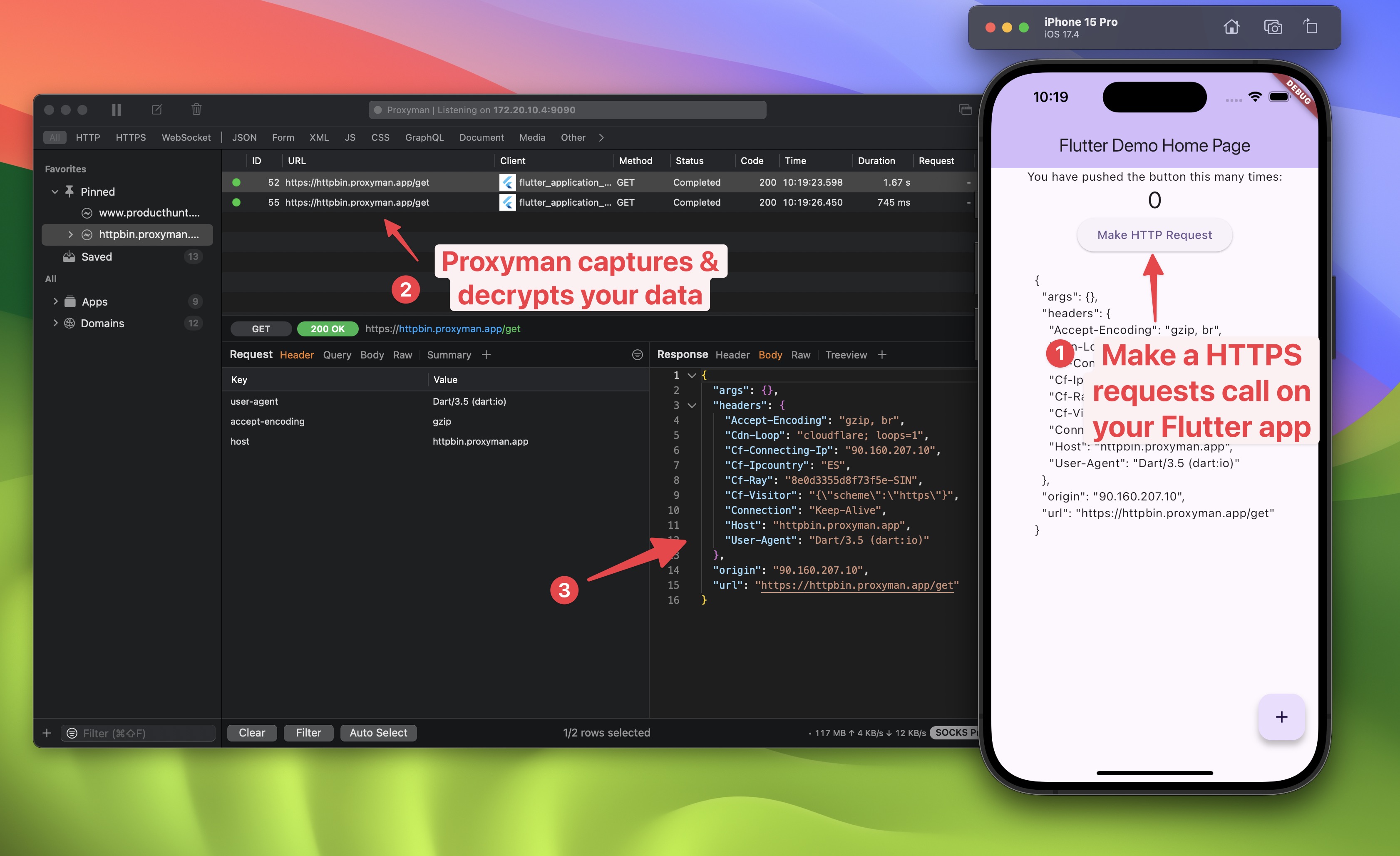
2.3. 抓取 Flutter iOS 真机的 HTTPS/HTTP 流量
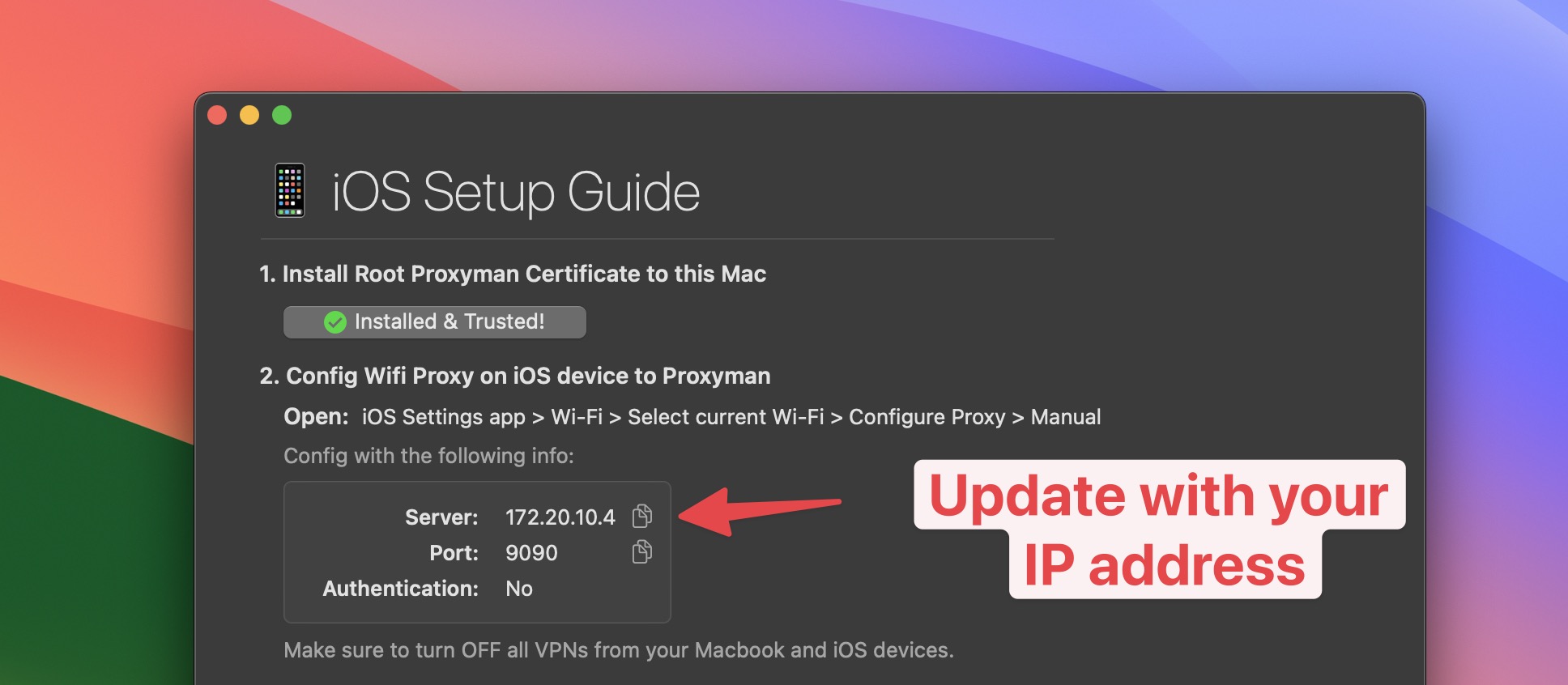
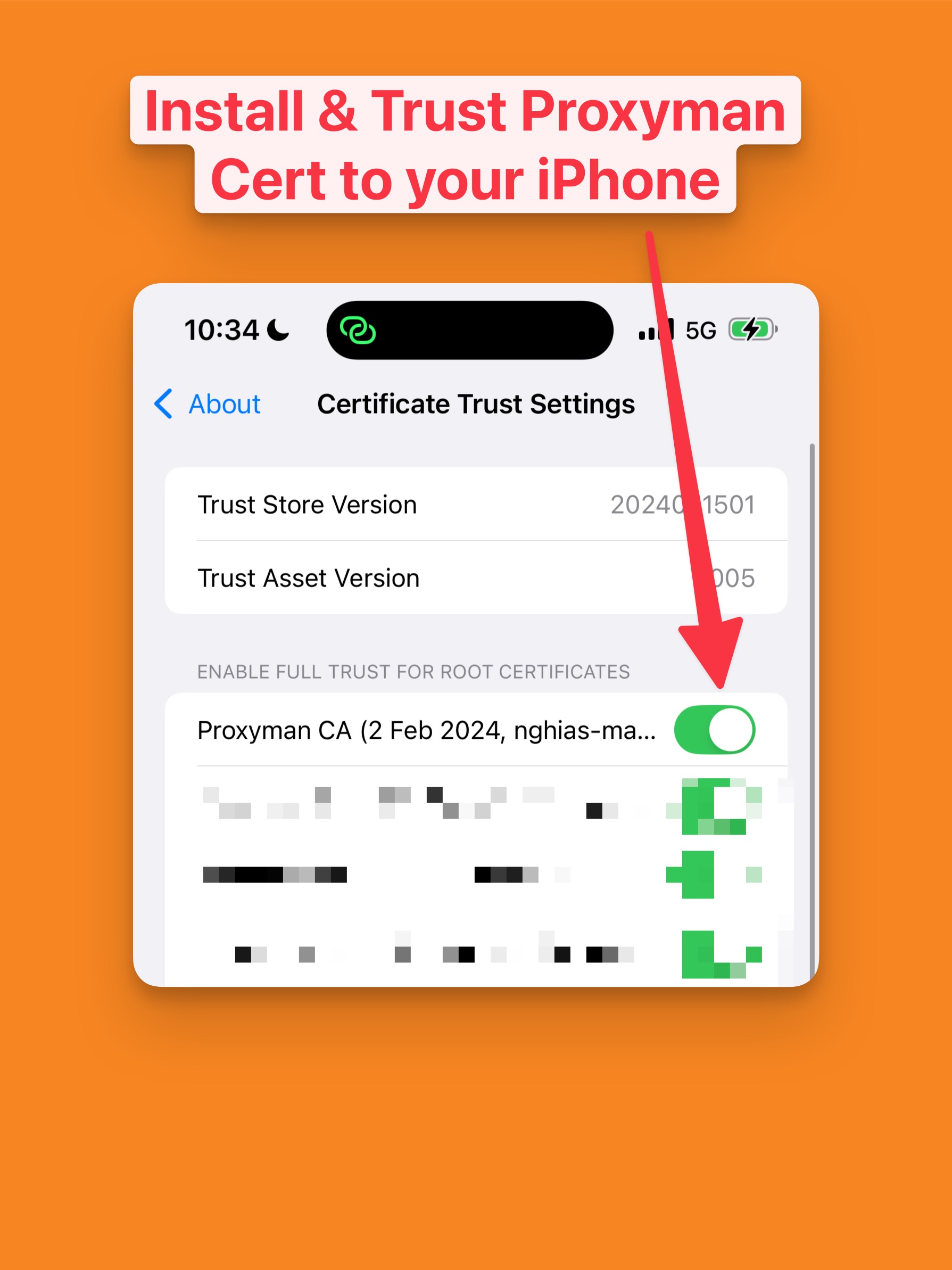
要抓取 iOS/iPadOS 真机上 Flutter 应用的 HTTP/HTTPS 流量,你需要在设备上安装 Proxyman 证书。
请按照 Proxyman → Certificate 菜单 → Install for iOS → Physical Device → 按照步骤操作 中的说明进行操作。
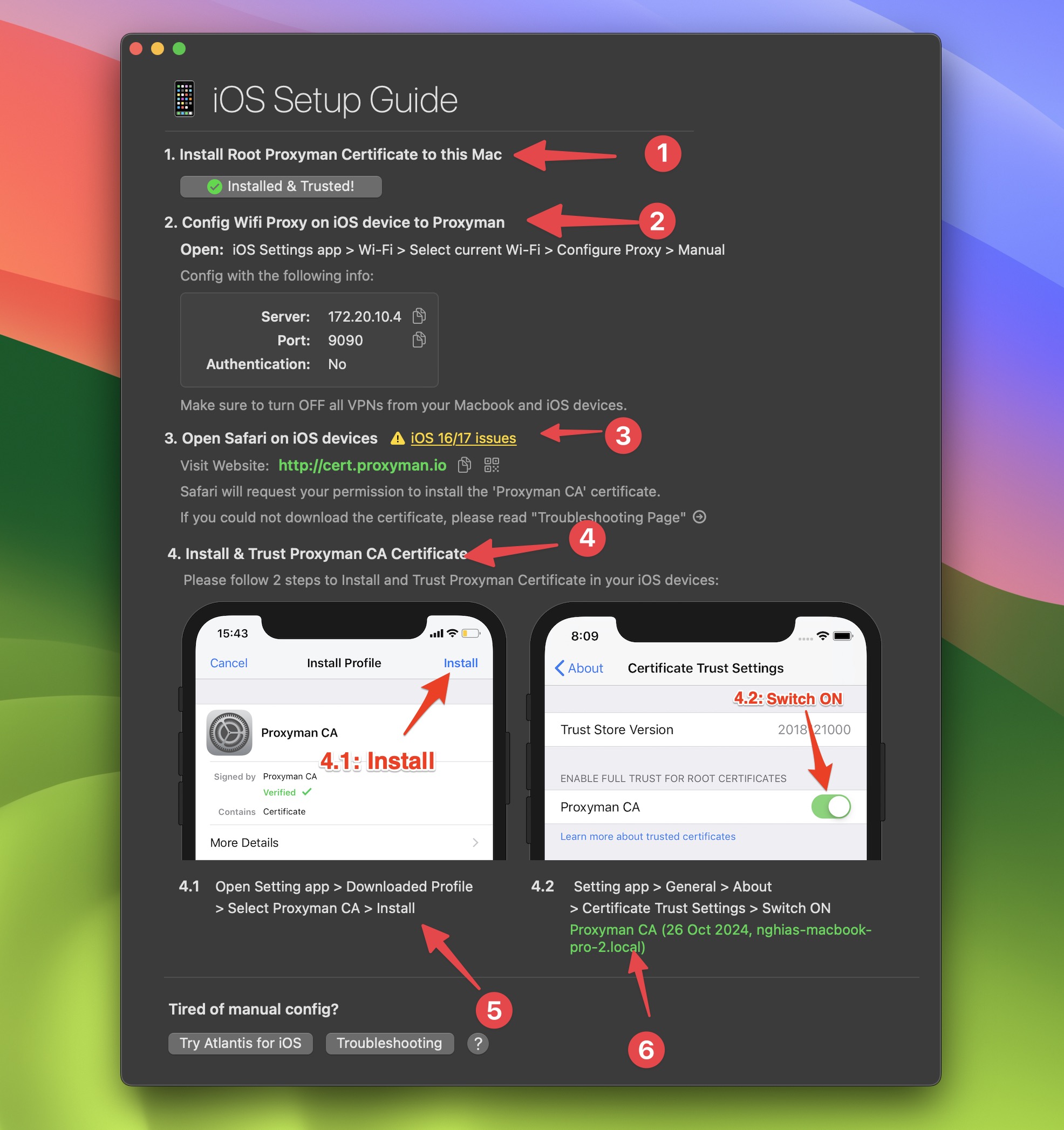
请务必在最后一步中安装并信任证书。
现在,你可以在 iOS/iPadOS 设备上运行 Flutter 应用,开始抓取 HTTP/HTTPS 流量。
Proxyman 会自动开始抓取 Flutter 应用的 HTTP/HTTPS 流量。
总结
抓取 Flutter 应用的 HTTP/HTTPS 流量非常简单。
- 为 Flutter 项目添加 HTTP 代理配置
- 在 iOS/iPadOS 设备上安装 Proxyman 证书
- 运行 Flutter 应用,使用 Proxyman 开始抓取 HTTP/HTTPS 流量
确保代理代码不会进入正式版构建
请将代理和 badCertificateCallback 代码包裹在仅在 Debug 模式下生效的判断条件中。接受所有证书的回调会移除重要的 HTTPS 安全检查,因此绝不能发布给用户。本文主要介绍 iOS。对于当前的 Android 模拟器,Proxyman 6.4 或更高版本可以使用一键 Flutter 设置,无需修改 Flutter 网络代码。
下一步
- 尝试使用一些调试工具查看并修改请求与响应的 Payload。
- 前往 Proxyman 官网 下载 Proxyman。