Golang
Proxyman Automatic Setup으로 Go 앱의 HTTP/HTTPS 트래픽을 캡처하세요. net/http, fasthttp, resty, gorequest, req, grequests를 지원합니다.
1. 새로운 자동 방법 (macOS v5.17.0 이상) ✅
Proxyman macOS v5.17.0 이상에서는 클릭 한 번으로 Golang의 HTTP/HTTPS 트래픽을 캡처할 수 있습니다.
- 원클릭 솔루션: HTTP 프록시 설정을 하거나 자체 서명 인증서를 직접 신뢰할 필요가 없습니다.
- ✅ net/http, fasthttp, resty, gorequest, req, grequests 등 여러 Go 네트워크 라이브러리를 지원합니다
사용 방법:
- Proxyman -> Setup Menu -> Automatic Setup을 엽니다.
- 원하는 Terminal을 선택하고 "Open New Terminal" 버튼을 클릭합니다.
- 필요한 경우 AppleScript 권한 요청을 허용합니다.
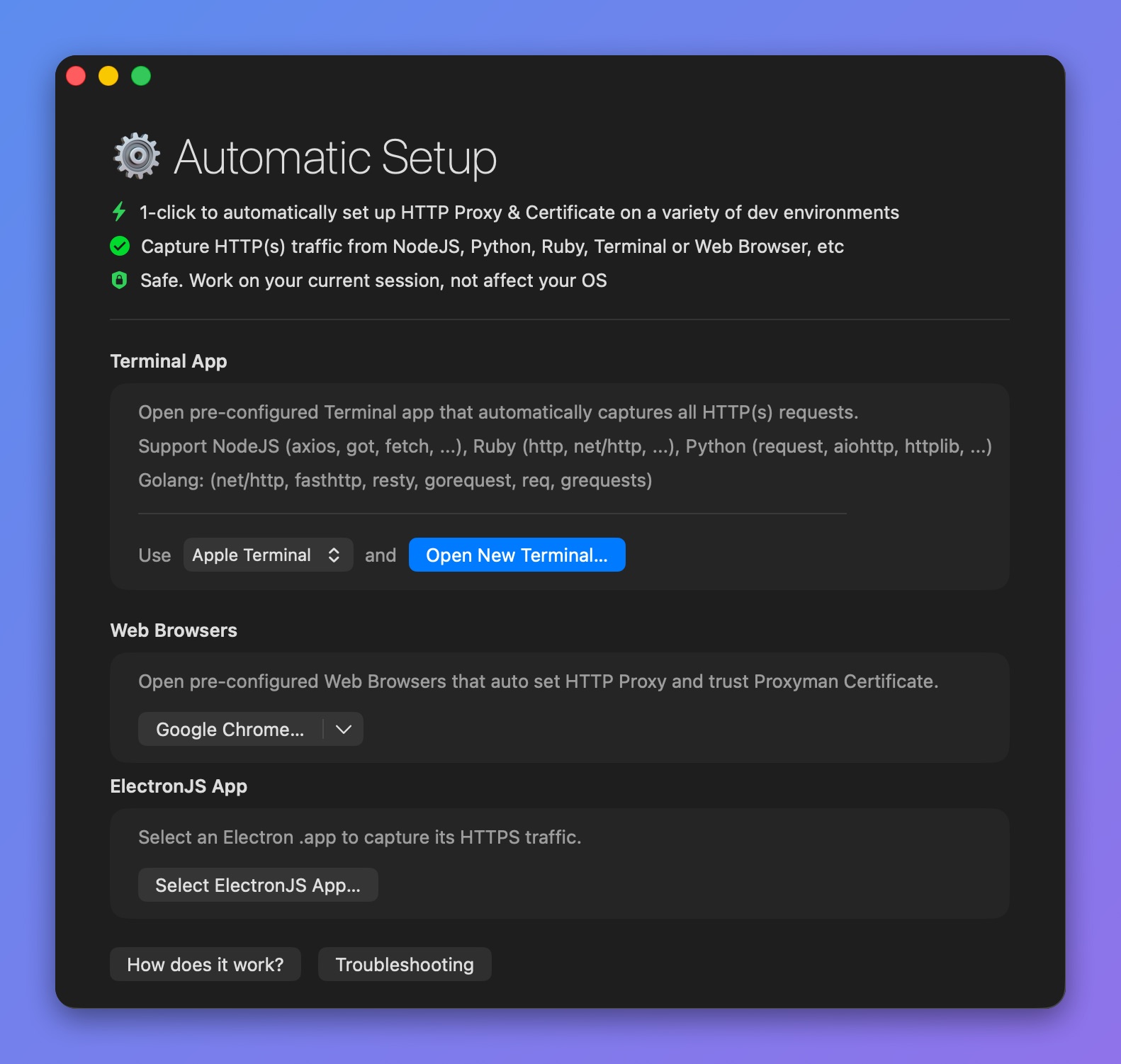
미리 설정된 Terminal을 열어 Go의 HTTPS 가로채기
- 새 Terminal 창이 열리면 Golang 백엔드 서버를 시작하거나 스크립트를 실행하세요 => Proxyman이 모든 트래픽을 자동으로 캡처합니다.
- 예를 들면:
$ go run main.go
- Proxyman이 net/http를 포함해 Go에서 보내는 모든 HTTP/HTTPS 트래픽을 캡처합니다.
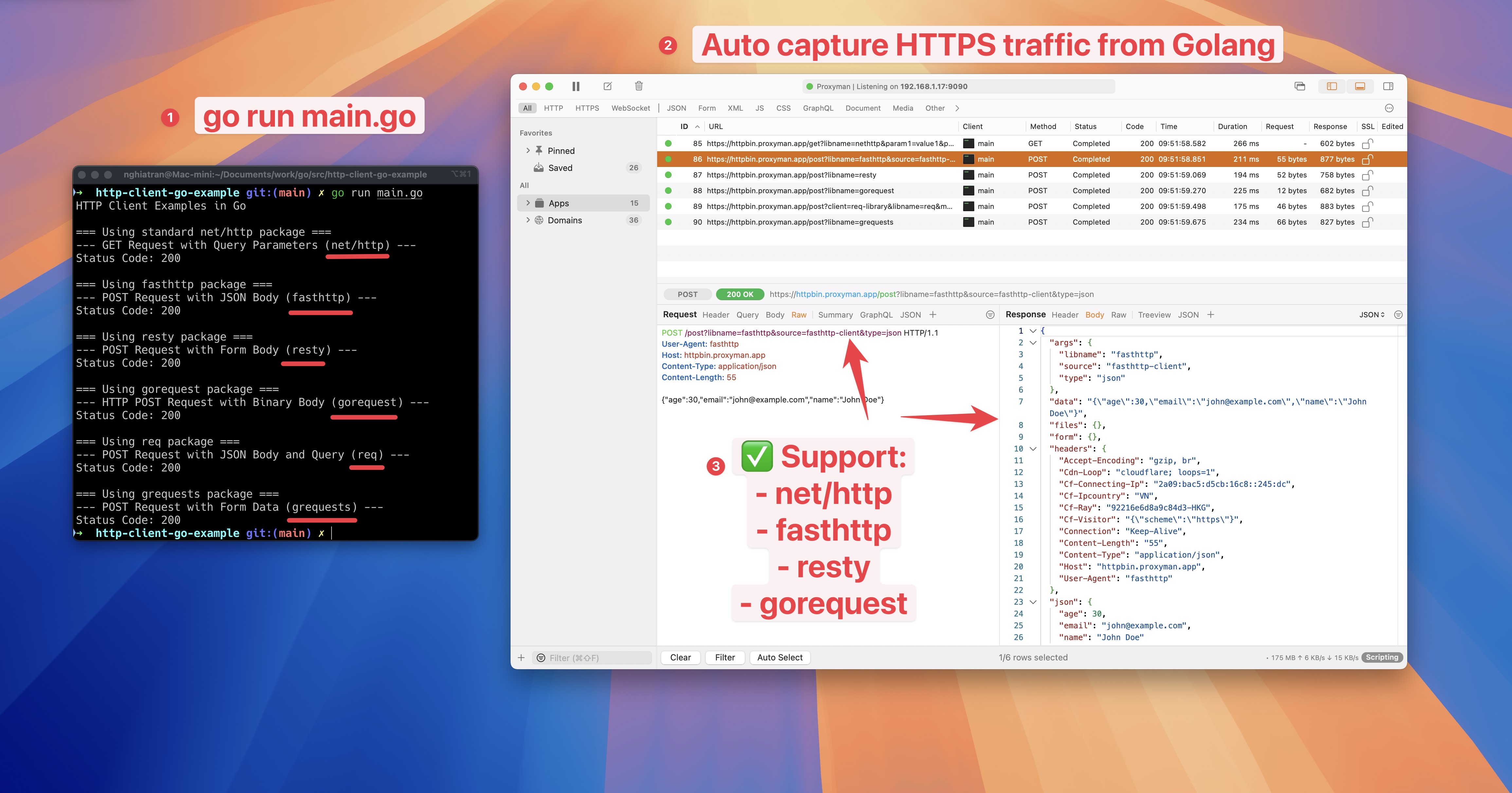
Go net/http의 HTTPS 트래픽 캡처 및 가로채기
2. 기존 방법 (권장하지 않음 ❌)
- Proxyman이 Golang 서버의 HTTP/HTTPS 트래픽을 전혀 캡처하지 못합니다.
- 일부 네트워크 라이브러리(예: net/http)는 시스템 HTTP 프록시를 따르지 않으므로, 트래픽이 Proxyman 앱을 거치지 않습니다.
2.1 해결 방법
net/http
- 프록시를 Proxyman으로 설정합니다. 기본값은 IP = localhost, 포트 9090입니다.
- Transport가 Proxyman의 자체 서명 인증서를 신뢰하도록 설정합니다. 그렇지 않으면 net/http가 이 인증서를 거부하여 SSL 오류가 발생합니다.
package main

import (
	"crypto/tls"
	"fmt"
	"io/ioutil"
	"log"
	"net/http"
	"net/url"
)

func main() {
	// Create a new HTTP client
	client := &http.Client{}

	// Configure the proxy
	proxyURL, err := url.Parse("http://localhost:9090")
	if err != nil {
		log.Fatal("Error parsing proxy URL:", err)
	}

	// Configure transport with proxy and TLS settings
	transport := &http.Transport{
		Proxy: http.ProxyURL(proxyURL),
		TLSClientConfig: &tls.Config{
			InsecureSkipVerify: true, // This allows self-signed certificates
		},
	}

	// Set the transport for the client
	client.Transport = transport

	// Make a request
	resp, err := client.Get("https://example.com")
	if err != nil {
		log.Fatal("Error making request:", err)
	}
	defer resp.Body.Close()

	// Read the response body
	body, err := ioutil.ReadAll(resp.Body)
	if err != nil {
		log.Fatal("Error reading response:", err)
	}

	// Print the response
	fmt.Printf("Status: %s\n", resp.Status)
	fmt.Printf("Body: %s\n", string(body))
}
더 알아보기
- Proxyman으로 Golang의 HTTP/HTTPS 트래픽 캡처하기 (Proxyman 웹사이트)