NextJS (fetch)
Automatic Setup의 Proxyman 사전 구성 Terminal을 사용해 Next.js 서버 측 fetch()와 Server Components의 HTTPS 요청을 캡처하세요.
1. 문제
- NextJS의
use server코드에서는 Proxyman이 트래픽을 전혀 캡처할 수 없습니다. - NextJS의
fetch는 시스템 HTTP 프록시를 따르지 않습니다. 따라서 어떤 트래픽도 Proxyman 앱을 거치지 않습니다.
2. 해결 방법
- 사전 구성된 Terminal을 시작합니다: Setup 메뉴 -> Automatic Setup -> "Open New Terminal" 클릭
- 새 Terminal이 열리면 이 Terminal에서 NextJS 서버를 시작하세요. 예:
npm run dev fetch에no-cache를 사용하세요.
export default async function MyPage() {
  const res = await fetch('https://httpbin.org/anything', { cache: 'no-cache' }) // no cache, or no request is sent to Proxyman
  return <div>My Page{res.text()}</div>
}
- 웹사이트를 새로고침하세요.
- 완료 ✅ Proxyman 앱이 HTTP 트래픽을 캡처합니다.
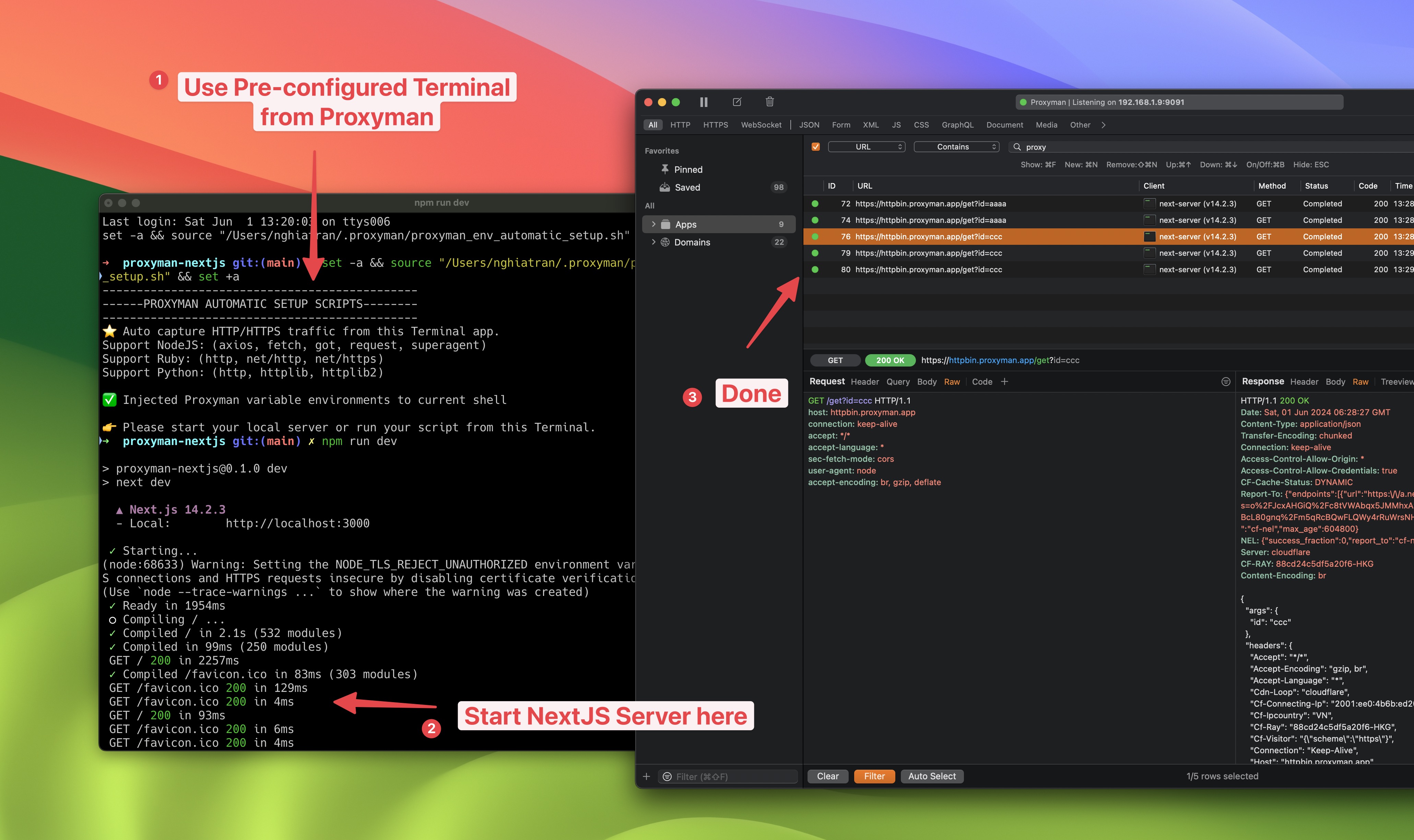
Proxyman에서 NextJS fetch 캡처하기