环境变量
使用 sharedState 在 Proxyman 脚本之间共享数据,并在脚本中通过 $ 前缀读取 API Token 等系统环境变量。
1. 共享状态
信息
共享状态适用于 Proxyman 支持的所有 macOS 版本(macOS 14 Sonoma 或更高版本)。
你可以通过全局对象 sharedState,在 onRequest() 和 onResponse() 之间,以及不同脚本之间共享状态。
- sharedState 是一个 JS 对象(字典)。你可以在 onRequest() 中设置任意键和值,然后在 onResponse() 或不同脚本中读取数据。
以下代码演示了如何:
- 获取全局计数器,并在每次脚本运行时将其递增
- 在请求与响应之间共享数据
function onRequest(context, url, request) {

  // Save some state to sharedState
  sharedState.url = url;
  sharedState.data = "custom";
  sharedState.info = {"username": "Proxyman"};

  // Increase the global counter
  var count = sharedState.count ?? 0;
  count += 1;
  sharedState.count = count;

  // Log
  console.log(sharedState);
  return request;
}

function onResponse(context, url, request, response) {

  // Receive it
  console.log("Custom data = " + sharedState.data);
  console.log("sharedState.count = " + sharedState.count);

  // Done
  return response;
}
信息
从 Proxyman 2.25.0 开始,sharedState 可以在不同脚本之间使用。只有在退出 Proxyman 或调用 `clearSharedState()` 函数时,数据才会被释放。
信息
在 Proxyman 2.24.0 之前,sharedState 仅在运行该脚本的当前流程中有效,脚本执行完毕后即被释放。
如需清除所有数据,请使用 `clearSharedState()` 函数。
// Clear all data from sharedState object
clearSharedState();
2. 环境变量
从 Proxyman 3.8.0 开始提供环境变量功能。
- 脚本可以读取系统环境变量。
- 支持 bash 和 zsh。
使用方法
- 在
~/.zshrc或~/.bashrc中定义环境变量
export ACCESS_TOKEN=AAABBBCCC
export PROXYMAN_PATH=/Users/my_user/Desktop/file-mapper
2. 打开任意脚本 -> More 按钮 -> Environment Variables -> Allow all scripts to access Environment Variables。
3. 点击 Reload,加载最新的环境变量更改。
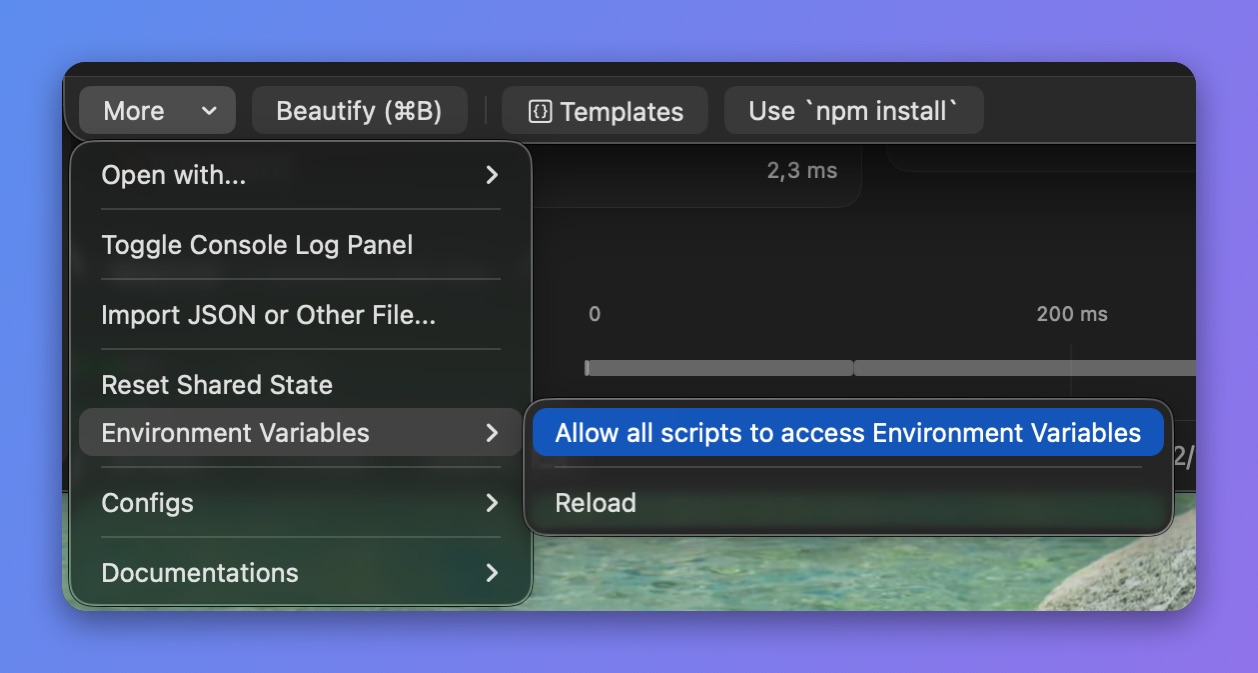
允许脚本读取环境变量
4. 在脚本中使用 $ 前缀访问环境变量
async function onResponse(context, url, request, response) {
  console.log($PATH);
  console.log($ACCESS_TOKEN);
  console.log($PROXYMAN_PATH);

  // Done
  return response;
}
3. 补充说明
- 手动重新加载系统环境变量(需要 Proxyman macOS 4.15.0 或更高版本)。请先开启权限:More 按钮 -> Environment Variables -> Allow all scripts to access Environment Variables。
async function onRequest(context, url, request) {
  // manually reload to get the latest changes
  _reloadEnv();

  // get env
  console.log($PROXYMAN_ID)

  // Done
  return request;
}