Protobuf
在 Proxyman 中通过 .desc 文件描述符和 Message Type 规则,解码 Protobuf 格式的 HTTP、HTTPS 请求、响应以及 WebSocket 消息。
1. Protobuf
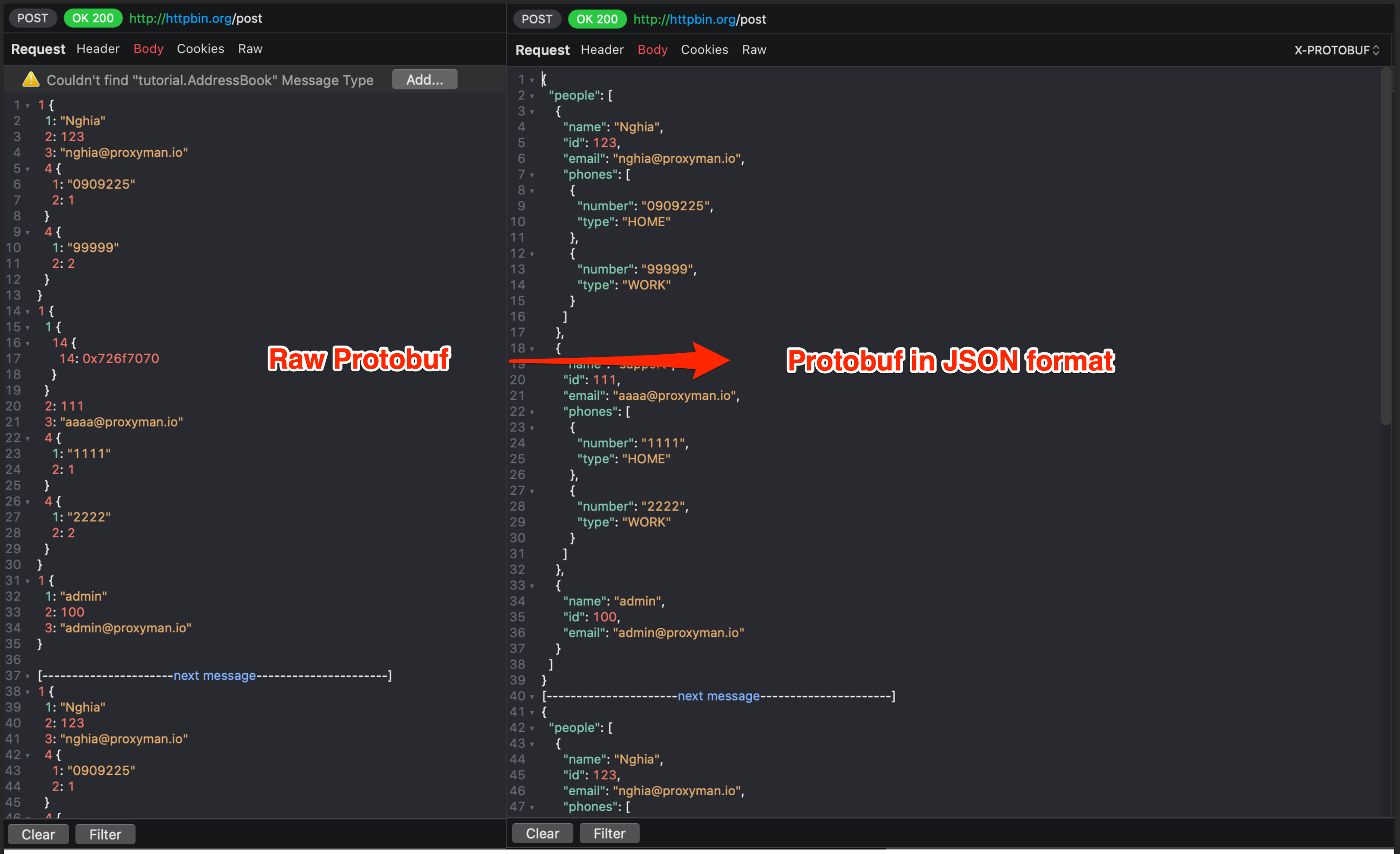
- Proxyman macOS 可以使用指定的 Protobuf desc 文件,解码 HTTP/HTTPS 请求和响应中的 Protobuf 数据体
- 将 Protobuf 二进制解码为纯文本显示
- 支持单个 Message,以及单个 Protobuf 二进制中的多个 Delimited Message
- 导入 desc 文件,读取其中所有的 Message Type,用于解码 Protobuf 二进制
- 解码 WebSocket 中的 Protobuf
2. Protobuf 文件描述符(*.desc)
Proxyman 需要文件描述符(*.desc)才能正确解析 Protobuf 数据。
获取文件描述符的方式有以下几种:
1. 询问同事
如果你的公司使用 Protobuf,你的同事(尤其是后端和前端团队)很可能已经有这个文件。
文件可能是一个,也可能是多个描述符文件。
2. 从 *.proto 文件生成
如果你有很多 *.proto 文件,可以使用以下命令生成一个 *.desc 文件。
# Install protobuf cli if need
brew install protobuf

# Create `input` folder on the Desktop
# Copy all proto files to the `input` folder

# Generate 1 descriptor file with multiple proto files
protoc --descriptor_set_out=output.desc --include_imports -I=/Users/<your_name>/Desktop/input /Users/<your_name>/Desktop/input/*.proto

# Done
# output.desc
拿到描述文件后,将其导入 Proxyman:
- Tools 菜单 -> Protobuf… -> 点击 Protobuf Schema... 按钮
- 点击 + 按钮,选择 output.desc 文件
Proxyman 3.6.0 及更高版本仅接受 File Descriptor (*.desc) 格式,以获得更好的 Protobuf 解析效果。
如果你有 *.proto 文件,可以将其转换为 *.desc。请参阅上文的 从 *.proto 文件生成。
Proxyman 会自动导入 Google Protobuf 中的所有常用类型,例如 Timestamp、Struct、Value、Enum、Method 等。
Proxyman 同时支持 proto2 和 proto3 语法。了解更多
3. Protobuf 配置
使用 Protobuf 之前,需要先设置 Proxyman 应使用哪个 Message Type 来解析 Protobuf 数据。
下表说明了各项设置:
| 名称 | 说明 |
|---|---|
| Schema | 如有需要,添加 .desc 文件 |
| Message Type | Protobuf 二进制数据中根对象的类名(Class name)。必须包含 Package 名称 |
| Payload Type: Auto | 自动检测 Protobuf 二进制数据是以 Single Message 还是 Delimited Message 编码 |
| Payload Type: Single Message | Protobuf 二进制中的单个消息 |
| Payload Type: Delimited List | Protobuf 二进制中的多个消息(带长度前缀) |
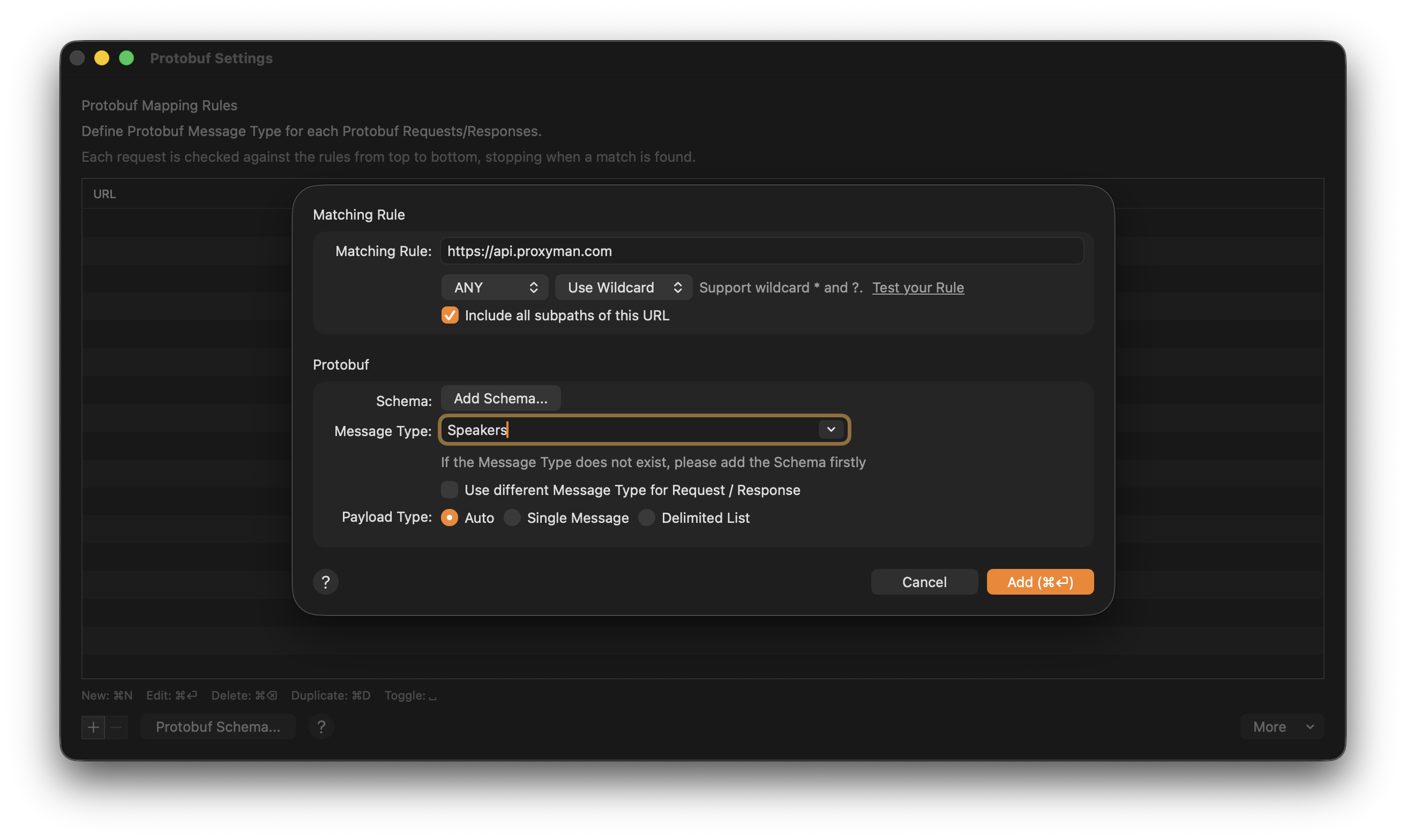
使用 Proxyman 解码 Protobuf HTTPS 响应
4. 如何使用?
有两种方式可以正确解析带有命名字段的 Protobuf:
- 定义 Protobuf 规则
- 从 Content-Type 请求头中读取
4.1 定义 Protobuf 规则
- 你的 Protobuf 请求应包含 Content-Type 请求头:
Content-Type: application/x-protobuf或Content-Type: application/protobuf - Proxyman 会检测到 Protobuf 数据,并因缺少 Message Type 而显示警告,提示无法正确解析。点击 Add 打开 Protobuf 设置。
或者,你也可以右键点击请求 -> Tools -> Protobuf…
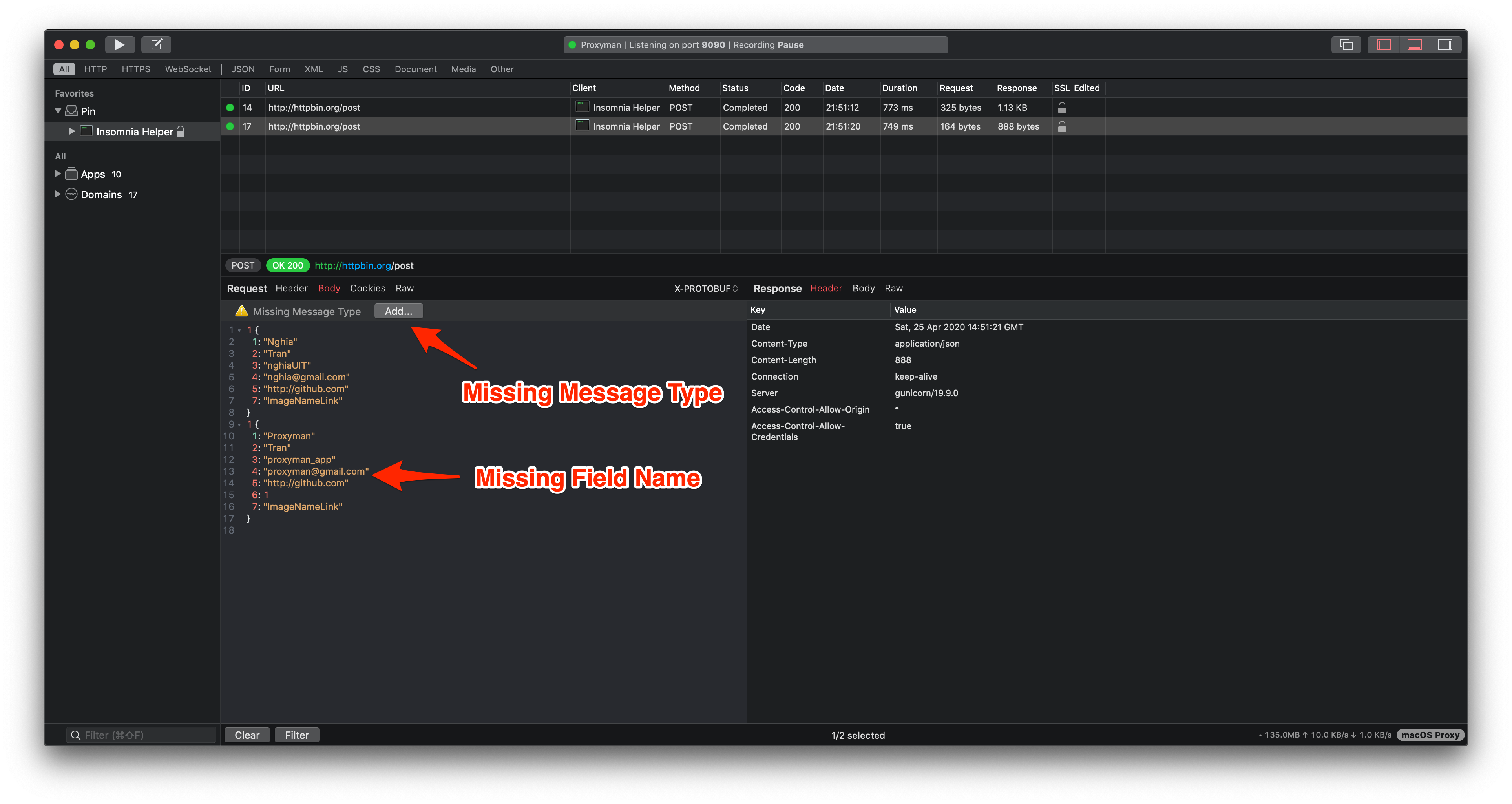
3. 在 Protobuf 规则窗口中,为该请求或响应选择 Message Type(如有需要,请先添加 desc 文件)。
如果请求和响应使用不同的 Protobuf Message Type,请勾选 `Use different Message Type for Request / Response` 复选框。
4. 点击 Add,即可看到 JSON 格式的数据体。
4.2 从 Content-Type 请求头读取
你可以从 Content-Type 中动态提供 Protobuf 配置。
例如,请求或响应中的 Content-Type 可能如下所示:
Content-Type: application/x-protobuf; messageType="tutorial.Address"; delimited=true
Content-Type: application/x-protobuf; messageType="com.proxyman.User"; delimited=false
这会告诉 Proxyman Protobuf 数据体的 Message Type 以及编码方式。
5. ✅ 通过 WebSocket 解析 Protobuf(macOS 6.5.0 或更高版本)
- 解码单个二进制 WebSocket 帧:阅读 websocket.md
- 你可以为 WebSocket 创建 Protobuf 规则。客户端消息使用 Request Message Type,服务端消息使用 Response Message Type。
6. 故障排查
6.1 部分字段名缺失
当字段的定义不在你的 Protobuf 文件描述符中时,部分字段名可能会缺失。你的描述文件可能已过期。
解决方法:
- 删除旧的 Protobuf Schema,并添加服务器上的最新描述文件。
- 如果你使用的是 Proxyman 3.5.2 或更早版本,请升级到 Proxyman 3.6.0 或更高版本,然后使用文件描述符(*.desc)以获得更好的效果。