WebSocket 抓包
使用 Proxyman 从 Web 浏览器、iOS 设备和模拟器、Android、NodeJS 或 Python 服务器抓取并解密 WebSocket(WS/WSS)流量。
1. 这是什么?
Proxyman 可以抓取 WebSocket(WS)和安全 WebSocket(WSS)流量,并让你轻松预览。
- 从 iOS 真机和 iOS 模拟器抓取 WS/WSS(需要 Atlantis framework)
- 从 Web 浏览器和 Mac 应用中抓取 WS/WSS。
- 从 Android 真机或 Android 模拟器中抓取 WS/WSS。
- 格式化显示 WebSocket 消息。
- 按 All / Sent / Received 过滤消息。
- 以 JSON / Tree Preview / HEX 格式查看内容。
- 自定义列:Frame、Length、Data、Time 等。
- 在可能的情况下,自动将二进制消息解码为 JSON。
- 在 Sublime 或 VS Code 等外部编辑器中打开 WebSocket 消息。
- 通过 Scripting 编辑、丢弃或发送 WebSocket 消息(需要 macOS 版 Proxyman 26.2.0 或更高版本,或 Windows/Linux 版 Proxyman 26.1.0 或更高版本)。
2. 从 Web 浏览器抓取 WS/WSS
本地 WebSocket
借助 Automatic Setup,Proxyman 可以从 Google Chrome 中抓取本地 WebSocket,例如 ws://localhost:3000。
- 进入 Setup 菜单 -> Automatic Setup…
- 选择 Google Chrome(New Profile 或 Current Profile)。随即会打开一个新的 Google Chrome 窗口。
- 在该窗口中打开你的本地 WebSocket 页面。Proxyman 会将其抓取下来。
生产环境 WebSocket
Proxyman 无需任何设置,即可自动抓取你在 Google Chrome 中的 WS/WSS 流量。
- 打开 Proxyman 和 Google Chrome
- 产生一些 WS/WSS 流量,例如访问 https://echo.websocket.org/.ws
- 在 Proxyman 中查看 WS/WSS 数据
带 Protobuf 负载的 WebSocket
从 macOS 版 Proxyman 6.5.0 或更高版本开始,Proxyman 可以解码 WebSocket 消息中的 Protobuf。
- 先确保 Proxyman 能够抓取你的 WebSocket 流量
- 右键点击 WebSocket Protobuf 消息 -> Protobuf -> Decode Raw Text… 或 Decode with Message Type…
- Raw mode:如果你没有 Protobuf desc 文件,可以使用此模式。
- Message Type:使用 Protobuf desc 文件中的 Message Type。
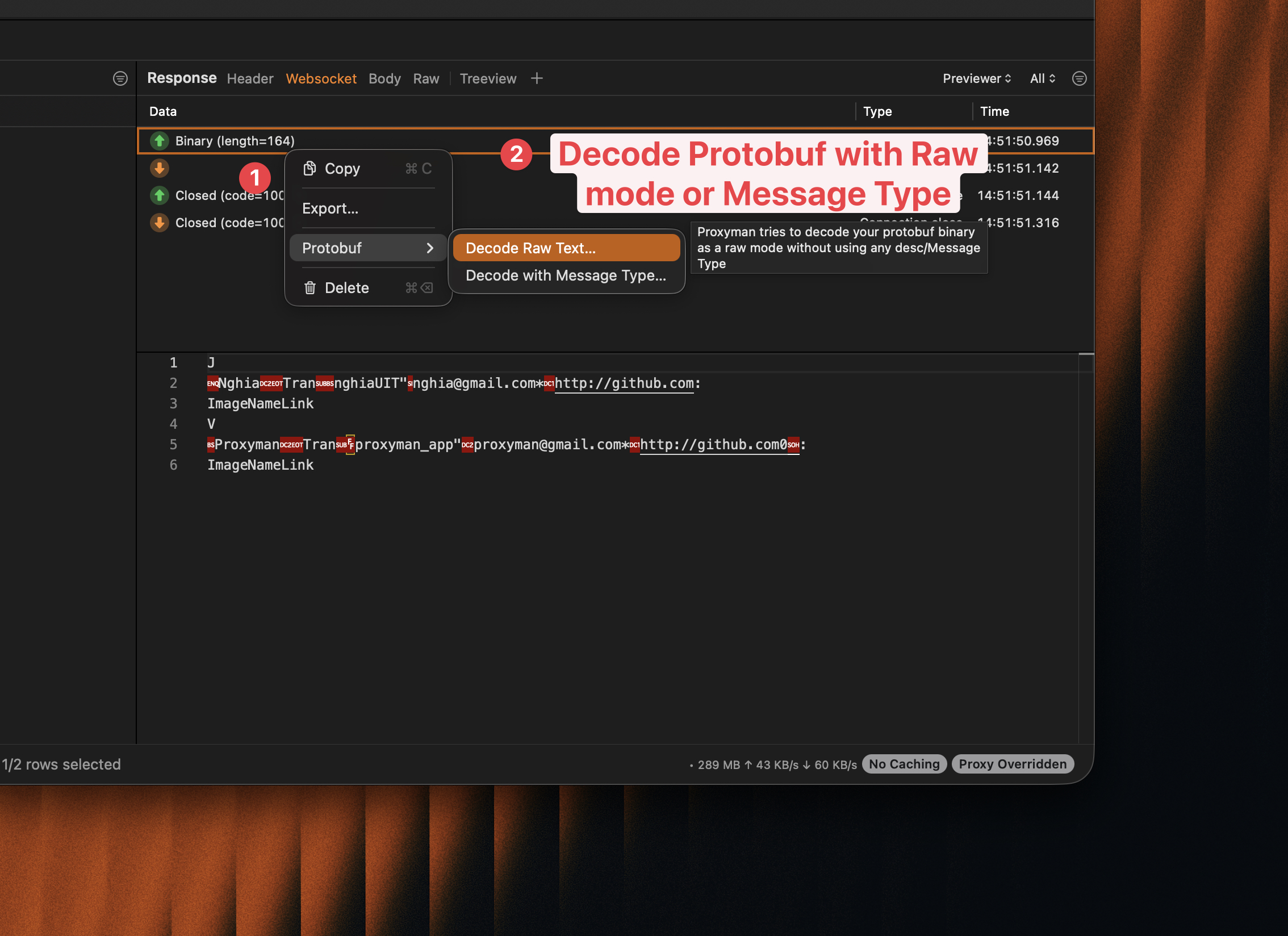
使用 Protobuf 解码 WebSocket 负载
3. 从 iOS 抓取 WS/WSS
如果你的 iOS 应用使用 URLSessionWebSocketTask,或使用 Starscream、SocketRocket 等 iOS WebSocket 库,Proxyman 可能无法抓取 WS/WSS 流量。
- 原因:这是 Apple 的设计。URLSessionWebSocketTask 不遵循系统 HTTP 代理,所有 WS/WSS 流量都会直接发送到互联网,因此 Proxyman 或 Charles Proxy 都无法抓取。
- 示例应用:https://github.com/ProxymanApp/websocket-example-ios-app
✅ 方案 1(推荐用于 iOS 17 或更高版本)
- 请按照 iOS 设备 或 iOS 模拟器 的设置指南操作。确保证书已安装并在设备上受信任。
- 在 Proxyman 中:Tools -> Proxy Settings -> SOCKS Proxy Settings… -> 启用。记下端口号。
- 在 Proxyman 主窗口中,记下工具栏中的当前 IP。
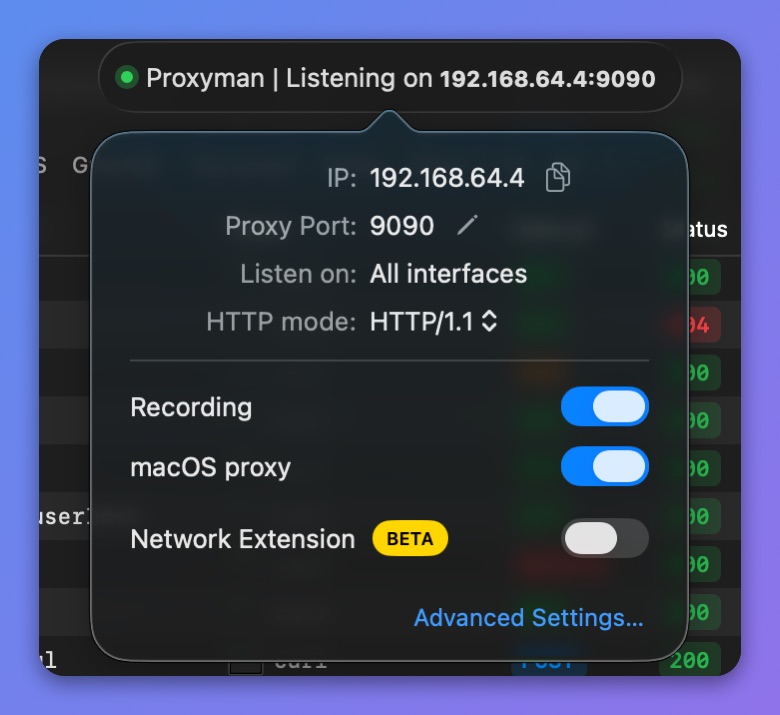
获取 Proxyman 当前 IP
- 在你的应用中配置 SOCKS 代理。确保仅在 Debug 构建中启用,例如通过开关控制。你不希望这个设置出现在 Release 构建中。
- 适用于 NWConnection
let parameters = webSocketURL.scheme == "wss" ? NWParameters.tls : NWParameters.tcp

let options = NWProtocolWebSocket.Options()
options.autoReplyPing = true

parameters.defaultProtocolStack.applicationProtocols.insert(options, at: 0)

if #available(iOS 17.0, *) {
    let socksv5Proxy = NWEndpoint.hostPort(host: "x.x.x.x", port: 8889) //  Please replace x.x.x.x with a real Proxyman IP
    let config = ProxyConfiguration.init(socksv5Proxy: socksv5Proxy)
    let context = NWParameters.PrivacyContext(description: "my socksv5Proxy")
    context.proxyConfigurations = [config]

    parameters.setPrivacyContext(context)
}

let connection = NWConnection(to: .url(webSocketURL), using: parameters)
connection.start(queue: .main)
- 适用于 URLSession 和 URLSessionWebSocketTask
private lazy var urlSession: URLSession = {
    let config = URLSessionConfiguration.default
    if #available(iOS 17.0, *) {
        let socksv5Proxy = NWEndpoint.hostPort(host: "x.x.x.x", port: 8889) //  Please replace x.x.x.x with a real Proxyman IP
        let proxyConfig = ProxyConfiguration.init(socksv5Proxy: socksv5Proxy)
        config.proxyConfigurations = [proxyConfig]
    }

    return URLSession(configuration: config, delegate: nil, delegateQueue: nil)
}()
- 完成 ✅
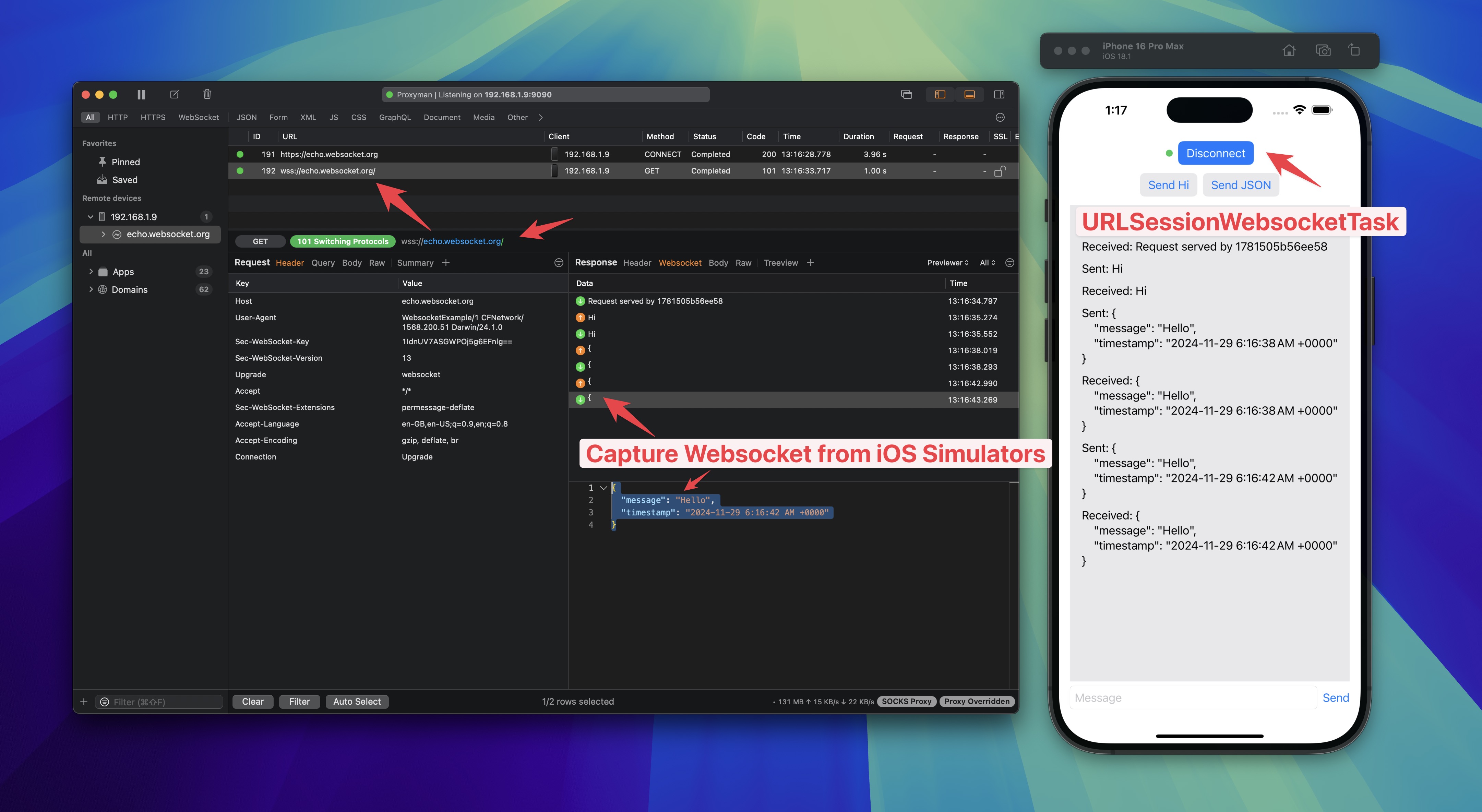
使用 Proxyman 从 iOS 抓取 WebSocket
- 感谢 FranklinSamboni -> https://github.com/ProxymanApp/Proxyman/issues/586#issuecomment-2125082129
- 教程:如何在 iOS 模拟器或设备上拦截和调试 WebSocket
✅ 方案 2
使用 Atlantis Framework(由 Proxyman 开发)从 iOS 抓取 URLSessionWebSocketTask 的 WS/WSS 流量。
更多内容请参阅 Atlantis WS/WSS 流量指南。
4. 从 Web 浏览器(Chrome、Safari 等)抓取 WebSocket
- Proxyman 开箱即可从 Web 浏览器抓取 WS/WSS,无需任何配置。
- 使用方法:打开 Google Chrome -> 访问建立 WS/WSS 连接的网站 -> 打开 Proxyman -> 找到你的 WebSocket 域名 -> 在 Response 面板中,对这些域名点击 Enable SSL Proxying。在浏览器中重新加载网站。Proxyman 会抓取并解密 WS/WSS ✅
5. 从 NodeJS、Golang、Python 服务器抓取 WebSocket
- Proxyman 可以抓取来自 NodeJS、Golang、Python 和 Ruby 服务器的 WS/WSS。
- 使用方法:阅读 automatic-setup.md,了解如何在其打开的终端中启动服务器 -> 建立 WS/WSS 连接 -> Proxyman 会自动抓取并解密 ✅
6. 在 localhost <-> 线上环境之间映射 WebSocket
你可以在 localhost <-> 线上环境之间映射 WebSocket 流量。请参阅 Map Remote 工具。
7. 使用 Scripting 修改 WebSocket 消息
从 macOS 版 Proxyman 26.2.0 和 Windows/Linux 版 Proxyman 26.1.0 开始,你可以用几行 JavaScript 实时修改 WebSocket 消息。在 Scripting 规则中勾选 Modify WebSocket Messages,然后使用 onWebsocket() 来:
- 编辑文本或二进制消息,两个方向均可。
- 丢弃消息,使对端永远收不到它。
- 向客户端或服务器发送新消息。
- 关闭 WebSocket,以测试你的应用如何重新连接。
function onWebsocket(context, url, request, response, message) {
  if (message.from === "server" && message.type === "text") {
    message.data = message.data.replace("staging.example.com", "api.example.com");
  }
  return message;
}