代码片段
复制可直接使用的 Proxyman Scripting JavaScript 代码片段:编辑请求头、查询参数、JSON 正文和状态码,映射本地文件、调用 API 等。
1. 这是什么?
这里收录了适用于 Proxyman Scripting 工具的 JavaScript 代码片段。
没有找到你需要的代码片段?
请到 GitHub 提交 issue,我们会为你提供帮助 ⭐️
在你的 Agent(Codex/Claude Code)中使用 Proxyman MCP,可以轻松生成脚本 🚀
2. 请求与响应的常用操作
- 更新请求或响应的请求头
- 更新请求查询参数
- 更新 URLEncoded 表单请求正文
- 更新 JSON 请求或响应正文
- 像 Map Local 工具一样将本地文件映射到响应正文
- 修改请求的 Scheme、Host、端口和路径
- 上游 ALPN 与 HTTP/2 设置
- HTTP 转 HTTPS
- HTTPS 转 HTTP
- 修改 HTTP 请求方法
- 修改响应的 HTTP 状态码
- 日志输出
- 使用 JSON 文件作为请求或响应正文
- 使用多个 JSON 文件
- 使用 Map Local 处理 GraphQL
- 在请求和响应正文中使用 ArrayBuffer
- 保留 Host
- 使用 Comment 与颜色高亮
- 中断请求或响应的连接(类似 Block List 工具)
Multipart/form-data
3. 插件
- Base64 编码/解码,或 atob/btoa
- 哈希插件(MD5、SHA1、SHA256、SHA512)
- UUIDv4 生成器
- Deflate/Inflate 或 GZip/UnGZip
- JWT 解码
3.1 使用 `npm install`
4. 正则表达式
5. 导入与导出文件
- 导入 JSON 文件
- 导入二进制数据(图片)
- 导入文本文件(css、html、js 等)
- 不使用 “Import Tool” 导入文件
- 写入或导出到本地文件
- 检查文件是否存在
- 读取本地文件
- 将响应用作 Mock API
6. 其他
7. 加密与解密
8. 使用 Scripting 进行 Map Remote
9. 发起 Async/await HTTP 请求(macOS)
- 带查询参数的 GET 请求
- 带 JSON 正文的 POST 请求
- 带 application/x-www-form-urlencoded 正文的 POST 请求
- PUT / PATCH / DELETE 请求
9.1. 发起 Async/await HTTP 请求(Windows/Linux)
10. URL 与 URLSearchParams
11. 访问环境变量
12. WebSocket
- 修改 WebSocket 的 URL 和请求头
- 使用 onWebsocket 记录 WebSocket 消息
- 读取文本和 JSON 消息
- 检查二进制消息
- 记录 ping 和 pong 帧
- 检查关闭帧
- 使用 onWebsocket 修改 WebSocket 消息
- 修改 JSON 消息中的字段
- 双向替换文本
- 丢弃消息
- 不经服务器直接回复客户端消息
- 向服务器发送消息
- 模拟连接丢失
- 修改二进制消息
HTTP 请求头与响应头
添加/更新:请求头或响应头
function onRequest(context, url, request) {
    // Add or update Request Header
    request.headers["X-Proxyman-Key"] = "My-Value";
    request.headers.name = "Proxyman";
    return request;
}

function onResponse(context, url, request, response) {
    // Add or update Response Header
    response.headers["X-Proxyman-Key"] = "My-Value";
    response.headers.id = 100;
    return response;
}
删除:请求头或响应头
function onRequest(context, url, request) {
    delete request.headers["X-Proxyman-Key"];
    return request;
}

function onResponse(context, url, request, response) {
    delete response.headers["X-Proxyman-Key"];
    return response;
}
请求查询参数
添加/更新
function onRequest(context, url, request) {
    request.queries["name"] = "Proxyman";
    request.queries["platform"] = "macOS";
    // => http://proxyman.io?name=Proxyman&platform=macOS
    return request;
}
删除
function onRequest(context, url, request) {
    delete request.queries["name"];
    delete request.queries["platform"];
    return request;
}
URLEncoded 表单正文
添加/更新
function onRequest(context, url, request) {
    // Make sure the Request Header is application/x-www-form-urlencoded
    // Content-Type: application/x-www-form-urlencoded
    var formBody = request.body;

    formBody["name"] = "Proxyman";
    formBody["platform"] = "macOS";

    request.body = formBody; // => name=Proxyman&platform=macOS
    return request;
}
删除
function onRequest(context, url, request) {
    // Content-Type: application/x-www-form-urlencoded
    var formBody = request.body;

    delete formBody["name"];
    delete formBody["platform"];

    request.body = formBody;
    return request;
}
修改请求目标(scheme、host、port、path)
function onRequest(context, url, request) {
    request.scheme = "http";
    request.host = "proxyman.dev";
    request.port = 9090;
    request.path = "v1/data/user";
    return request;
}
上游 ALPN 与 HTTP/2 设置
macOS 版 Proxyman v26.0.0 或更高版本可用。设置方法请参阅 HTTP/2。
在 onRequest 中设置 request.upstream,即可改变 Proxyman 连接服务器的方式。请为该 HTTPS 域名启用 SSL Proxying。H2 覆盖设置还要求在 Settings 中启用 HTTP/2,并且客户端需要与 Proxyman 建立 HTTP/2 连接。
async function onRequest(context, url, request) {
  request.upstream = {
    tls: { alpnProtocols: ["h2"] },
    http2: {
      headerTableSize: 65536,
      initialWindowSize: 6291456,
      maxHeaderListSize: 262144
    }
  };
  return request;
}
ALPN 接受非空且无重复项的列表:
["h2"]:强制使用 HTTP/2。如果服务器无法使用,则连接失败。["h2", "http/1.1"]:允许回退到 HTTP/1.1。["http/1.1"]:使用 HTTP/1.1。
HTTP/2 的值必须是从 0 到下表最大值之间的整数。省略的字段或值为 null 的字段使用默认值。
| 设置 | 默认值 | 最大值 |
|---|---|---|
headerTableSize | 65536 | 4294967295 |
initialWindowSize | 6291456 | 2147483647 |
maxHeaderListSize | 262144 | 4294967295 |
要重置所有覆盖设置,请删除 request.upstream 或将其设为 null。无效或不兼容的设置会返回本地 502 Scripting 错误。
HTTP 转 HTTPS
function onRequest(context, url, request) {
    request.scheme = "https";
    request.port = 443; // Don't forget to override the port
    return request;
}
HTTPS 转 HTTP
function onRequest(context, url, request) {
    request.scheme = "http";
    request.port = 80; // Don't forget to override the port
    return request;
}
修改 HTTP 请求方法
function onRequest(context, url, request) {
    request.method = "POST";
    return request;
}
修改响应的 HTTP 状态码
function onResponse(context, url, request, response) {
    response.statusCode = 404;
    return response;
}
JSON 正文
在请求时
function onRequest(context, url, request) {
    // Set JSON content
    request.headers["Content-Type"] = "application/json";

    // Get Request body
    var jsonBody = request.body;

    // Modify data
    jsonBody["name"] = "Proxyman";
    jsonBody["platform"] = "macOS";
    jsonBody["info"] = {
                        "website": "proxyman.io",
                        "region": "Earth"
                       };
    // Set it again
    request.body = jsonBody;
    return request;
}
在响应时
function onResponse(context, url, request, response)  {
    // Set JSON content
    response.headers["Content-Type"] = "application/json";

    // Get Request body
    var jsonBody = response.body;

    // Modify data
    jsonBody["name"] = "Proxyman";
    jsonBody["platform"] = "macOS";
    jsonBody["info"] = {
                        "website": "proxyman.io",
                        "region": "Earth"
                       };
    // Set it again
    response.body = jsonBody;
    return response;
}
Multipart/form-data
从 macOS 版 Proxyman 6.6.0 起,你可以读取、添加和删除 multipart/form-data。
function onRequest(context, url, request) {
  // Only run for multipart requests
  if (!request.multipart) {
    return request;
  }

  var parts = request.multipart;

  // 1) List parts (debug)
  console.log("Multipart parts:", parts);

  // 2) Modify a text part by name
  for (var i = 0; i < parts.length; i++) {
    if (parts[i].name === "text_field") {
      var p = parts[i];
      p.body = "Updated text from script";
      parts[i] = p;
    }
  }

  // 3) Modify a file part by name (binary body as [UInt8])
  for (var i = 0; i < parts.length; i++) {
    if (parts[i].name === "file_field") {
      var p = parts[i];
      p.body = [72, 101, 108, 108, 111]; // "Hello"
      p.fileName = "hello.txt";
      p.contentType = "text/plain";
      parts[i] = p;
    }
  }

  // 4) Add a new text part
  parts.push({
    name: "new_field",
    body: "Added by script"
  });

  // 5) Remove a part by name
  var filtered = [];
  for (var i = 0; i < parts.length; i++) {
    if (parts[i].name !== "remove_me") {
      filtered.push(parts[i]);
    }
  }

  // Apply updates
  request.multipart = filtered;

  return request;
}
像 Map Local 工具一样将本地文件映射到响应正文(Proxyman 2.25.0+)
使用 bodyFilePath 属性即可将本地文件设置为正文,非常方便。
// For request
request.bodyFilePath = "~/Desktop/image.png";

// For response
response.bodyFilePath = "~/Desktop/image.png";
function onResponse(context, url, request, response) {

  response.headers["Content-Type"] = "image/png";
  response.bodyFilePath = "~/Desktop/image.png";

  // Done
  return response;
}
function onResponse(context, url, request, response) {

  response.headers["Content-Type"] = "application/json";
  response.bodyFilePath = "~/Desktop/my_response.json";

  // Done
  return response;
}
使用 JSON 文件作为请求或响应正文
你可以使用 JSON 文件作为请求或响应正文。
按照 导入 JSON 文件 的步骤操作。
使用多个 JSON 文件
你可以通过 if 语句为每个匹配的端点设置不同的正文。
- 按照 导入 JSON 文件 的步骤,将 JSON 文件导入脚本
- 使用通配符或正则表达式设置 Script Rule,使其能够匹配多个端点,例如 https://my-domain.com/v\*
- 使用 `includes()` 检查端点是否匹配
const file_1 = require("@users/myfile_1.json");
const file_2 = require("@users/myfile_2.json");
const file_3 = require("@users/myfile_3.json");

function onResponse(context, url, request, response) {

  // Set JSON content
  response.headers["Content-Type"] = "application/json";

  // Check
  if (url.includes("v1/data")) {
    response.body = file_1
  } else if (url.includes("v2/login")) {
      response.body = file_2
  } else if (url.includes("v3/user")) {
      response.body = file_3
  }

  // Done
  return response;
}
使用 Map Local 处理 GraphQL
更多信息请参阅 https://github.com/ProxymanApp/Proxyman/issues/412#issuecomment-697101594
// Import your JSON file here
const file = require("@users/B02D96D5.default_message_32E64A5B.json");

function onRequest(context, url, request) {

  // 1. Extract the queryName from the request
  var queryName = request.body.query.match(/\S+/gi)[1].split('(').shift();

  // 2. Save to sharedState
  sharedState.queryName = queryName

  // Done
  return request;
}

function onResponse(context, url, request, response) {

  // 3. Check if it's the request we need to map
  if (sharedState.queryName == "user") {

    // 4. Import the local file by Action Button -> Import
    // Get the local JSON file and set it as a body (like Map Local)
    response.headers["Content-Type"] = "application/json";
    response.body = file;
  }

  // Done
  return response;
}
在请求和响应正文中使用 ArrayBuffer
由于 JavaScript 没有 Data 对象类型,Data 正文在 JavaScript 中会转换为 Base64 编码字符串。如需将 Uint8Array、blob 或 ArrayBuffer 传入正文,请先将其转换为 Base64 编码字符串,并将 ContentType 设为 application/octet-stream。
Proxyman 会将 Base64 编码转换为 ArrayBuffer,因此客户端能够正确接收数据。
// Import
const { btoa } = require('@addons/Base64.js');

function onResponse(context, url, request, response) {
  // Construct the ArrayBuffer
  const buffer = new ArrayBuffer(256)
  const view = new Uint8Array(buffer)
  for (let i = 0; i < view.length; i++) {
    view[i] = i
  }

  // Convert ArrayBuffer to Base64String
  var newBody = btoa(String.fromCharCode.apply(null, new Uint8Array(buffer)));

  // Set new body
  response.body = newBody;
  response.statusCode = 200
  response.headers['Content-Type'] = 'application/octet-stream'

  // Done
  return response;
}
保留 Host
function onRequest(context, url, request) {
    request.preserveHostHeader = true
    return request
}
使用 Comment 与颜色高亮
使用 comment 或 color 高亮主表格视图中的对应流量。
function onRequest(context, url, request) {
    request.comment = "It's a Request"
    request.color = "red" // red, blue, yellow, purple, gray, green
    return request
}

function onResponse(context, url, request, response) {
    response.comment = "It's a Response"
    response.color = "yellow" // red, blue, yellow, purple, gray, green
    return response
}
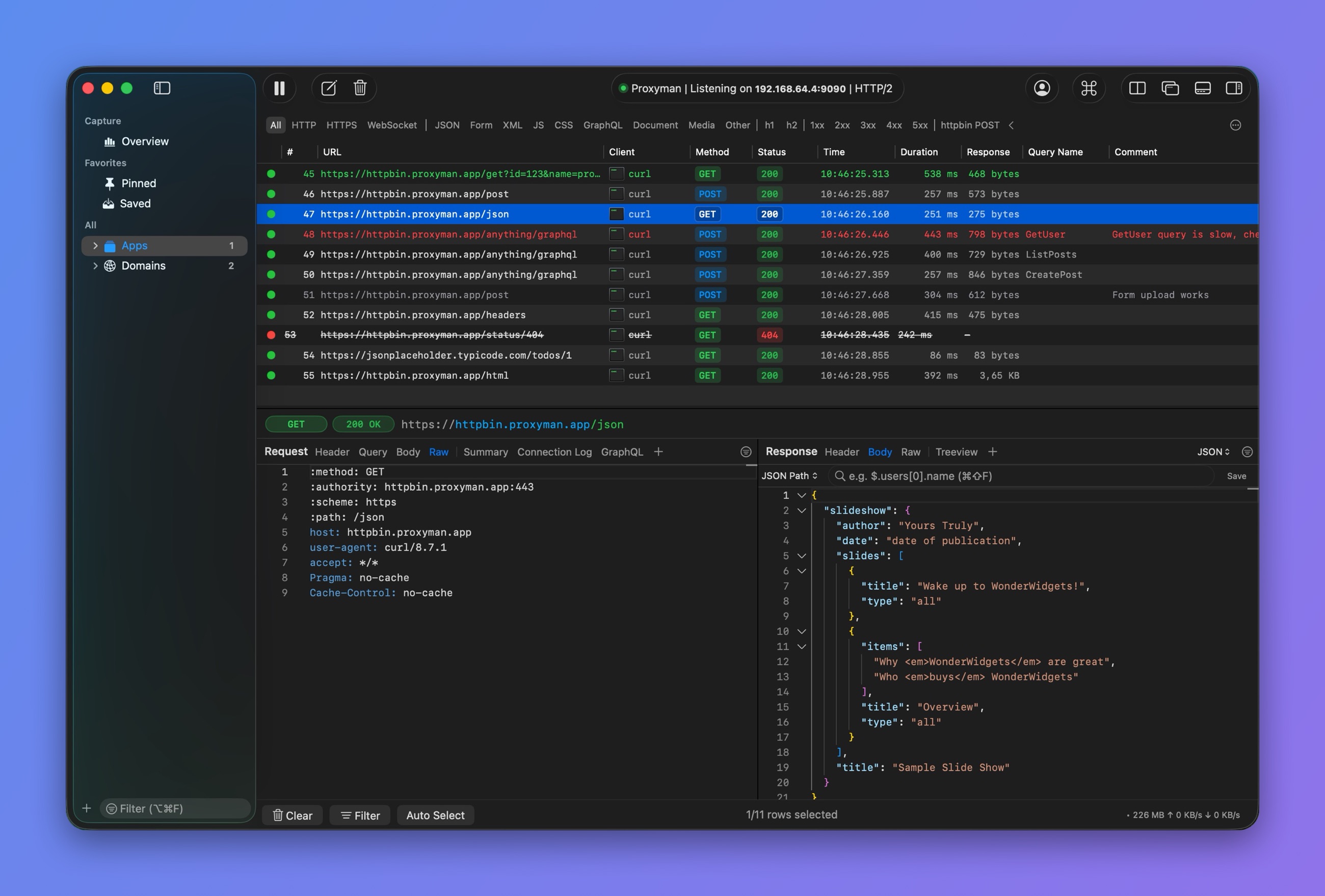
带颜色和备注的行
使用 require() 导入文件
JSON
- 准备一个 JSON 文件,并保存到桌面
// myfile.json
{
  "name": "Proxyman",
  "platform": "macOS",
  "info": {
    "website": "proxyman.io",
    "region": "Earth"
  }
}
2. 点击 More -> Import JSON or Other File...,然后选择你的文件
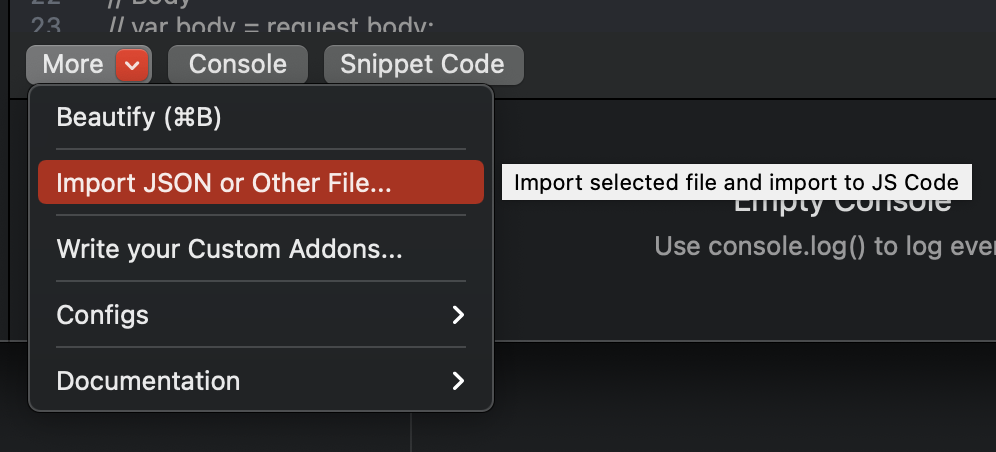
3. Proxyman 会将导入代码添加到脚本顶部
// ~/Library/Application Support/com.proxyman.NSProxy/users/myfile.json
const file = require("@users/myfile.json");

function onResponse(context, url, request, response) {
  // 1. Set header to JSON if need
  response.headers["Content-Type"] = "application/json";

  // 2. Set Body as a imported file
  response.body = file;

  return response;
}
所选文件会被复制到 ~/Library/Application\ Support/com.proxyman.NSProxy/users 文件夹中。
对于其他文件类型(例如图片、文本或 PDF),请确保设置了正确的 Content-Type 请求头。
二进制文件
- 按照上述相同步骤操作(选择你的二进制文件)
- 将其设置为正文
// ~/Library/Application Support/com.proxyman.NSProxy/users/myscreenshot.png
const file = require("@users/myscreenshot.png");

function onResponse(context, url, request, response) {
  // Set header
  response.headers["Content-Type"] = "image/png";

  // Set Body
  response.body = file;

  return response;
}
文本文件
- 按照上述相同步骤操作(选择你的文本文件)
- 将其设置为正文
// ~/Library/Application Support/com.proxyman.NSProxy/users/main.css
const file = require("@users/main.css");

function onResponse(context, url, request, response) {
  // Set header
  response.headers["Content-Type"] = "text/css";

  // Set Body
  response.body = file;

  return response;
}
不使用 “Import Tool” 导入文件
从 Proxyman 2.24.0 起,你可以不使用 “Import Tool” 导入任意文件。
// Import your file from your Desktop folder
const file = require("~/Desktop/myfile.json");

function onResponse(context, url, request, response) {

  // 1. Set header to JSON if need
  response.headers["Content-Type"] = "application/json";

  // 2. Set Body as a imported file
  response.body = file;

  return response;
}
- 如果文件扩展名为 “.js”,Proxyman 会将其作为 JS 脚本执行
- 否则,Proxyman 会像普通文件一样导入它
只有通过 “Import Tool” 导入的文件,才会在将脚本导出给同事时一并包含。
将响应用作 Mock API
你可以将 Scripting 用作 Mock API。请参阅 将 Scripting 用作 Mock API。
使用插件
使用 Base64 插件
// Encode Base64
const { btoa } = require("@addons/Base64.js")

// Usage:
var text = "HelloWorld";
var encodedText = btoa(text);
// Decode Base64
const { atob } = require("@addons/Base64.js")

// Usage:
var text = atob("aGVsbG8=");
使用哈希插件(MD5、SHA1、SHA256、SHA512)
// Hash MD5
const { md5 } = require("@addons/MD5.js")

// Usage:
var hashedText = md5("Hello World");
// Hash SHA1
const { sha1 } = require("@addons/SHA1.js")

// Usage:
var hashedText = sha1("Hello World");
使用 UUID-v4 插件
// Generate UUID v4
const { uuidv4 } = require("@addons/UUID.js")

// Usage:
var uuid = uuidv4();
Deflate/Inflate 与 GZip/UnGZip
Deflate/inflate
const { inflate, deflate } = require("@addons/Pako.js")

// Compress
var input = "Hello World from Pako!!!"
var result = deflate(input);
console.log(result); // eJzzSM3JyVcIzy/KSVFIK8rPVQhIzM5XVFQEAGsMB/8=

// Decompress
var text = 'eJzzSM3JyVcIzy/KSVFIK8rPVQhIzM5XVFQEAGsMB/8=';
var rawText = inflate(text);
console.log(rawText); // Hello World from Pako!!!
GZip/UnGZip
const { ungzip, gzip } = require("@addons/Pako.js")

// Compress
var text =  'HelloWorld';
var result = gzip(text);
console.log(result); // H4sIAAAAAAAAA/NIzcnJD88vykkBAHkMd3cKAAAA

// Decompress
var text =  'H4sIAAAAAAAAA/NIzcnJD88vykkBAHkMd3cKAAAA';
var rawText = ungzip(text);
console.log(rawText); // HelloWorld
JWT 解码
const { jwtDecode } = require('@addons/JWTDecode.js');

var text = 'eyJhbGciOiJIUzI1NiIsInR5cCI6IkpXVCJ9.eyJzdWIiOiIxMjM0NTY3ODkwIiwibmFtZSI6IkpvaG4gRG9lIiwiaWF0IjoxNTE2MjM5MDIyfQ.SflKxwRJSMeKKF2QT4fwpMeJf36POk6yJV_adQssw5c';
var jSONObject = jwtDecode(text)
日志输出
// Print the obj
const myObj = {};
console.log(myObj);

// Print type of the obj
console.log(typeof(myObj));
正则表达式
仅数字
//Init Regex
var reg = /^-?\d*\.?\d*$/;

if (reg.test("123123123")) {
    console.log("Matched");
}
使用正则表达式获取 URL 的 Scheme、Host、端口、路径和查询参数
function onRequest(context, url, request) {
  console.log(url);

  // Get each part
  const regex = /^(https?):\/\/([^:\/\n]+)(?::(\d+))?([^#\n?]+)(?:\?([^#\n]+))?/;
  const [, scheme, host, port, path, query] = url.match(regex);

  // Assign again
  request.scheme = scheme;
  request.host = host;
  if (port !== undefined) {
    request.port = parseInt(port);
  }
  request.path = path;

  // Log
  console.log("----------");
  console.log(scheme);
  console.log(host);
  console.log(port);
  console.log(path);

  // Done
  return request;
}
其他
绕过 CORS
function onResponse(context, url, request, response) {

  // Allow all
  response.headers["Access-Control-Allow-Origin"] = "*";
  response.headers["Access-Control-Allow-Headers"] = "*";
  response.headers["Access-Control-Allow-Methods"] = "*";

  // Done
  return response;
}
向请求和响应注入请求头
function onRequest(context, url, request) {
  // add header
  request.headers["My-Injected-Header"] = "Proxyman";
  return request
}

function onResponse(context, url, request, response) {
  // add header
  response.headers["My-Injected-Header"] = "Proxyman";
  return response;
}
使用 sleep() 函数延迟响应
这对于模拟特定请求或响应的“慢速网络”很有用。如果需要图形界面工具,请参阅 Network Conditions。
- macOS
function onResponse(context, url, request, response) {
  console.log("Start sleep");

  // Sleep 5 seconds
  sleep(5000);

  // Done
  return response;
}
- Windows/Linux
async function onResponse(context, url, request, response) {
  console.log("Start sleep");

  // Sleep 5 seconds
  // Must use `await` keyword on Windows/Linux
  await sleep(5000);

  // Done
  return response;
}
AES 加密/解密
const { encryptAES, decryptAES } = require("@addons/CryptoJS.js")

function onRequest(context, url, request) {

  // Encrypt
  var message = 'my message from Proxyman';
  var password = 'secret key 123';
  var ciphertext = encryptAES(message, password);

  // Decrypt
  var originalText = decryptAES(ciphertext, password);

  // Done
  return request;
}
DES 加密/解密
const { encryptDES, decryptDES } = require("@addons/CryptoJS.js")

function onRequest(context, url, request) {

  // Encrypt
  var message = 'my message from Proxyman';
  var password = 'secret key 123';
  var ciphertext = encryptDES(message, password);

  // Decrypt
  var originalText = decryptDES(ciphertext, password);

  // Done
  return request;
}
写入/导出到本地文件
- 覆盖模式
function onResponse(context, url, request, response) {

  // Write to single file
  writeToFile(response.body, "~/Desktop/body.json");

  // Write the Body to file with flow ID
  writeToFile(response.body, "~/Desktop/sample-" + context.flow.id);

  // Done
  return response;
}
- 追加模式(仅适用于 Proxyman 3.6.2+)
async function onResponse(context, url, request, response) {

  // Append to the existed file
  // Or create a new file if it doesn't exist
  var opt = {appendFile: true}
  writeToFile(response.body, "~/Desktop/body.json", opt);

  // Done
  return response;
}
检查文件是否存在
- 可用版本:macOS 版 Proxyman 5.4.0+
async function onRequest(context, url, request) {

  const filePath = "~/Desktop/myfile.json"

  // check if the file exists
  if (isFileExists(filePath)) {
    console.log("File exists");
  } else {
    console.log("File NOT exists");
  }

  // Done
  return request;
}
读取文件
- 如果是基于文本的文件,返回 String
- 否则返回 Uint8Array
- 可用版本:macOS 版 Proxyman 5.4.0+
async function onRequest(context, url, request) {  // console.log(request);

  const textFilePath = "~/Desktop/myfile.json";

  // check exist
  if (isFileExists(textFilePath)) {

    // read from file
    const text = readFromFile(textFilePath);

    // parse string to JSON Object
    const obj = JSON.parse(text);
  }

  // Read binary file
  const binaryFilePath = "~/Desktop/screenshot.png";
  const binaryFile = readFromFile(binaryFilePath); // Uint8Array

  // Done
  return request;
}
Map Remote
将 v1 端点映射到 v2
function onRequest(context, url, request) {

  // Replace v1 to v2 in URL Path
  var newPath = request.path.replace("v1", "v2");
  request.path = newPath

  // Done
  return request;
}
将 Localhost 映射到生产环境
function onRequest(context, url, request) {

  // Use production URL
  request.scheme = "https";
  request.host = "proxyman.io";
  request.port = 443;

  // Done
  return request;
}
将生产环境映射到 Localhost
function onRequest(context, url, request) {

  // Use localhost URL
  request.scheme = "http";
  request.host = "localhost";
  request.port = 3000;

  // Done
  return request;
}
发起 async/await HTTP 请求(macOS)
`$http` 可在 macOS 上使用。Windows/Linux 请参阅下一节。
带查询参数的 GET 请求
async function onResponse(context, url, request, response) {
  // GET Request with Query
  var url = "https://httpbin.proxyman.app/get?id=proxyman&country=united%20states";
  var output = await $http.get(url);

  // Get Status Code
  console.log(output.statusCode);

  // Get body
  console.log(output.body)

  // Get header
  console.log(output.headers)

  // Done
  return response;
}
带 JSON 正文的 POST 请求
async function onResponse(context, url, request, response) {
  // Define JSON Body and Header
  // Make sure "Content-Type" is "application/json"
  var param = {
    body: {
      "user": {
        "name": "Proxyman"
      }
    },
    headers: {
      "Content-Type": "application/json"
    }
  }

  // POST request with await
  var output = await $http.post("https://httpbin.proxyman.app/post", param);

  // Get Status Code
  console.log(output.statusCode);

  // Get body
  console.log(output.body)

  // Get header
  console.log(output.headers)

  // Done
  return response;
}
带 application/x-www-form-urlencoded 正文的 POST 请求
async function onResponse(context, url, request, response) {
  // Define form Body and Header
  // Make sure "Content-Type" is "application/x-www-form-urlencoded"
  var param = {
    body: {
      "key1": "value1",
      "key2": "value2"
    },
    headers: {
      "Content-Type": "application/x-www-form-urlencoded"
    }
  }

  // POST request with await
  var output = await $http.post("https://httpbin.proxyman.app/post", param);

  // Get Status Code
  console.log(output.statusCode);

  // Get body
  console.log(output.body)

  // Get header
  console.log(output.headers)

  // Done
  return response;
}
PUT / PATCH / DELETE 请求
async function onRequest(context, url, request) {

  var param = {
    body: {
      "user": {
        "name": "Proxyman"
      }
    },
    headers: {
      "Content-Type": "application/json"
    }
  }

  var output = await $http.post("https://httpbin.proxyman.app/post", param);
  var output = await $http.put("https://httpbin.proxyman.app/put", param);
  var output = await $http.delete("https://httpbin.proxyman.app/delete", param);

  // Done
  return request;
}
发起 async/await HTTP 请求(Windows/Linux)
Windows/Linux 内置了 Axios 库,你可以使用 `Axios` 语法轻松发起 HTTP(s) 请求。
async function getUser() {
  try {
    const response = await axios.get('https://httpbin.proxyman.app/user?ID=12345');
    console.log(response);
  } catch (error) {
    console.error(error);
  }
}
像 Block List 工具一样中断请求或响应
- 仅适用于 Proxyman 3.11.0 及更高版本
中断请求
function onRequest(context, url, request) {
  // drop the connection
  abort();
}
function onRequest(context, url, request) {

  // Use the if to abort on certain conditions
  if (true) {
    abort();
    return; // Must return a void to stop the func
  }

  // Done
  return request;
}
中断响应
function onResponse(context, url, request, response) {
  // drop the connection
  abort();
}
URL 与 URLSearchParams
从 Proxyman 4.13.0 起,原生支持 URL 和 URLSearchParams。
function onRequest(context, url, request) {

  // URL
  const urlObj = new URL("https://proxyman.io/api/v1/user?id=123");
  console.log(urlObj.hostname);
  console.log(urlObj.search);
  console.log(urlObj.searchParams);

  // URLSearchParams
  const params1 = new URLSearchParams("foo=1&bar=2");

  // Done
  return request;
}
重新加载系统环境变量
macOS 版 Proxyman 4.15.0 或更高版本。
请先开启权限:点击 More 按钮 -> Environment Variables -> Allow all scripts to access Environment Variables。
async function onRequest(context, url, request) {
  // manually reload to get the latest changes
  _reloadEnv();

  // get env
  console.log($PROXYMAN_ID)

  // Done
  return request;
}
修改 WebSocket 的 URL 和请求/响应头
- macOS 版 Proxyman 6.2.0 或更高版本支持。
onRequest和onResponse用于修改 URL 和握手请求头。如需读取消息,请使用 onWebsocket(macOS、Windows 和 Linux 版 Proxyman 26.1.0 或更高版本)。如需修改消息,请使用 Modify WebSocket Messages(macOS 版 Proxyman 26.2.0 或更高版本,Windows/Linux 版 Proxyman 26.1.0 或更高版本)。
从 localhost 映射到生产环境
- 规则 ws://proxyman.debug:3000
async function onRequest(context, url, request) {
  // console.log(request);
  console.log(url);

  request.scheme = "wss";
  request.host = "wss.httpbin-proxyman.xyz"
  request.port = 443

  // Done
  return request;
}
从生产环境映射到 localhost
- 规则 wss://echo.websocket.org
async function onRequest(context, url, request) {
  // console.log(request);
  console.log(url);

  request.scheme = "ws";
  request.host = "proxyman.debug"
  request.port = 3000

  // Done
  return request;
}
使用 onWebsocket 记录 WebSocket 消息
这些 onWebsocket 代码片段需要 macOS、Windows 和 Linux 版 Proxyman 26.1.0 或更高版本。iOS 不支持这些功能。
匹配已抓取的 ws:// 或 wss:// URL,保存并启用脚本,然后重新连接 WebSocket。设置方法和完整的 message 对象请参阅 Scripting 与 WebSocket。
每个示例都定义了一个独立的 onWebsocket 函数。选择其中一个示例使用,或将这些检查合并到同一个函数中。如果未勾选 Modify WebSocket Messages 选项,该钩子为只读:修改 message 或返回值不会改变流量。如需修改消息,请参阅 使用 onWebsocket 修改 WebSocket 消息。
记录两端捕获到的每条消息:
function onWebsocket(context, url, request, response, message) {
  console.log(`[${message.from}] ${message.type}: ${message.data}`);
}
读取文本和 JSON 消息
检查服务器发送的文本。有效的 JSON 消息会被解析;其他文本则原样记录。
function onWebsocket(context, url, request, response, message) {
  if (message.type !== "text" || message.from !== "server") return;

  try {
    const payload = JSON.parse(message.data);
    console.log("Server JSON: " + JSON.stringify(payload, null, 2));
  } catch (error) {
    // A text message does not have to contain JSON.
    console.log("Server text: " + message.data);
  }
}
Proxyman 会在调用钩子前重组分片的文本帧,因此你可以直接在这里解析完整的 JSON 消息。二进制分片同样会被重组;不存在单独的续帧回调。
检查二进制消息
使用 message.rawData 获取原始字节。message.data 仅为文本表示,可能显示为 Binary (length=N)。
function onWebsocket(context, url, request, response, message) {
  if (message.type !== "binary") return;

  const bytes = message.rawData;
  // Limit the preview so large messages do not flood the console.
  const hex = Array.from(bytes.slice(0, 32))
    .map(byte => byte.toString(16).padStart(2, "0"))
    .join(" ");
  const suffix = bytes.length > 32 ? " ..." : "";
  console.log(`[${message.from}] binary (${bytes.length} bytes): ${hex}${suffix}`);
}
rawData 是复制得到的 Uint8Array,且为不可枚举属性。请直接访问它,不要期望 console.log(message) 或 JSON.stringify(message) 会包含它。
记录 ping 和 pong 帧
使用这些事件可检查双向的心跳流量。ping 和 pong 的负载数据不会显示。
function onWebsocket(context, url, request, response, message) {
  if (message.type !== "ping" && message.type !== "pong") return;

  console.log(`[${message.from}] ${message.type} on ${url}`);
}
检查关闭帧
记录关闭代码以及发送该帧的一方。关闭原因不会显示。
function onWebsocket(context, url, request, response, message) {
  if (message.type !== "close") return;

  console.log(`[${message.from}] closed with code ${message.closeCode}`);
}
使用 onWebsocket 修改 WebSocket 消息
这些代码片段需要 macOS 版 Proxyman 26.2.0 或更高版本,或 Windows/Linux 版 Proxyman 26.1.0 或更高版本。iOS 不支持。
在规则上勾选 Modify WebSocket Messages,保持 Request 处于勾选状态,保存并启用脚本,然后重新连接 WebSocket。各返回值的作用及设置方法,请参阅 修改 WebSocket 消息:
return message:发送修改后的消息。return null:丢弃该消息。- 不返回任何值:发送原始消息。
sendToClient(data)/sendToServer(data):发送一条新消息。字符串会作为文本消息发送,Uint8Array会作为二进制消息发送。abort():关闭两端的 WebSocket 连接。
修改 JSON 消息中的字段
修改服务器发送的每条 JSON 消息中的某个字段。其他消息按原样发送。
function onWebsocket(context, url, request, response, message) {
  if (message.type !== "text" || message.from !== "server") {
    return message;
  }

  try {
    const json = JSON.parse(message.data);
    if (json.type === "price") {
      json.price = 0;
      message.data = JSON.stringify(json);
    }
  } catch (error) {
    // Not JSON: send it as it is
  }
  return message;
}
双向替换文本
替换客户端和服务器发送的每条文本消息中的主机名。
const FIND_REGEX = /staging\.example\.com/g;
const REPLACE_WITH = "api.example.com";

function onWebsocket(context, url, request, response, message) {
  if (message.type === "text") {
    message.data = message.data.replace(FIND_REGEX, REPLACE_WITH);
  }
  return message;
}
丢弃消息
丢弃匹配正则表达式的客户端消息,例如分析事件。服务器永远不会收到这些消息。
const DROP_REGEX = /"type"\s*:\s*"analytics"/;

function onWebsocket(context, url, request, response, message) {
  if (message.from === "client" && message.type === "text" && DROP_REGEX.test(message.data)) {
    console.log("Dropped: " + message.data);
    return null;
  }
  return message;
}
不经服务器直接回复客户端消息
使用 sendToClient() 回复客户端消息,并丢弃原始消息,使服务器永远收不到它。适用于模拟服务器的回复。
function onWebsocket(context, url, request, response, message) {
  if (message.from === "client" && message.type === "text" && message.data.includes('"subscribe"')) {
    sendToClient(JSON.stringify({ type: "error", code: 503, text: "Service unavailable" }));
    return null;
  }
  return message;
}
通过 sendToClient() 和 sendToServer() 发送的消息不会再次触发 onWebsocket(),因此脚本不会无限循环。
向服务器发送消息
当客户端发送第一条消息时,向服务器额外发送一条消息,例如订阅另一个频道。
let isSubscribed = false;

function onWebsocket(context, url, request, response, message) {
  if (message.from === "client" && message.type === "text" && !isSubscribed) {
    isSubscribed = true;
    sendToServer(JSON.stringify({ type: "subscribe", channel: "ETH" }));
  }
  return message;
}
onWebsocket() 之外的代码每个连接只运行一次,因此每个新连接中 isSubscribed 都会从 false 开始。
模拟连接丢失
在第 10 条消息后关闭两端的 WebSocket,以测试应用的重连行为。
const CLOSE_AFTER_MESSAGES = 10;
let messageCount = 0;

function onWebsocket(context, url, request, response, message) {
  messageCount += 1;
  if (messageCount === CLOSE_AFTER_MESSAGES) {
    console.log("Closing the WebSocket after " + messageCount + " messages");
    abort();
  }
  return message;
}
修改二进制消息
使用 Uint8Array 设置新的字节。消息类型保持不变:二进制消息仍为二进制。
function onWebsocket(context, url, request, response, message) {
  if (message.type === "binary" && message.from === "server") {
    message.rawData = new Uint8Array([1, 2, 3]);
  }
  return message;
}
使用 `npm install`
更多信息请参阅 use-npm-install.md
安装包
打开 Terminal,将包安装到 Proxyman 的 Application Support 文件夹中:
- 安装
dayjs
$ cd "$HOME/Library/Application Support/com.proxyman.NSProxy"
$ npm install --prefix . dayjs --ignore-scripts --no-audit --no-fund
安装完成后,包应位于以下路径:
~/Library/Application Support/com.proxyman.NSProxy/node_modules
在脚本中使用包
使用包名调用 require():
const dayjs = require("dayjs");

async function onRequest(context, url, request) {
  const formattedDate = dayjs("2026-05-05T13:00:00Z").format("YYYY-MM-DD");
  request.headers["X-Proxyman-Dayjs"] = formattedDate;
  return request;
}