Environment Variables
Share data between Proxyman scripts with sharedState, and read system environment variables such as API tokens in your scripts with the $ prefix.
1. Shared State
Shared State works on all macOS versions that Proxyman supports (macOS 14 Sonoma or later).
You can share state between onRequest() and onResponse(), and between different scripts, with the global object sharedState.
- sharedState is a JS Object (Dictionary). You can assign any keys and values in onRequest(), then read the data in onResponse() or in different scripts.
The following code shows how to:
- Get the global counter and increase it each time the script runs
- Share data between Request and Response
function onRequest(context, url, request) {

  // Save some state to sharedState
  sharedState.url = url;
  sharedState.data = "custom";
  sharedState.info = {"username": "Proxyman"};

  // Increase the global counter
  var count = sharedState.count ?? 0;
  count += 1;
  sharedState.count = count;

  // Log
  console.log(sharedState);
  return request;
}

function onResponse(context, url, request, response) {

  // Receive it
  console.log("Custom data = " + sharedState.data);
  console.log("sharedState.count = " + sharedState.count);

  // Done
  return response;
}
From Proxyman 2.25.0+, sharedState is available across different scripts. It is only released when you quit Proxyman or call the `clearSharedState()` function.
Before Proxyman 2.24.0, sharedState only lives in the current flow that runs the script, and it's released when the script finishes.
To clear all data, use the `clearSharedState()` function.
// Clear all data from sharedState object
clearSharedState();
2. Environment Variables
The Environment Variables feature is available from Proxyman 3.8.0 or later.
- Scripts can read system environment variables.
- Supports bash and zsh.
How to use
- Define an env in your
~/.zshrcor~/.bashrc
export ACCESS_TOKEN=AAABBBCCC
export PROXYMAN_PATH=/Users/my_user/Desktop/file-mapper
2. Open any script -> More button -> Environment Variables -> Allow all scripts to access Environment Variables.
3. Click Reload to load the latest env changes.
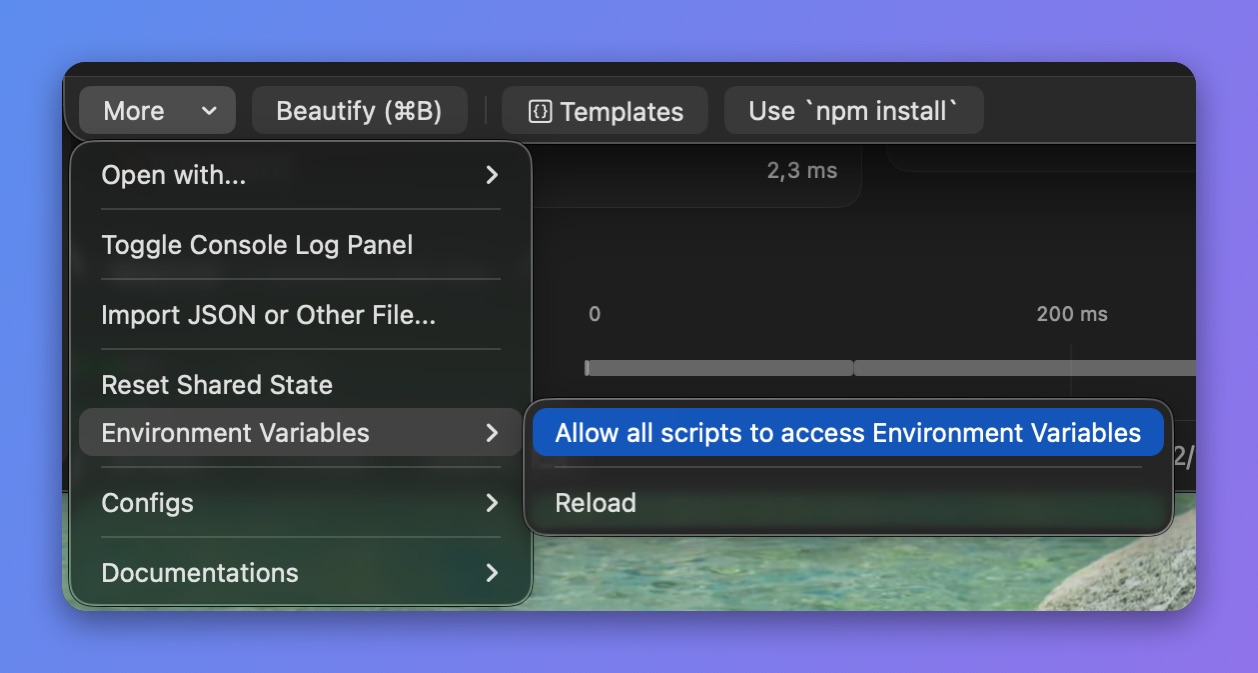
Allow scripts to read Environment Variables
4. Access an env variable in your script with the $ prefix
async function onResponse(context, url, request, response) {
  console.log($PATH);
  console.log($ACCESS_TOKEN);
  console.log($PROXYMAN_PATH);

  // Done
  return response;
}
3. Additions
- Manually reload the system env (Proxyman macOS 4.15.0 or later). Enable the permission first: More button -> Environment Variables -> Allow all scripts to access Environment Variables.
async function onRequest(context, url, request) {
  // manually reload to get the latest changes
  _reloadEnv();

  // get env
  console.log($PROXYMAN_ID)

  // Done
  return request;
}