Protobuf
Decode Protobuf HTTP and HTTPS requests, responses, and WebSocket messages in Proxyman with a .desc file descriptor and a Message Type rule.
1. Protobuf
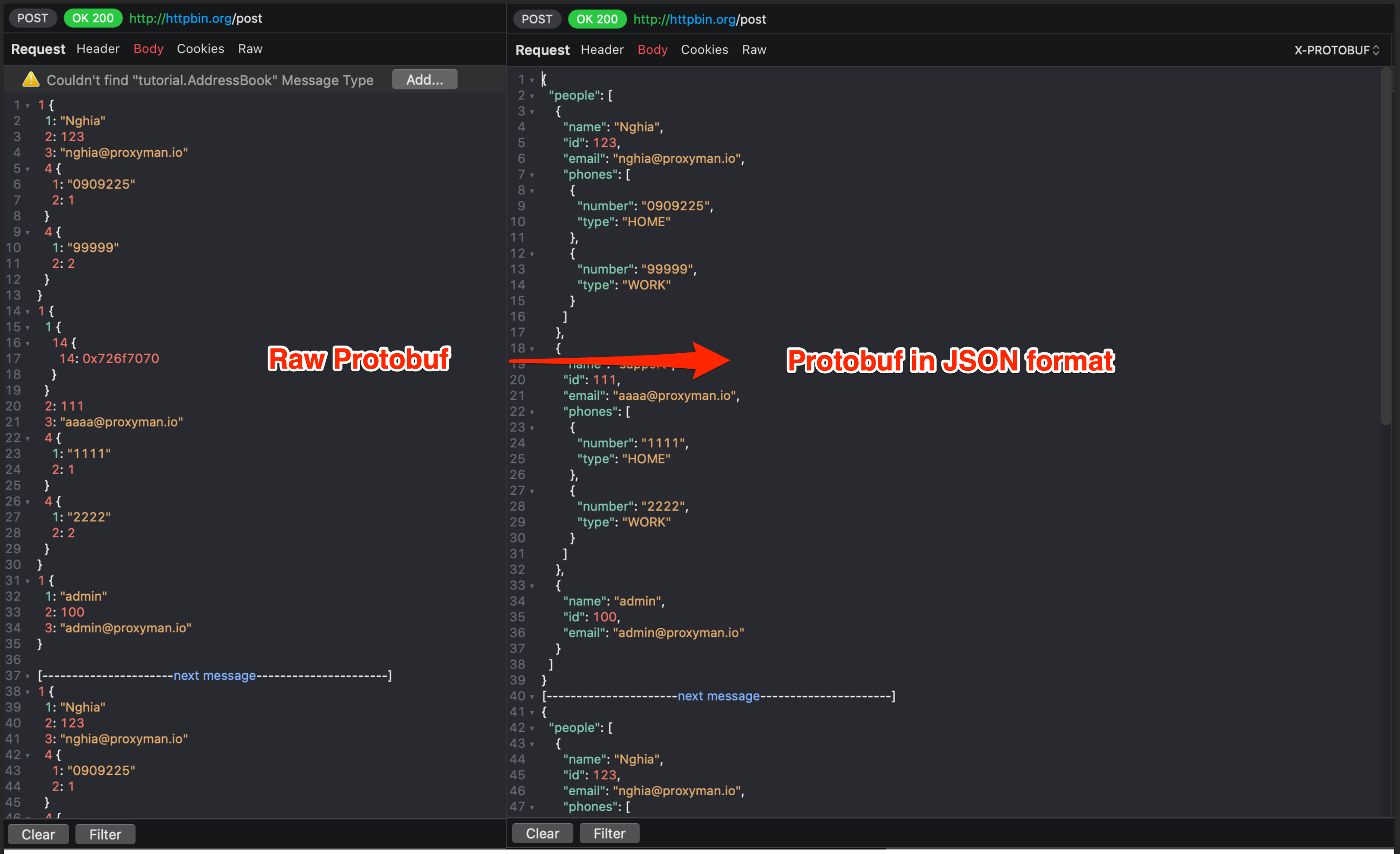
- Proxyman macOS can decode the Protobuf body of your HTTP/HTTPS requests and responses with a given Protobuf desc file
- Decode Protobuf binary and show it as plain text
- Supports a Single Message or multiple Delimited Messages in a single Protobuf binary
- Import a desc file and read all its Message Types to decode Protobuf binary
- Decode Protobuf from Websocket
2. Protobuf File Descriptor (*.desc)
Proxyman requires a File Descriptor (*.desc) to properly parse the Protobuf Data.
There are a few ways to get the File Descriptor:
1. Ask your colleagues.
If your company uses Protobuf, there's a good chance that your colleagues already have this file, especially the Backend and Frontend teams.
It might be one or multiple descriptor files.
2. Generate from *.proto file
If you have many *.proto files, you can generate one *.desc file with the following command.
# Install protobuf cli if need
brew install protobuf

# Create `input` folder on the Desktop
# Copy all proto files to the `input` folder

# Generate 1 descriptor file with multiple proto files
protoc --descriptor_set_out=output.desc --include_imports -I=/Users/<your_name>/Desktop/input /Users/<your_name>/Desktop/input/*.proto

# Done
# output.desc
Once you have the Descriptor File, import it to Proxyman:
- Tools menu -> Protobuf… -> click the Protobuf Schema... button
- Click the + button and select the output.desc file
Proxyman 3.6.0+ only accepts File Descriptor (*.desc) for better Protobuf parsing.
If you have *.proto files, you can convert them to *.desc. See Generate from *.proto file above.
Proxyman automatically imports all common types from Google Protobuf, such as Timestamp, Struct, Value, Enum, Method, etc.
Proxyman supports both proto2 and proto3 syntax. Read more
3. Protobuf Config
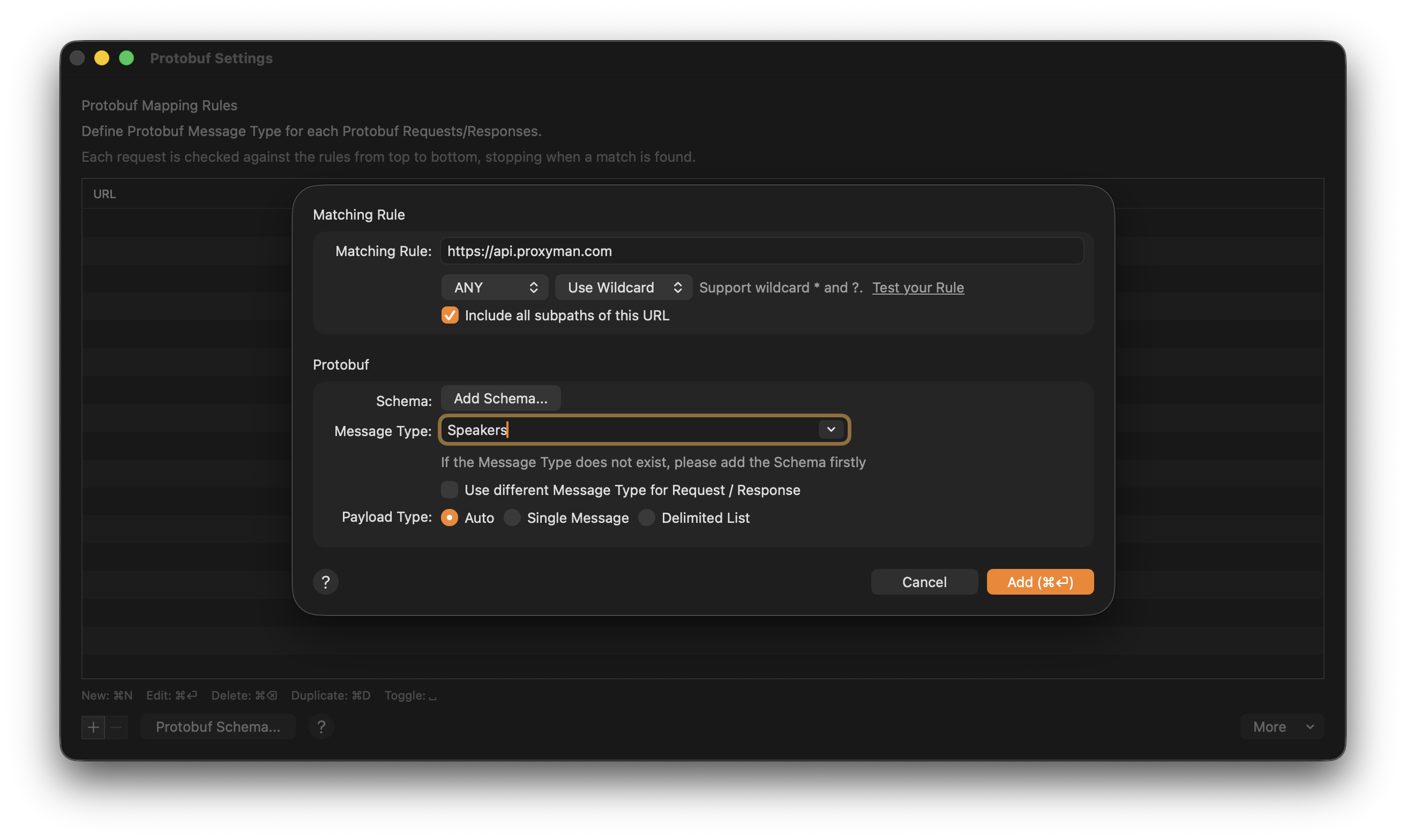
Before using Protobuf, you have to set which Message Type Proxyman should use to parse the Protobuf data.
The following table describes the settings:
| Name | Description |
|---|---|
| Schema | Add a .desc file if needed |
| Message Type | The Class name of the root object in Protobuf binary. Must include Package name |
| Payload Type: Auto | Auto detect if the Protobuf Binary is encoded as a Single Message or Delimited Message |
| Payload Type: Single Message | Single Message in a Protobuf Binary |
| Payload Type: Delimited List | Multiple Messages in a Protobuf Binary (Length-Prefix) |
Decode Protobuf HTTPS Response with Proxyman
4. How to use?
There are two ways to parse Protobuf properly with named fields:
- Define Protobuf Rules
- Read from Content-Type Header
4.1 Define Protobuf Rule
- Your Protobuf request should have a Content-Type header:
Content-Type: application/x-protobuforContent-Type: application/protobuf - Proxyman detects the Protobuf payload and shows a warning that it can't parse it properly because the message type is missing. Click Add to open Protobuf Settings.
Alternatively, you can right-click on your request -> Tools -> Protobuf…
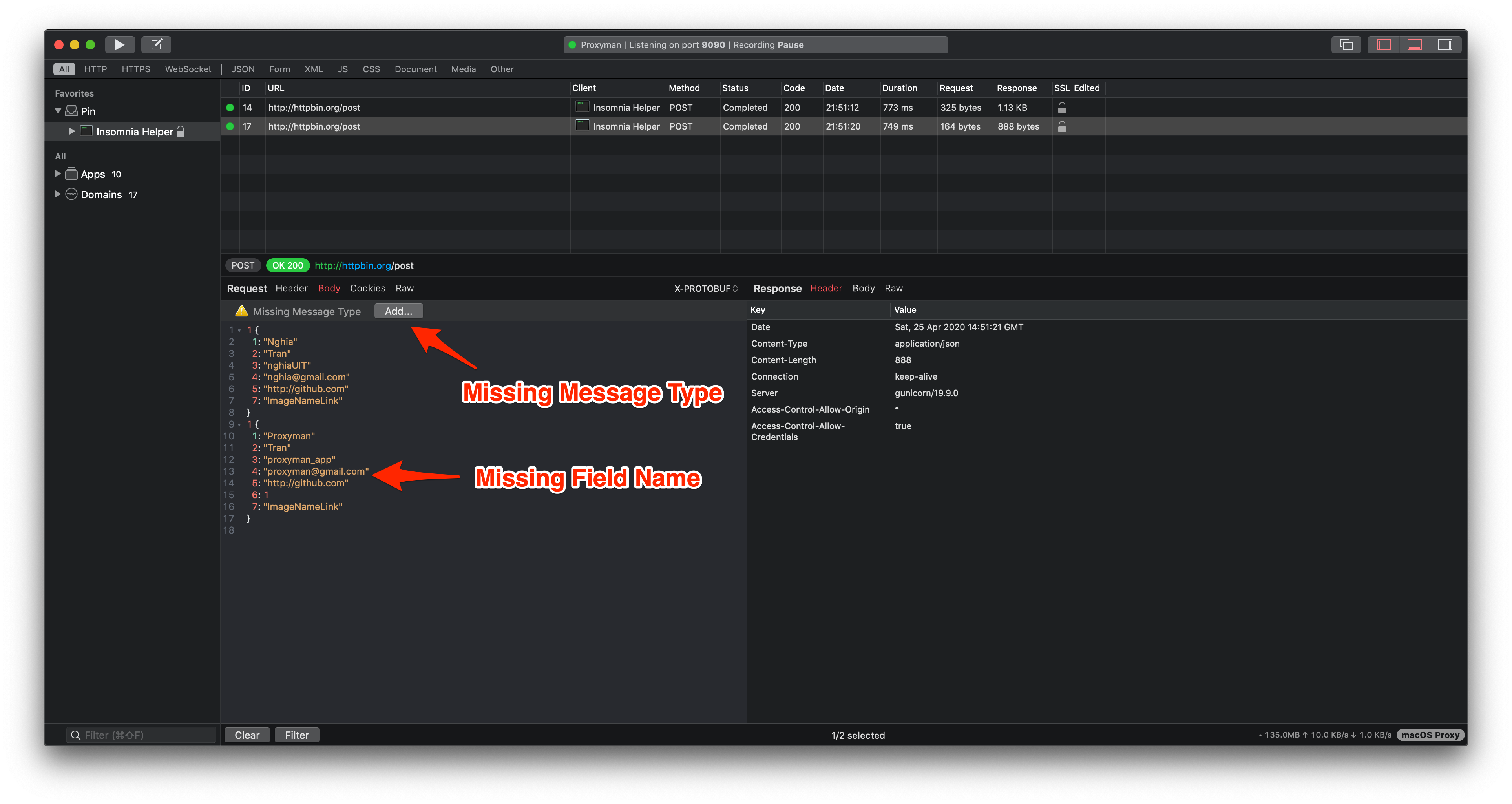
3. In the Protobuf rule window, select the Message Type for this Request/Response (add a desc file if needed).
If the Request and Response use different Protobuf Message Types, select the `Use different Message Type for Request / Response` checkbox.
4. Click Add and see the body in JSON format.
4.2 Read from Content-Type Header
You can dynamically provide the Protobuf Config from Content-Type
For example: Your Content-Type in the Request or Response might look like:
Content-Type: application/x-protobuf; messageType="tutorial.Address"; delimited=true
Content-Type: application/x-protobuf; messageType="com.proxyman.User"; delimited=false
This tells Proxyman the Message Type and the payload encoding of the Protobuf body.
5. ✅ Protobuf With Websocket (from macOS 6.5.0 or later)
- Decode a single binary WebSocket frame: Read websocket.md
- You can create a Protobuf rule for WebSocket. Use the Request Message Type for client messages, and the Response Message Type for server messages.
6. Troubleshooting
6.1 Some name fields are missing
Some field names can be missing when their definitions are not in your Protobuf File Descriptor. Your descriptor might be out of date.
Solution:
- Remove the old Protobuf Schema and add the latest descriptor file from your server.
- If you're using Proxyman 3.5.2 or older, please update to Proxyman 3.6.0 or later. Then, use File Descriptor (*.desc) for better results.