Capture HTTP(s) traffic from Flutter Android Emulator
1-click to capture and debug all network traffic from your Flutter apps. No code changes required.
Why is Flutter traffic hard to capture?
- Flutter's Dart
HttpClientbypasses the system proxy - Charles Proxy, Fiddler, mitmproxy can't capture Flutter traffic
- Typical fix: modify code with
HttpOverrides- tedious!
Proxyman solves this with 1-click
- Installs certificate into Android system trust store
- Flutter's Dart VM respects system-level CA certificates
- No code changes required
The Solution: Proxyman's 1-Click Setup
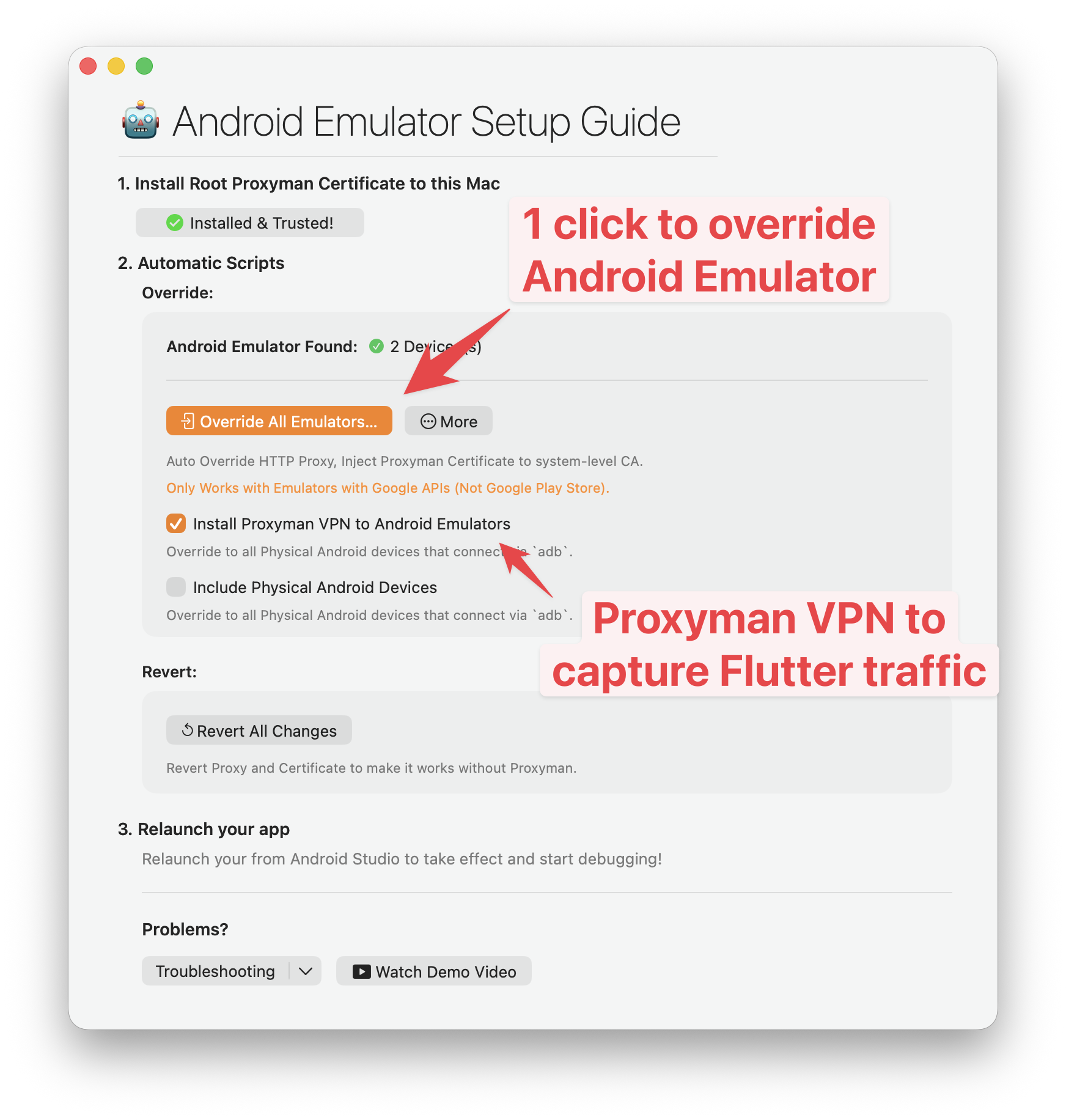
- Open Android Emulator Setup Guide
- Certificate Menu -> Install Certificate on Android -> Emulators.
- Use Automatic Script
- Click on "Override All Emulators" button to set up HTTP Proxy and install Proxyman's certificate.
It also installs Proxyman's VPN to your Emulators, so Flutter traffic will be captured by Proxyman. - Run your Flutter app
- Launch your Flutter app from Android Studio or VS Code. All HTTP(s) traffic will be captured automatically - no code changes needed.

See Demo
Capture all HTTP/HTTPS traffic from your Flutter Android Emulator with just a few clicks.
Native macOS app
Best-in-class macOS app with meticulous attention to detail.
A closer look at Proxyman
Working Session
Pin working domains and hide noisy traffic while you debug.
All you'd expect from a great Mac app: Familiar UI, Universal Shortcuts Keys, and super-fast Apple M1/M2/M3/M4 and M5 performance.
Complete suite of network debugging tools
Dive into the network level to diagnose and fix problems with reliable and powerful tools.
Capture HTTP/HTTPS Traffic
Multiple Filters
Narrow down your search with Proxyman's Multiple Filters. You can combine complex filtered criteria like Protocol, Content-Type, URL, Request Header, Response Header, Body, etc that find exact what you're looking for.
Scripting Tool
Breakpoint, Map local GUI is so slow?
Try Scripting Tool: Use Javascript code to manipulate the Request/Response with your own logic.
We provide a handful of Snippet Code, common Add-ons and JS Libraries to facilitate your debugging procedure and make it 100x faster.
Breakpoint Tool
Breakpoint Tool helps you to modify Requests/Responses Data on the fly without changing any client code. Supports URL, Headers, Body, Status Code, Raw Message, etc.
Map Local Tool
Map Local Tool allows developers to mock a Response with a local file. Boost development speed up by directly modifying the response with Status Code, Header, and Body without waiting for the backend.
GraphQL Debugging
Easily debug GraphQL Request by defining a matching rule with a particular GraphQL QueryName. Works with Breakpoint, Map Local, Map Remote, and Scripting Tool.
WebSocket Realtime
Inspect live WebSocket messages as they arrive. Follow client and server frames in real time, preview their payloads, and quickly track down realtime communication issues.
AI-Powered Debugging with MCP
Connect Claude Code to Proxyman via Model Context Protocol. Fetch flows, analyze requests, and create debugging rules - all from your terminal.
Fetch all requests from a connected iPhone or Android device
| Method | URL | Status | Duration |
|---|---|---|---|
| GET | /api/v2/users/profile | 200 | 124ms |
| POST | /api/v2/auth/refresh-token | 200 | 89ms |
| GET | /api/v2/projects/list | 200 | 203ms |
| GET | /api/v2/notifications | 304 | 45ms |
| PUT | /api/v2/settings/preferences | 200 | 167ms |
| GET | /api/v2/analytics/dashboard | 200 | 312ms |
Found 6 requests from the connected mobile device. All requests target the api.atlantis.com domain with successful responses.
Proxyman's built-in MCP server lets AI assistants interact with your debugging session in real time - no plugins required.
Works with your favorite AI tools
Spot your bugs with ease
Quickly find the differences between requests/responses with built-in Diff Tool.
Side-by-Side or Unified Display, with Light/Dark GitHub Theme.
Try Online
Run directly on your Web Browser. Your data is safe 🔐
Try macOS app
Offline macOS app works with your local data. Lifetime deal.
Compose requests with ease
Create, edit, and send custom HTTP requests directly from Proxyman.
Start from scratch, paste a cURL command, or reuse requests from your history.
History
Revisit, duplicate, and resend previous requests without rebuilding them from scratch.
Import cURL
Paste a cURL command to instantly populate its method, URL, headers, and body.
Compose full requests like Postman
Configure methods, URLs, headers, queries, and bodies in one focused workspace.
Bulk Edit
Paste or update multiple headers and parameters at once to save repetitive editing.
WebSocket
Open WebSocket connections and send messages without switching to another tool.
Preview request / response instantly
Inspect the complete request and formatted response side by side as soon as it returns.
Inspect network traffic from iOS/ Android
Easy-to-follow instructions to capture HTTP traffic from your iOS/ Android devices, simulators, emulators.
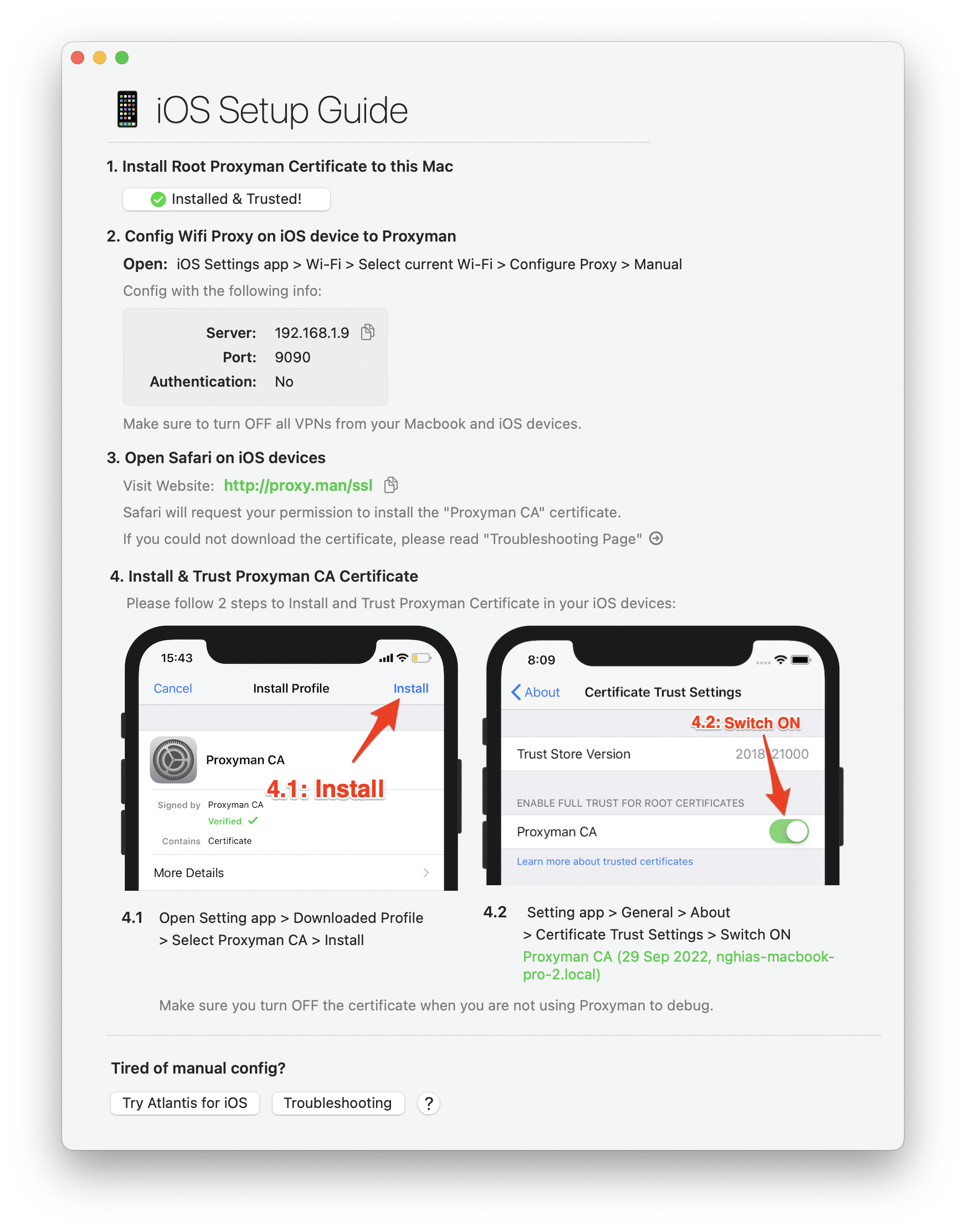
Capture traffic from iOS/ Android devices
Proxyman provides a straightforward walkthrough to set up a Proxy with iOS, Android physical devices, iOS Simulators and Android Emulators .
Simply follow the detailed instructions to capture and intercept HTTP(s) traffic with just a few clicks.
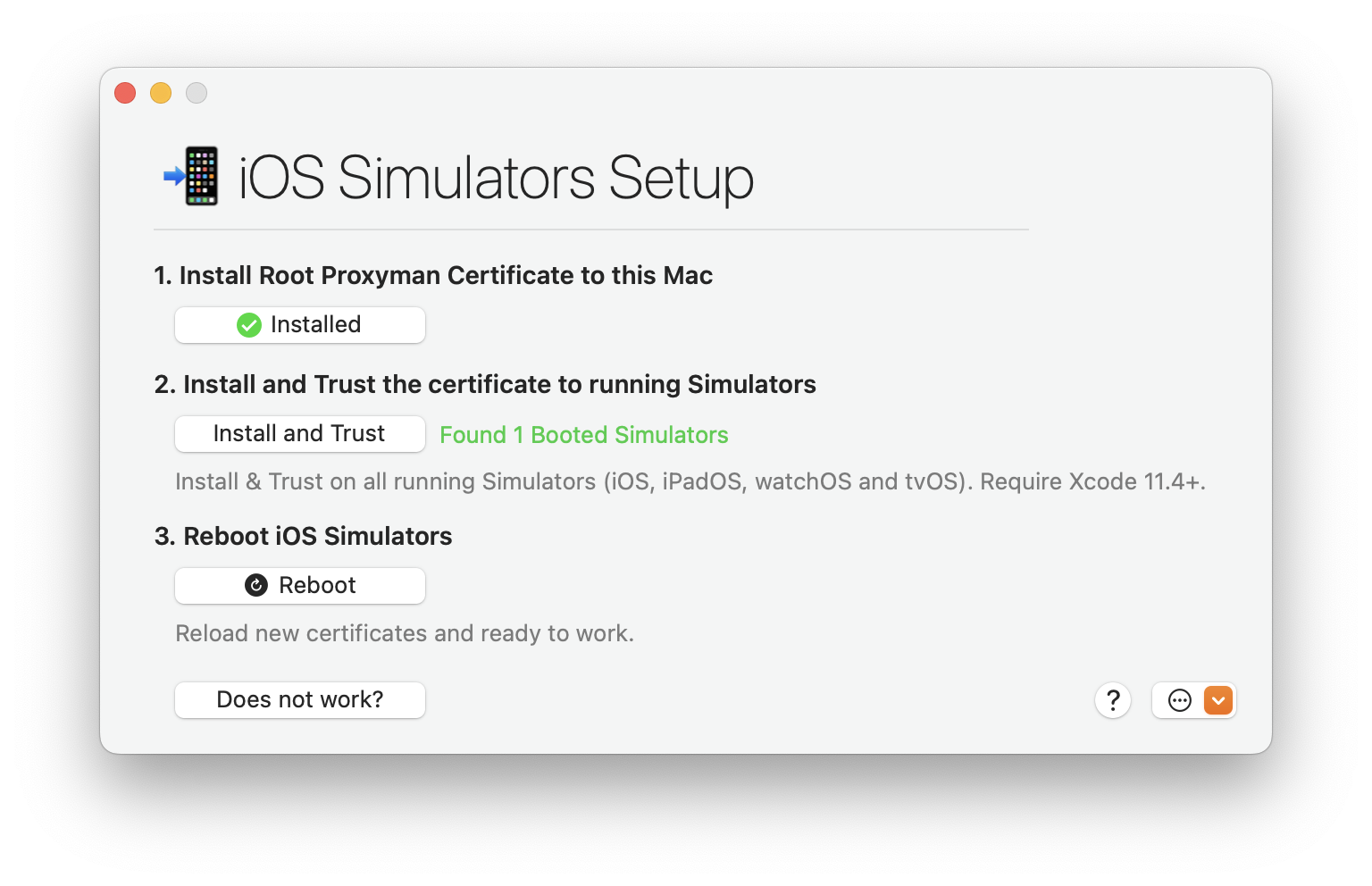
Capture traffic from iOS Simulators
Tired of manual & error-prone config on your iOS Simulator?
Leave all complicated steps to us and let Proxyman automatically inspect the network traffic for you. No need to configure HTTP Proxy, Install or Trust any Certificate.
Capture traffic from mobile devices
Capture traffic from popular network libraries
What's more?
Comprehensive list of current and up-coming Proxyman features.
Basic Features
- Inspect HTTP/HTTPS traffic in plain text
- SSL Proxying
- Proxying on iOS Devices, iOS Simulator and Android
- Export Requests/ Responses
- Content Filter
- Body Syntax Highlighting
- JSON/ Tree View Format
- Horizontal/Vertical Layout
Finder Categorize
- Multiple Tabs
- Custom Previewer Tabs
- Custom Header Columns
- Highlight with Color & Add Comment
- MessagePack Body Previewer
- JSONPath Filter
- Customize Toolbar


Advanced Features
- HTTP/2 (macOS)
- Network Extension / Transparent Proxy (BETA, macOS 26+, PRO)
- Proxy Helper Tool
- Map Local (File/Directory)
- Map Remote
- Breakpoint
- No Caching
- Repeat Requests
- Compose Requests
- WebSocket Debugging
- Save Session
- Block List
- Allow List
- External Proxying (HTTP/HTTPS/SOCKS/PAC)
- Protobuf
- Import Charles Proxy files
- Custom Root & Client & Server Certificates
- Wildcard & Regex Matching Rules
- Scripting (ReWrite)
- JS Addons and Snippet Code
- Atlantis framework for iOS
- GraphQL Debugging
- Network Condition (Network Throttling)
- Multiple Filters
- Publish to Gist
- Reverse Proxy
- Code Generator
- Command Line
- Diff for Request/Response
- Access Control
- Automatic/Manual Setup
- DNS Spoofing
- SOCKS Proxy
- Custom Filters
- Command Palette
Upcoming Features
Proxyman Plugins
- Request new features?
More than 800,000+

 happy users
Proxyman is used daily by 800k+ developers worldwide. Here are some of their feedbacks.

















and more from Daring Fireball, Inessential, Donny Wals, iOS Dev Weekly, Twitter, and Hacker News.
Mentioned on Hacker News
What developers are saying in the discussion
Check out Proxyman Tutorials






Start debugging today
Start debugging with confidence. Join thousands of developers — from indie hackers to Fortune 500 teams.