Proxyman Proxy Helper Tool
Install the Proxyman Proxy Helper Tool to change and restore the macOS system proxy faster, and to let guest or non-admin users capture traffic.
Proxyman also offers Network Extension to capture HTTP/HTTPS traffic from Mac apps that ignore proxy settings. The Helper Tool manages the system proxy; Network Extension captures supported traffic without per-app proxy setup.
Network Extension is BETA and requires Proxyman PRO on macOS 26 or later.
What is the Proxy Helper Tool?
By default, Proxyman changes your HTTP/HTTPS proxy settings with the networksetup command-line tool. However, networksetup is slow and can delay starting or quitting the app.
Proxyman offers a faster solution: the Proxyman Proxy Helper Tool. It is a macOS Privileged Helper Tool that changes the network proxy settings with high performance.
You can see the difference by starting the app with and without the Proxy Helper Tool.
On first launch, Proxyman asks you to install the Proxy Helper Tool. You can skip it and install it later in Settings → Advanced.
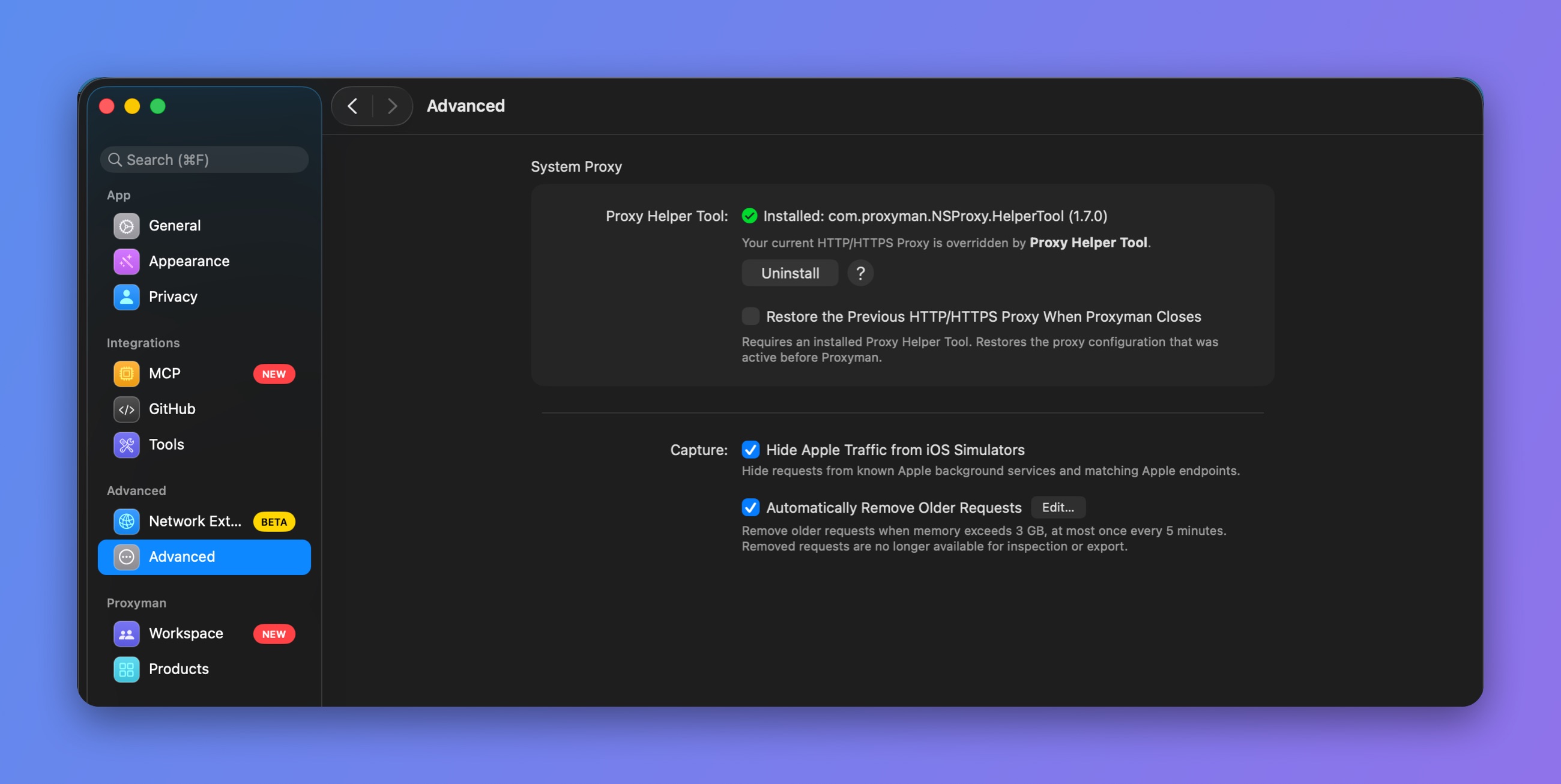
Proxy Helper Tool in Settings, Advanced
After the installation, you can find the Helper Tool at /Library/PrivilegedHelperTools/com.proxyman.NSProxy.HelperTool
When Proxyman ships a new version of the Proxy Helper Tool, you need to install it again.
Grant permission on macOS 13 Ventura or later
On macOS 13 Ventura or later, you must allow the Helper Tool in System Settings before it can work.
To grant the permission:
- Open System Settings → General → Login Items (Login Items & Extensions on macOS 15 or later).
- Find Proxyman and switch it ON ✅
If the permission is missing, Settings → Advanced in Proxyman shows an Open Login Items… button that takes you there.
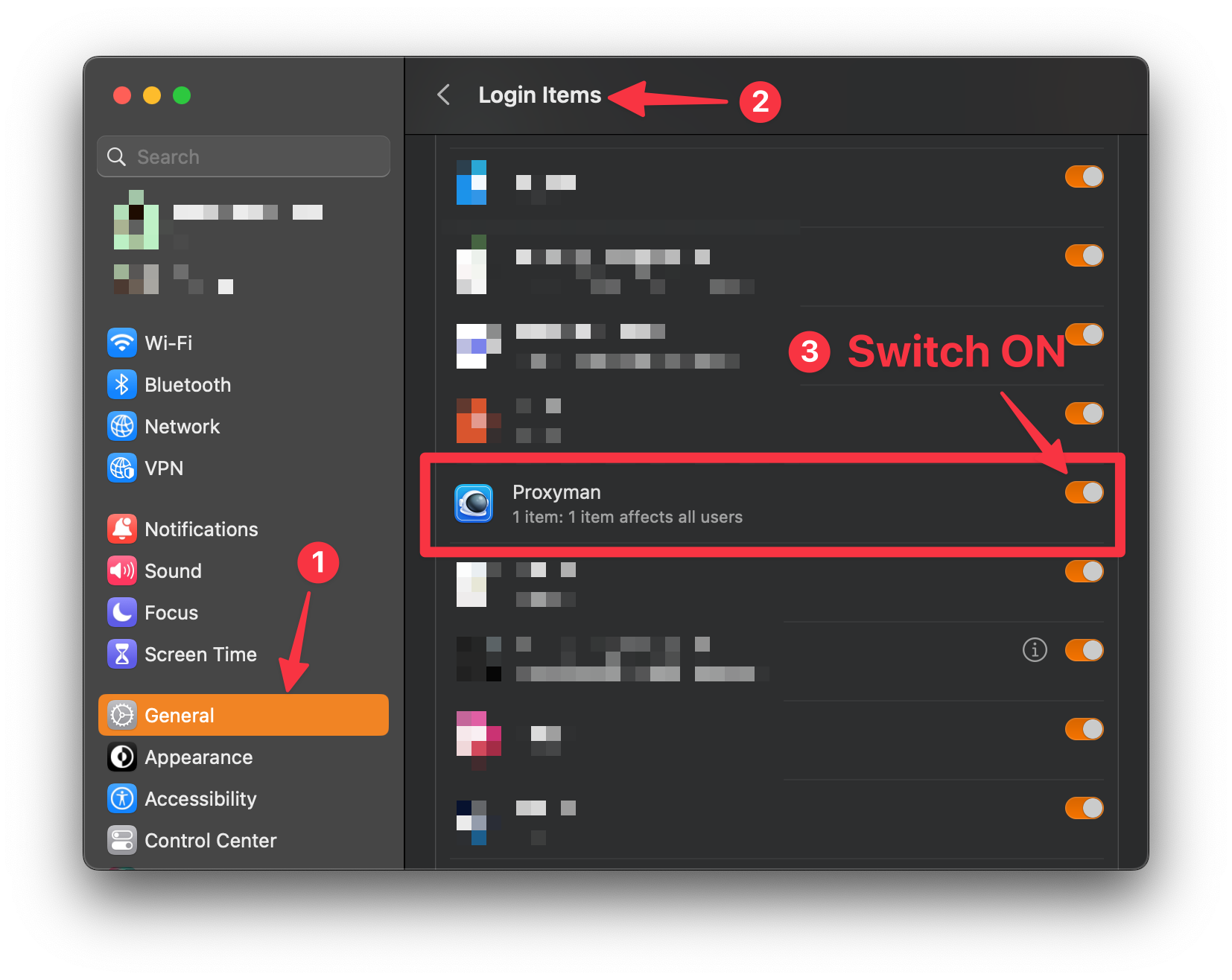
Grant permission to Proxyman Helper Tool
Guest or non-admin users
If you're a guest or non-admin user, the networksetup command fails and cannot change the HTTP/HTTPS proxy settings until you install the Proxy Helper Tool.
The Proxy Helper Tool has the privileges to change the proxy settings for all kinds of users.
If you're a guest or non-admin user, we highly recommend installing the Proxy Helper Tool for a smoother experience.
Uninstall the Proxy Helper Tool
You can uninstall the Proxy Helper Tool in Settings → Advanced → Uninstall, or delete it directly at /Library/PrivilegedHelperTools/com.proxyman.NSProxy.HelperTool
Install the Proxy Helper Tool by command line
From Proxyman for macOS 4.12.0 or later, you can install the Helper Tool without the GUI:
sudo /Applications/Proxyman.app/Contents/MacOS/proxyman --install-privileged-components
Changelog
Version 1.6.0 (Proxyman 5.11.0 or later)
- Fixed: Proxyman can't restore the PAC URL when the app is closed
Version 1.5.0
- Fixed a security vulnerability where Proxyman v1.5.0 or older (2019) could connect to the Helper Tool (v1.4.0) and override the system proxy without user consent. The fix adds constraints to verify the incoming connection: the caller must be notarized by Apple, signed with the Proxyman LLC certificate, and have Library Validation and the Force Hard flag enabled. (CVE-2023-45732)
📣 Credit to Scott Leitch from NCC Group.
Version 1.4.0
- Comply with new macOS 13 Ventura Requirements for Helper Tool
- Show App Icon & App Name on the Login-Items
On macOS Ventura or later, helper tools, launch daemons, and launch agents are listed under Allow in the Background, even though Proxyman only runs in the foreground.
There is an ongoing discussion on Twitter asking Apple to fix this in macOS.
After you install version 1.4.0, the Login Items entry might not update because macOS caches it.

Login Items shows an old cached entry
To fix it:
- Open the Terminal app and run:
sfltool resetbtm - Restart your Mac
- Done
Version 1.3.0
- Remember and restore to your previous Proxy Setting.
Version 1.2.0
- Gracefully revert the HTTP Proxy Config if Proxyman crashes.
Troubleshooting
If you see this error when installing the Helper Tool:
The operation couldn’t be completed. (CFErrorDomainLaunchd error 9.)
Follow the steps in this article: Fix CFErrorDomainLaunchd error 9 (Tencent Cloud)
Related GitHub issue: ProxymanApp/Proxyman#1113