Modify WebSocket Messages
Edit, drop, or send WebSocket (WS/WSS) messages on the fly with onWebsocket in Proxyman Scripting. Works in both directions, with text and binary messages.
1. What's it?
With the Modify WebSocket Messages option, the onWebsocket() function of a script can change WebSocket messages on the fly. With a few lines of JavaScript, you can:
- Edit a message, for example change a JSON field or replace text.
- Drop a message, so the other side never sees it.
- Send a new message to the client or the server.
- Close the WebSocket on both sides.
It works with WS and WSS, in both directions: from the client to the server, and from the server to the client.
Modify WebSocket Messages is available in macOS Proxyman 26.2.0 or later and Windows/Linux Proxyman 26.1.0 or later. It is not available on iOS.
The server sends a real BTC price, but the app receives $1. A message with a password is dropped, and the app gets a warning from the script.
2. The problem
Apps for chat, trading, games, and live dashboards use WebSocket to get real-time data. Testing them is hard:
- You can't control the server. It sends real data. Making it send an edge case, like a price of 0 or an error message, means changing the server code.
- Some cases are hard to reproduce. A dropped message, a strange reply, or a lost connection rarely happens when you need it.
- Other tools can't change messages. Breakpoint and Map Local work on the HTTP handshake, not on the messages after it. Without the option,
onWebsocket()only reads the messages.
3. Benefits
- Test every message your app should handle, without changing the server.
- Mock a server reply: answer a message of the client with
sendToClient(). The server never sees it. - Hide sensitive data or block analytics events before they reach the server.
- Simulate a lost connection to test how your app reconnects.
- Only the WebSocket that matches the rule waits for the script. Other traffic keeps flowing.
4. How to use it?
- Capture your WebSocket connection. For
wss://, enable SSL Proxying for the domain, like for HTTPS. - Right-click the
ws://orwss://flow -> Tools -> Scripting…. Proxyman creates a rule with the URL filled in, and a script withonWebsocket(). - Keep Request checked, and check Modify WebSocket Messages.
- Write your
onWebsocket()code, then press Save & Activate (⌘S, or Ctrl+S on Windows/Linux). - Reconnect the WebSocket. Proxyman reads the option when the WebSocket connects, not for every message.
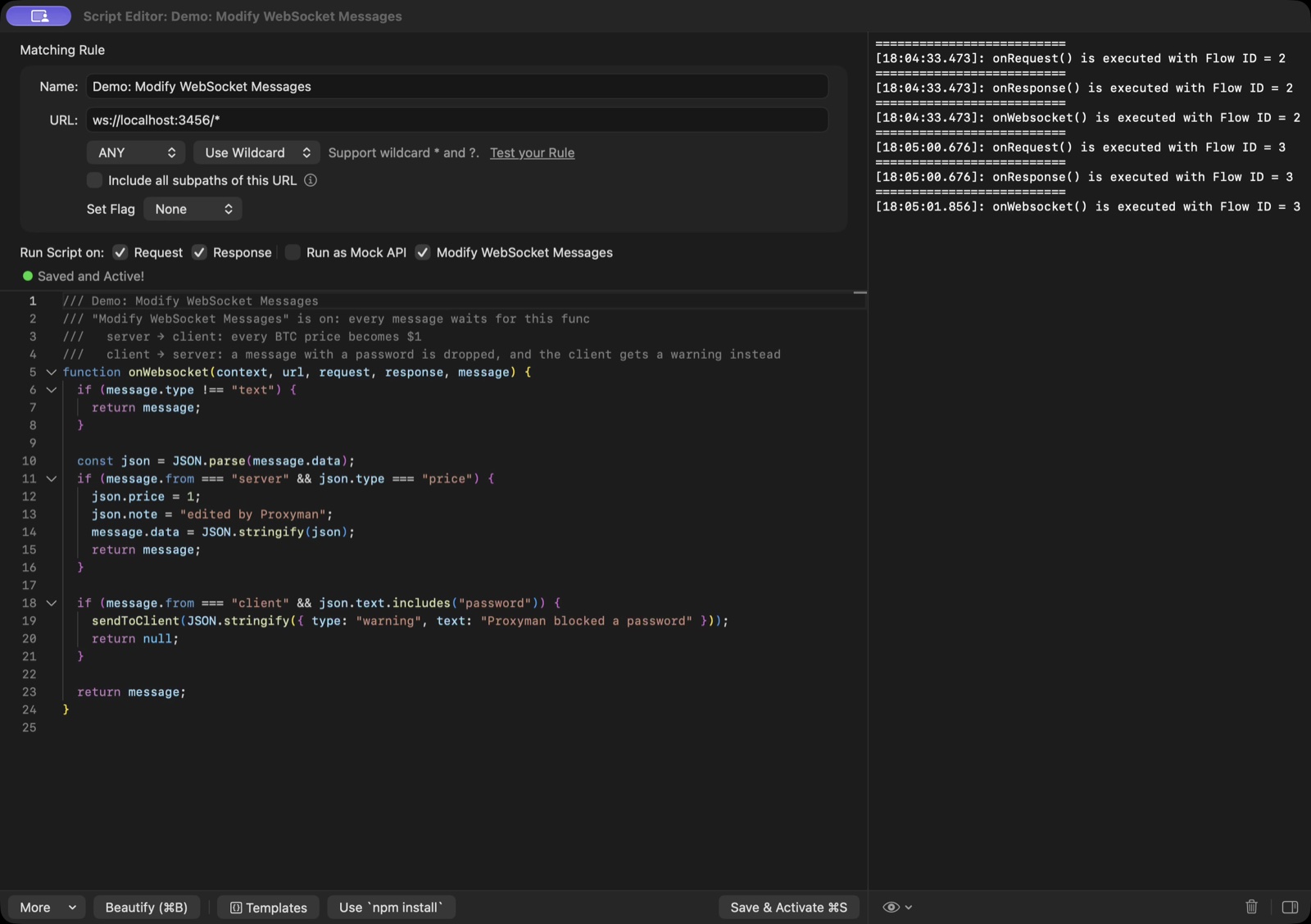
Check Modify WebSocket Messages in the Script Editor
This script makes every BTC price from the server $1, and drops a message from the client that has a password:
function onWebsocket(context, url, request, response, message) {
  // Only change text messages. Binary, ping, pong, and close messages pass through
  if (message.type !== "text") {
    return message;
  }

  const json = JSON.parse(message.data);

  // 1. Server -> client: every BTC price becomes $1
  if (message.from === "server" && json.type === "price") {
    json.price = 1;
    json.note = "edited by Proxyman";
    message.data = JSON.stringify(json);
    return message;
  }

  // 2. Client -> server: drop a message with a password, and warn the client
  if (message.from === "client" && json.text.includes("password")) {
    sendToClient(JSON.stringify({ type: "warning", text: "Proxyman blocked a password" }));
    return null;
  }

  // 3. Everything else: send it as it is
  return message;
}
The Websocket tab shows the edited messages, the messages sent by the script, and the dropped messages:
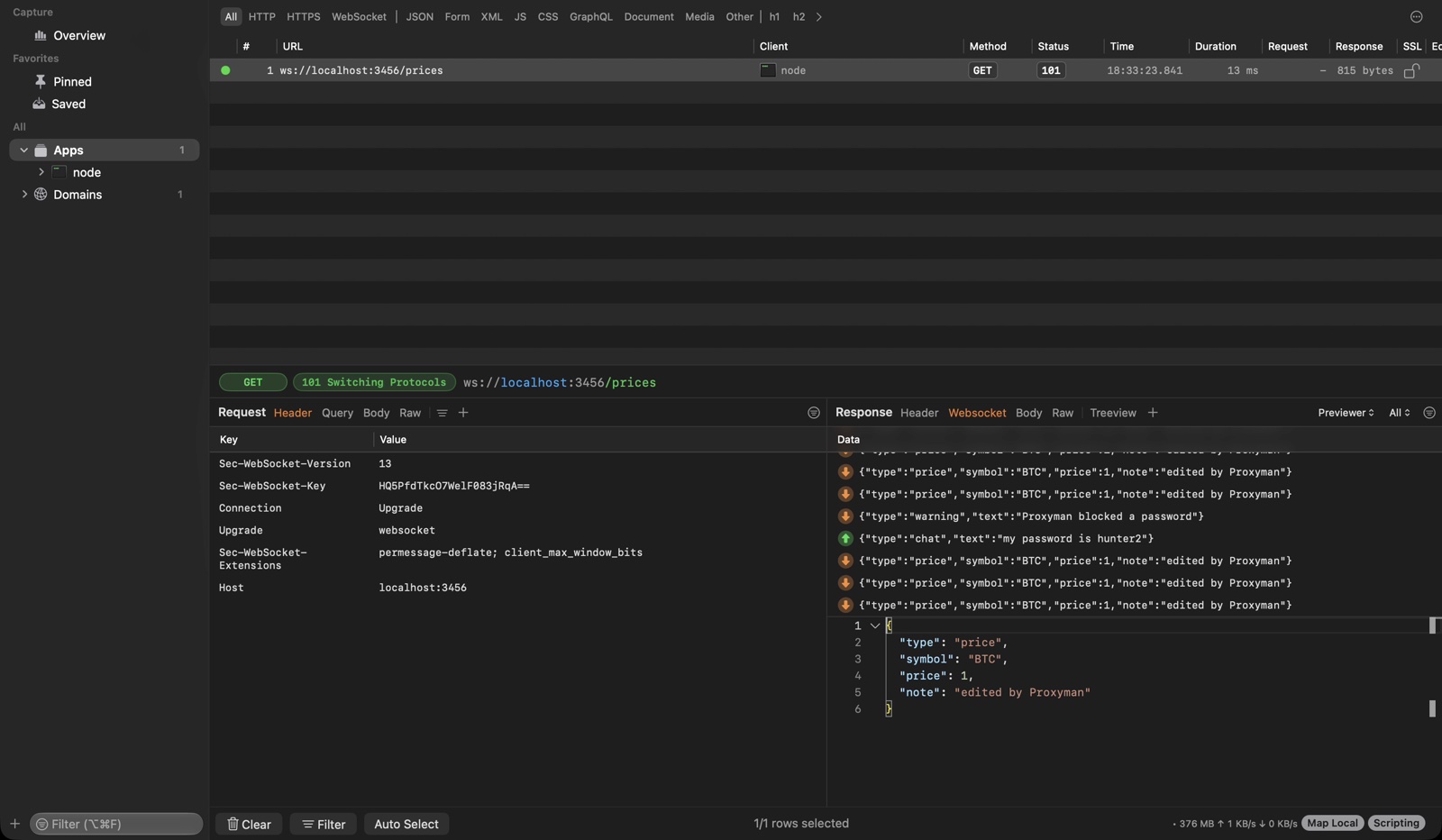
Edited and dropped messages in the Websocket tab
For a step-by-step guide with a local WebSocket server that you can run yourself, read How to modify WebSocket messages with Scripting.
5. What onWebsocket() returns
When the option is on, Proxyman holds each text and binary message until onWebsocket() returns. What you return decides what happens:
In onWebsocket() | Result |
|---|---|
return message | Send the message, with your changes. |
return null | Drop the message. The other side never sees it. |
| No return | Send the original message. |
abort() | Close the WebSocket on both sides. |
sendToClient(data) / sendToServer(data) | Send a new message. A String sends a text message, a Uint8Array a binary message. |
The message object has:
| Field | Value |
|---|---|
message.from | "client" or "server". |
message.type | "text", "binary", "ping", "pong", or "close". |
message.data | The text of the message. Change it to edit a text message. |
message.rawData | The bytes of a binary message, as a Uint8Array. Set a new Uint8Array to edit a binary message. |
message.closeCode | A number, available only for close messages, such as 1000. |
See Scripting with WebSocket for the other arguments.
The option is off by default. When it's off, onWebsocket() works as before: it only reads the messages and never delays them.
6. Templates
You don't need to write the script from scratch. In the Script Editor, click Templates and search for "websocket":
- Log WebSocket Messages: print every message in the Console Log. It only reads the messages.
- Modify JSON WebSocket Messages: change a field of the JSON messages from the server.
- Replace Text in WebSocket Messages: find and replace text in both directions.
- Drop WebSocket Messages: drop the messages that match a regex, for example analytics events.
- Reply to a WebSocket Message: answer a message of the client with
sendToClient(). The server never sees it. - Simulate a WebSocket Disconnect: close the WebSocket after a few messages.
Click Replace to use a template. Proxyman also sets the checkboxes it needs, including Modify WebSocket Messages.
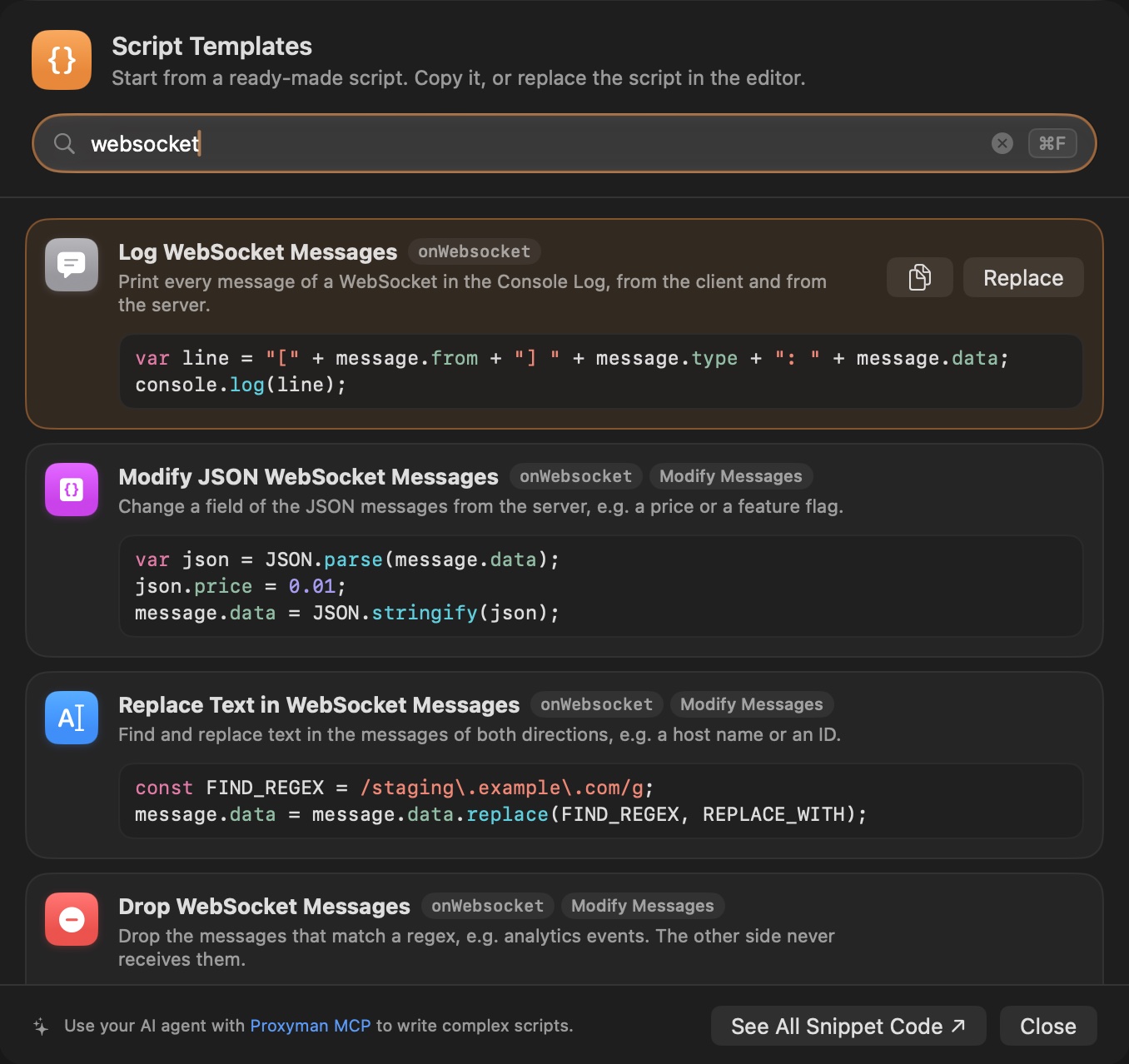
WebSocket templates in the Script Editor
More examples are on the Snippet Code page.
7. Good to know
- You can edit and drop text and binary messages. Ping, pong, and close messages are always sent:
onWebsocket()can read them, but what it returns is ignored. - A message keeps its type: you can't turn a text message into a binary message.
- If your script throws an error, or doesn't return within 30 seconds, Proxyman sends the original message and prints the error in the Console Log.
- The code outside
onWebsocket()runs once per connection, so a counter at the top of the script counts the messages of each connection. - Messages sent with
sendToClient()andsendToServer()don't runonWebsocket()again, so a script that replies can't loop forever. - When several scripts with the option match the same WebSocket, they run in order: each one receives what the previous one returned. A dropped message doesn't reach the next scripts.
- A message bigger than 16 MB is sent as it is, without the script.
asyncfunctions are supported, so you can useawaitand $http inonWebsocket().- AI agents can create the same rule with Proxyman MCP:
create_scripting_ruletakesmodify_websocket_messages: true.
8. Troubleshooting
The messages don't change
- Check Modify WebSocket Messages, then press Save & Activate (⌘S, or Ctrl+S on Windows/Linux).
- Reconnect the WebSocket. The option is read when the WebSocket connects.
- Keep Request or Response checked. A rule with both unchecked doesn't run at all, including
onWebsocket(). - Return
messageafter you change it. Without a return, Proxyman sends the original message. - Open the Console Log in the Script Editor and look for errors.
I can't see my WebSocket in Proxyman
Follow the WebSocket guide for your platform. Many apps and libraries skip the proxy for localhost.